







Question: OBJECTIVES (in program glowscript) Create 3D box objects Update the position of an object iteratively (repeatedly) to animate its motion Update the momentum and position
OBJECTIVES (in program glowscript)
Create
3D box objects
Update the position of an object
iteratively (repeatedly) to animate its motion
Update the momentum and position of an object iteratively (repeatedly) to predict its motion
1.We use a white box to represent the track. Type the following command and run the program.
track = box(pos=vector (0,-.05, 0), size=vector (2.0,0.05, .10), color=color.white)
2.We will now use a red boxwhose center is at the origin to represent a moving cart located at the origin. Type the following command and run the program.
cart=box(pos=vector (0,0,0), size= vector (0.1, 0.0 5, 0.06), color=color.red)
3. Reposition the cart so its left end is aligned with the left end of the track.
4.Give the cart a velocity of 0.5 m/s in the +x direction by adding the following command
velcart = vector(0.50,0,0) #sets the carts velocity at 0.5 m/s in the +x direction
5.Let us assume that our cart has constant velocity so our acceleration is zero. Add the following command
to your program: Accelcart = vector(0,0,0) #carts acceleration is set to zero
6. We now we set the initial time to zero, and set our step size, i.e. , to 0.01. Add the following commands and run your program.
t = 0 #initial time is 0s
deltat =0.01# time step size
7. As an example of a loop, enter the following commands and run the program.
while t
The statement:
t = t + deltat
8. We now want to model the constant velocity cart iteratively using a loop. Modify the loop in your program
to make it look like the following and run your program:
whilet
cart.pos =cart.pos + velcart*deltat #computes new position
velcart = velcart + accelcart*deltat #computes new velocity
t = t + deltat
print(The End)
9. Add the following line inside your loop (indented) and run the program: rate (100)
10.Modify your code so that the cart starts at the right end of the track and moves to the left till it just
reaches the end of the track.
How do I make this program work?
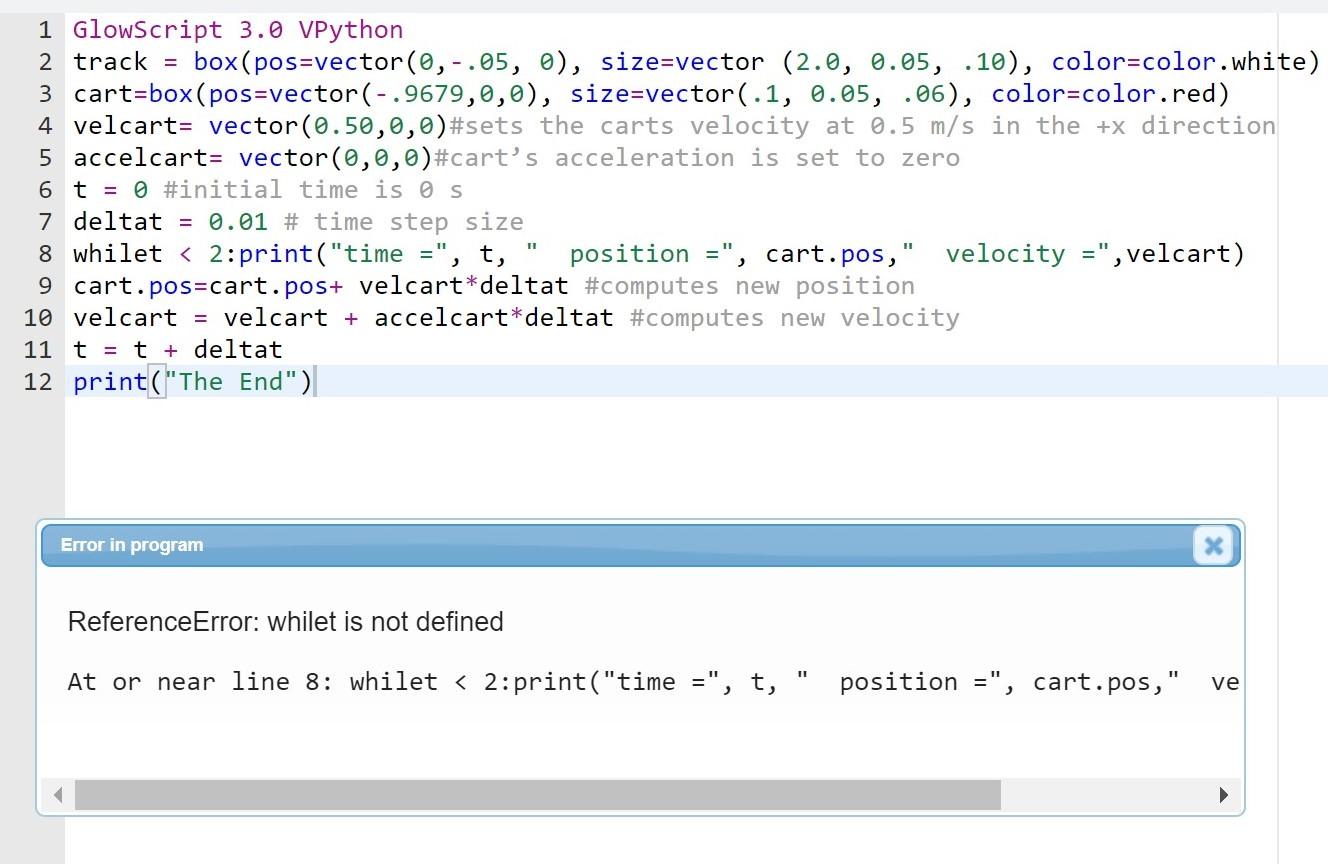
= 1 GlowScript 3.0 VPython 2 track box(pos=vector(0,-.05, 0), size=vector (2.0, 0.05, .10), color=color.white) 3 cart=box (pos=vector(-.9679,0,0), size=vector(.1, 0.05, .06), color=color.red) 4 velcart= vector(0.50,0,0)#sets the carts velocity at 0.5 m/s in the +x direction 5 accelcart= vector(0,0,0)#cart's acceleration is set to zero 6 t = 0 #initial time is s 7 deltat = 0.01 # time step size 8 whilet
Step by Step Solution
There are 3 Steps involved in it

Get step-by-step solutions from verified subject matter experts
 Study Help