







Question: Objectives Restrict access for network resources. Required Resources 2 Cisco Routers (1841) with additional WIC-1ENET & HWIC-2T modules. 3 Cisco Switches (2950-24) Computers UTP (straight
Objectives
Restrict access for network resources.
Required Resources
2 Cisco Routers (1841) with additional WIC-1ENET & HWIC-2T modules.
3 Cisco Switches (2950-24)
Computers
UTP (straight through and cross over) cables
Remark: No need to configure any dynamic routing protocols between the two routers.
Tasks:
Build up the topology.
Connect the network as shown in Fig 1.
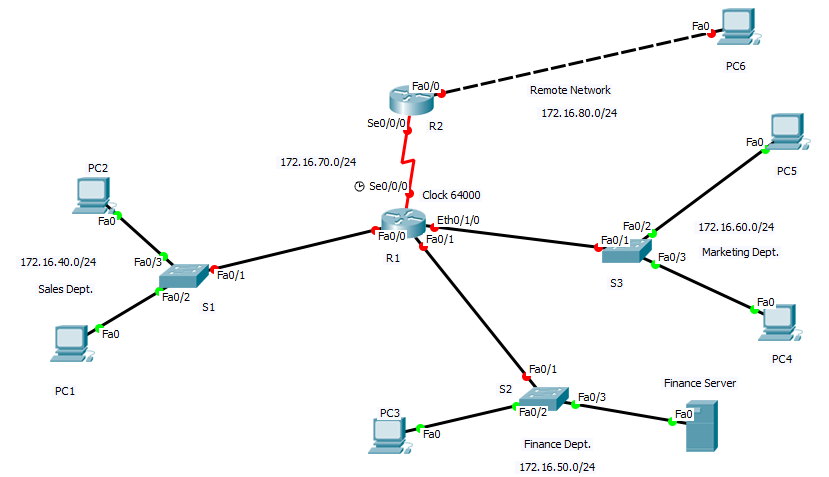
Fig1. Network Topology
Perform Basic Router Configurations
Steps:
Configure the basic routers configuration to match the topology diagram.
Configure IP addresses and Subnet masks on all devices in the network (all devices should function properly). Refer to the diagram in Fig.1.
Filter the traffics.
Scenario:
A router R1 has three LAN connections and one WAN connection to a remote network. Users on the Sales department should not have access to the Finance department, but they should be able to access the remote and the marketing department files. The Marketing department needs to access the Finance LAN for application services.
Steps:
Use a standard access list to stop specific users from gaining access to the Finance department. Apply the necessary requirements to achieve that.
Verification
Use ping command to verify that youve achieved the requirements.
*Take Screenshot for each step
Fa0 PC6 Fao/0 Remote Network 172.16.80.0/24 Seo R2 Fa0 172.16.70.0/24 PC2 PC5 Se0,0/ Clock 64000 Fa0 Eth0/1/0 Fa0/2 172.16.60.0/24 Fa0/0 Fa0/1 Fa0/1 R 1 Fa0/3 Marketing Dept. 172.16.40.0/24 Fa0/3 Fa0/1 S3 Sales Dept. Fa0/2 Fa0 S1 Fa0 PC4 Fa0/1 Finance Server PC1 S2 Fa0/3 PC3 Fa0/2 Fa0 Fa0 Finance Dept. 172.16.50.0/24 Fa0 PC6 Fao/0 Remote Network 172.16.80.0/24 Seo R2 Fa0 172.16.70.0/24 PC2 PC5 Se0,0/ Clock 64000 Fa0 Eth0/1/0 Fa0/2 172.16.60.0/24 Fa0/0 Fa0/1 Fa0/1 R 1 Fa0/3 Marketing Dept. 172.16.40.0/24 Fa0/3 Fa0/1 S3 Sales Dept. Fa0/2 Fa0 S1 Fa0 PC4 Fa0/1 Finance Server PC1 S2 Fa0/3 PC3 Fa0/2 Fa0 Fa0 Finance Dept. 172.16.50.0/24
Step by Step Solution
There are 3 Steps involved in it

Get step-by-step solutions from verified subject matter experts
 Study Help