Question: Objectives: To acquaint you with PHP file handling, HTML forms, arrays, strings, and control structures. Tasks: You will write a web application that helps user
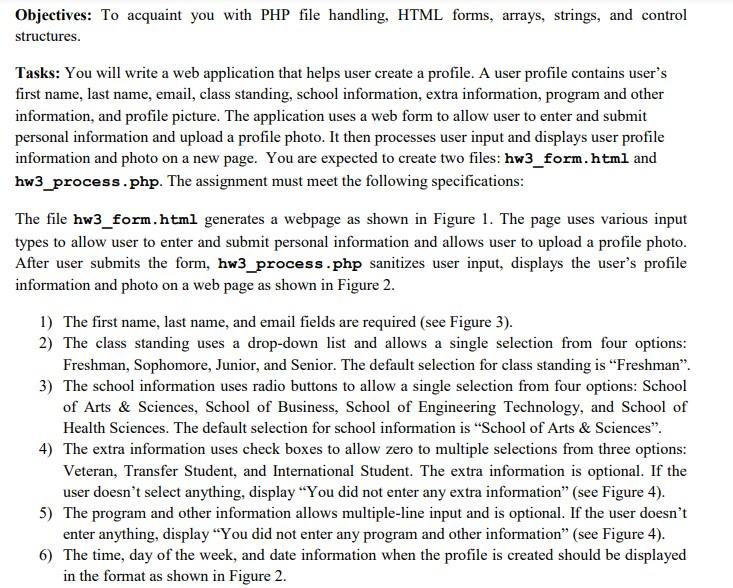
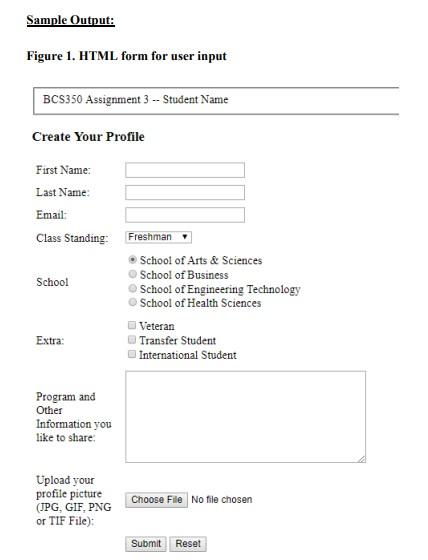
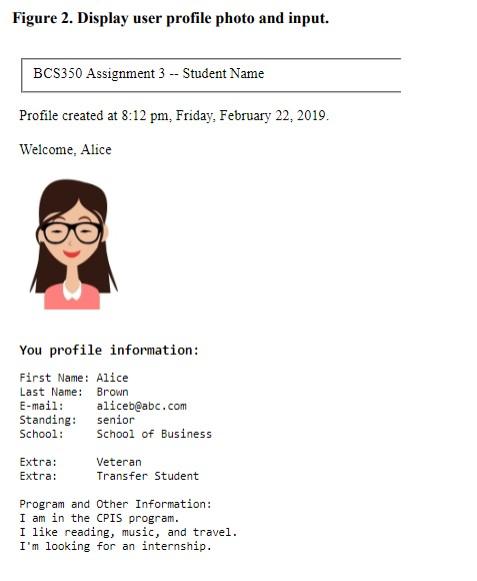
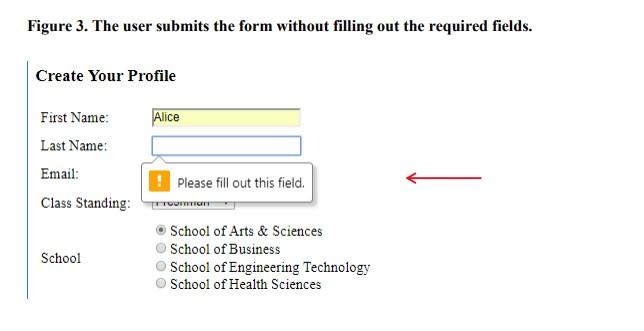
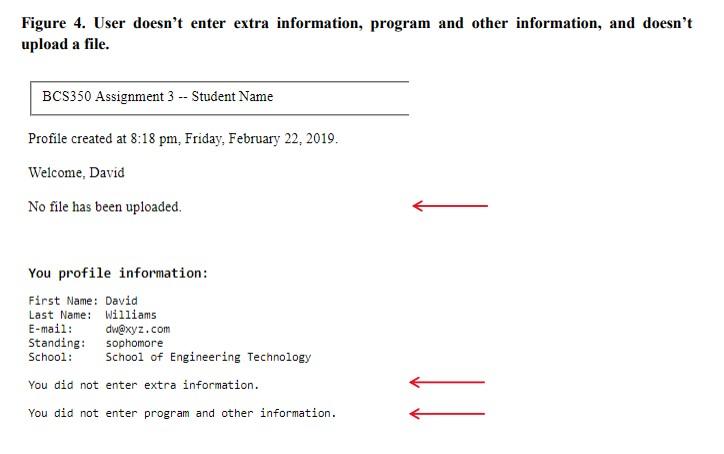

Objectives: To acquaint you with PHP file handling, HTML forms, arrays, strings, and control structures. Tasks: You will write a web application that helps user create a profile. A user profile contains user's first name, last name, email, class standing, school information, extra information, program and other information, and profile picture. The application uses a web form to allow user to enter and submit personal information and upload a profile photo. It then processes user input and displays user profile information and photo on a new page. You are expected to create two files: hw3_form.html and hw3_process . php. The assignment must meet the following specifications: The file hw3_form.html generates a webpage as shown in Figure 1. The page uses various input types to allow user to enter and submit personal information and allows user to upload a profile photo. After user submits the form, hw3_process.php sanitizes user input, displays the user's profile information and photo on a web page shown in Figure 2. 1) The first name, last name, and email fields are required (see Figure 3). 2) The class standing uses a drop-down list and allows a single selection from four options: Freshman, Sophomore, Junior, and Senior. The default selection for class standing is "Freshman". 3) The school information uses radio buttons to allow a single selection from four options: School of Arts \& Sciences, School of Business, School of Engineering Technology, and School of Health Sciences. The default selection for school information is "School of Arts \& Sciences". 4) The extra information uses check boxes to allow zero to multiple selections from three options: Veteran, Transfer Student, and International Student. The extra information is optional. If the user doesn't select anything, display "You did not enter any extra information" (see Figure 4). 5) The program and other information allows multiple-line input and is optional. If the user doesn't enter anything, display "You did not enter any program and other information" (see Figure 4). 6) The time, day of the week, and date information when the profile is created should be displayed in the format as shown in Figure 2. 7) The form has a file input to allow user to browse the computer and select a file to upload. If the user doesn't upload a file, display "No file has been uploaded" (see Figure 4). If the image file is not a JPG, GIF, PNG or TIF file, show the filename and display that the file is not an accepted file (see Figure 5). 8) The form has a Submit button to submit form data and a Reset button to clear up the form data. 9) The input entered by the user, not from a list of predefined options, must be sanitized. These include input for first name, last name, email, and program and other information. Make a fieldset and place "BCS350 Assignment 3 - your name" on the top of both web pages. You are free to decide the styles of your pages. Submission: You must submit a ZIP file that includes two files named hw3_form.html and hw3_process.php through the assignment submission link on Brightspace. Do NOT use any other names for these files. Your submitted program should not contain any syntax errors. Please include the integrity statement "I certify that this submission is my own original work" with your name and RAM ID as comments in all your source files. Hints: 1. Use HTML input required attribute https://www.w3schools.com/tags/att input required.asp 2. Use the php empty function to check if an input field is empty. http://php.net/manual/en/function.empty.php 3. Use if (\$_FILES['filename'] ['error']==0) to check whether a file is uploaded or not. 4. Use HTML table or tag to format web content. 5. Chapter 7 has good examples for file uploading and filename extension checking. 6. Use the following function to sanitize user input. function sanitizeString(\$var) 1 if (get_magic_quotes_gpo ()) \$var = stripslashes ( \$var ); \$var = htmlentities ( \$var ); return \$var; \} Figure 1. HTML form for user input Create Your Profile First Name: Last Name: Email- Class Standing: Figure 2. Display user profile photo and input. BCS350 Assignment 3 - Student Name Profile created at 8:12 pm, Friday, February 22, 2019. Welcome, Alice You profile information: First Name: Alice Last Name: Brown E-mail: aliceb@abc,com Standing: senior School: School of Business Extra: Veteran Extra: Transfer Student Figure 3 . The user submits the form without filling out the required fields. Create Your Profile First Name: Last Name: Email: Class Standing: School of Arts \& Sciences School - School of Business School of Engineering Technology School of Health Sciences Figure 4. User doesn't enter extra information, program and other information, and doesn't upload a file. Figure 5 . User uploaded a file which is not acceptable image file. BCS350 Assignment 3 - Student Name Profile created at 8:23pm, Friday, February 22, 2019. Welcome, Mike example7-16.php is not an accepted image file. You profile information: First Name: Mike Last Name: Peterson E-mail: Standing: Junior School: School of Arts \& Sciences You did not enter extra information. You did not enter program and other information









 Study Help