







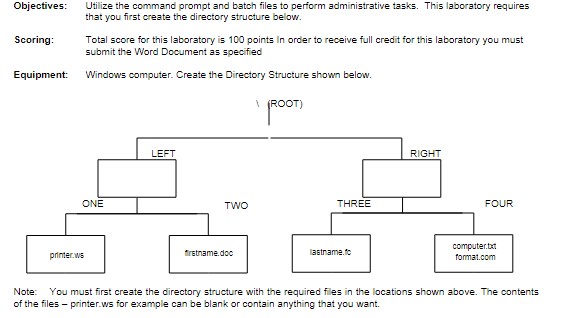
Question: Objectives: Utilize the command prompt and batch files to perform administrative tasks. This laboratory requires that you first create the directory structure below. Scoring: Total
Objectives: Utilize the command prompt and batch files to perform administrative tasks. This laboratory requires
that you first create the directory structure below.
Scoring: Total score for this laboratory is points In order to receive full credit for this laboratory you must
submit the Word Document as specified
Equipment: Windows computer. Create the Directory Structure shown below.
Note: You must first create the directory structure with the required files in the locations shown above. The contents
of the files printer.ws for example can be blank or contain anything that you want.
Using Batch Files
Simply put, a batch file is a list of Command Prompt commands that are run in sequential order to automate a process.
The batch file that you create in this part of the laboratory will be used to alter the directory structure that you created.
Batch files are created by using a text editor NotePad or WordPad and are identified with a bat extension. You will
use commands that you have already practiced in this laboratory: DEL, and RMDIR RD You will also use the ECHO
command to control displaying information on the screen. To start the text editor that comes with Windows type
Notepad in the search box from the START button. Make sure you save the batch file with the name ERASE.BAT.
The text editor will try to trick you and save it with a bat.txt extension. Make sure you work around that and save it
with a BAT extension only. To verify you can run a dir of the folder holding the batch file. Dir will show file extensions.
You may need to create a separate folder where the system allows you to store the batch file. You could name it Batch
if you like.
Use a command available to you to create and save a batch file that has Erase as the filename and BAT
as the extension. Note that all delete and remove directory commands must include the switch to include
the mode that eliminates prompting for a confirmation when a filedirectory is deleted. The file should
contain the following commands in sequence:
A command to turn command echoing off.
A command to delete all files in the THREE directory including wildcards in the path
A command that displays the message that all files in the THREE directory have been deleted
A command to remove the THREE directory
A command that displays the message that the THREE directory has been removed.
bcaedffadoc
Page
ONE TWO THREE FOUR
ROOT
RIGHTLEFT
firstname.docprinter.ws lastname.fc computer.txt
format.com
CPT Technical Support Concepts
Laboratory: Batch Files
A command to delete all files in the TWO directory including wildcards in the path
A command that displays the message that all files in the TWO directory have been deleted
A command to delete all files in the ONE directory including wildcards in the path
A command that displays the message that all files in the ONE directory have been deleted
Create a document in Word document and include the following screen shotssnips and submit it to blackboard
in the designated labassignment
a Use the Tree command and display your filedirectory structure. Note, that you may run it once for the left and
once for the right directory. You need to include the switch that shows files when the command runs for full
credit.
points
b Display the actual batch file that you created in notepad. Make sure that every line and switch included in the
file shows in your screen snip.
points
c Run the batch command by typing the name of the batch file at the command prompt or using start
filename.bat. Check to see that the batch file deleted the intended files and directories. Include the screen
snips using the tree command to show that the intended filesdirectories were deleted. Note, that you may run
it once for the left and once for the right directory. You need to include the switch that shows files when the
command runs for full credit.
points
Save the Word document with the following filename LastNameFirstNamebatchfilertf
Submit your document to the appropriate assignmentlab in Blackboard.
pointsObjectives: Utilize the command prompt and batch files to perform administrative tasks. This laboratory requires
that you first create the directory structure below.
Scoring: Total score for this laboratory is points In order to receive full credit for this laboratory you must
submit the Word Document as specified
Equipment: Windows computer. Create the Directory Structure shown below.
Note: You must first create the directory structure with the required files in the locations shown above. The contents
of the files
printer.ws for example can be blank or contain anything that you want.
Step by Step Solution
There are 3 Steps involved in it
1 Expert Approved Answer
Step: 1 Unlock

Question Has Been Solved by an Expert!
Get step-by-step solutions from verified subject matter experts
Step: 2 Unlock
Step: 3 Unlock
 Study Help