







Question: obypas other Menu objects. Find the Error 1. 2. 3. .button { -fx-background-color = #0000FF; } .label { font-size: 14pt; } // This code
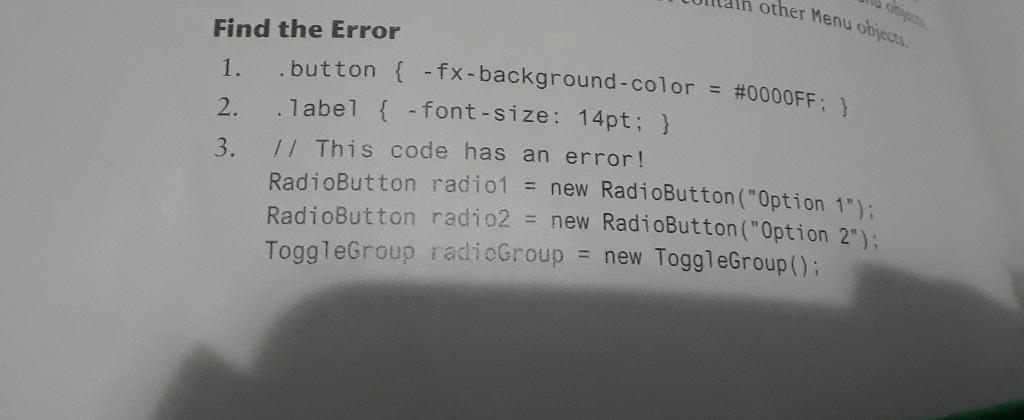
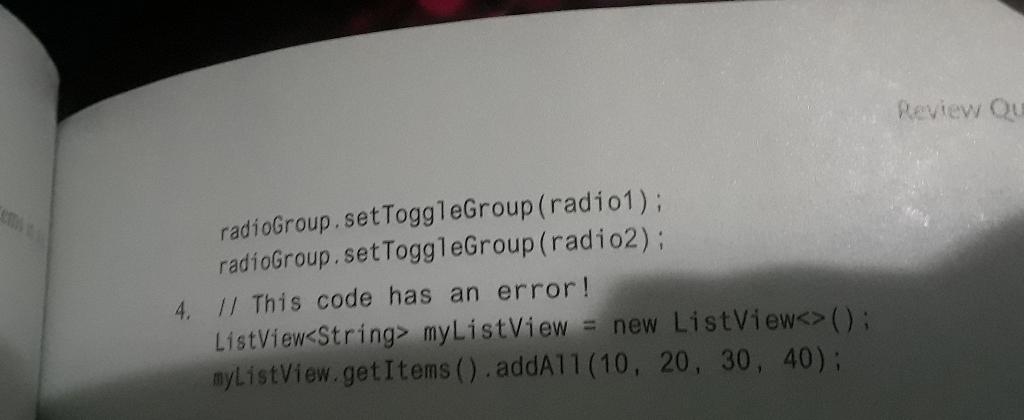
obypas other Menu objects. Find the Error 1. 2. 3. .button { -fx-background-color = #0000FF; } .label { font-size: 14pt; } // This code has an error! RadioButton radio1 = new RadioButton("Option 1"); RadioButton radio2 = new RadioButton("Option 2"); ToggleGroup radioGroup = new ToggleGroup(); ems Review Qu radioGroup.setToggleGroup (radio1); radioGroup.setToggleGroup (radio2); 4. // This code has an error! ListView myListView = new ListView (); myListView.getItems().addAll(10, 20, 30, 40);
Step by Step Solution
There are 3 Steps involved in it
The errors in the code snippets provided are as follows 1 The error in snippet 1 is in the CSS synta... View full answer

Get step-by-step solutions from verified subject matter experts
 Study Help