







Question: Okay I am trying to create a project/code using ReactJS. I have tried to install on my command prompt. Please show me how to install
Okay I am trying to create a project/code using ReactJS. I have tried to install on my command prompt. Please show me how to install and code on here.
This is what I want to use/do:
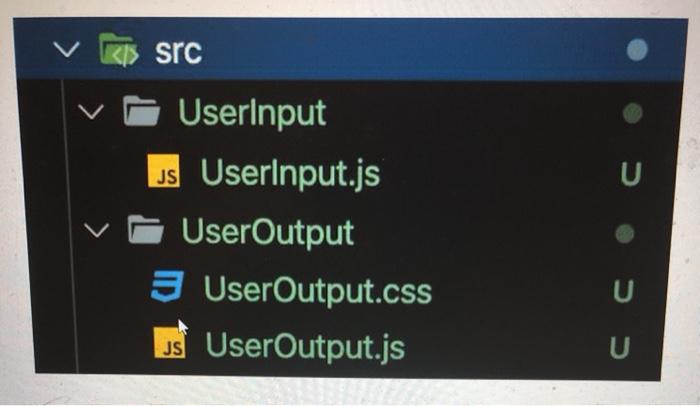
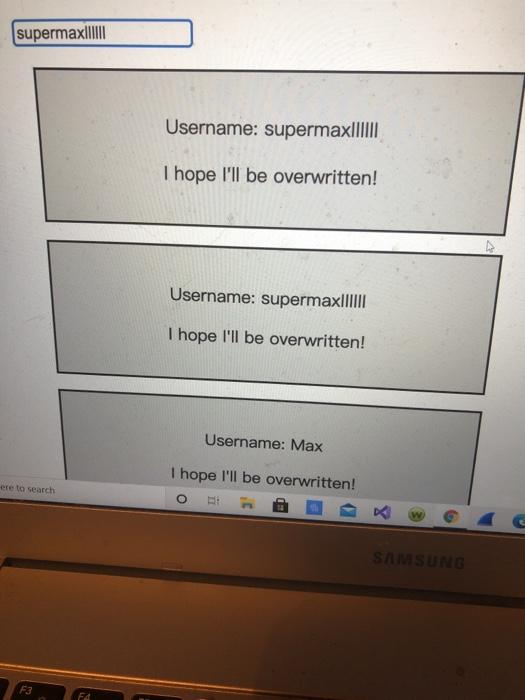
The code:
UserInput.js
import React from 'react'; const userInput = (props) => { const inputStyle = { border: '2px solid red' }; return ; }; export default userInput; UserOutput.js
import React from 'react'; import './UserOutput.css'; const userOutput = (props) => { return ( Username: {props.userName}
I hope I'll be overwritten!
); }; export default userOutput; App.js
import React, { Component } from 'react'; import './App.css'; import UserInput from './UserInput/UserInput'; import UserOutput from './UserOutput/UserOutput'; class App extends Component { state = { username: 'supermax' } usernameChangedHandler = (event) => { this.setState({username: event.target.value}); } render() { return ( - Create TWO new components: UserInput and UserOutput
- UserInput should hold an input element, UserOutput two paragraphs
- Output multiple UserOutput components in the App component (any paragraph texts of your choice)
- Pass a username (of your choice) to UserOutput via props and display it there
- Add state to the App component (=> the username) and pass the username to the UserOutput component
- Add a method to manipulate the state (=> an event-handler method)
- Pass the event-handler method reference to the UserInput component and bind it to the input-change event
- Ensure that the new input entered by the user overwrites the old username passed to UserOutput
- Add two-way-binding to your input (in UserInput) to also display the starting username
- Add styling of your choice to your components/ elements in the components - both with inline styles and stylesheets
UserOutput.css
UserOutput { width: 60%; padding: 16px; margin: 16px; border: 2px solid black; background-color: #ccc; text-align: center; }
kis src UserInput JS UserInput.js UserOutput 3 UserOutput.css UserOutput.js JS supermax|IIII Username: supermax|||||| I hope I'll be overwritten! Username: supermaxIIIII I hope I'll be overwritten! Username: Max I hope I'll be overwritten! ere to search SAMSUNG F3 F
Step by Step Solution
There are 3 Steps involved in it

Get step-by-step solutions from verified subject matter experts
 Study Help