







Question: On Java Gui !!! Conduct testing of the calculator GUI application and ensure all the requirements specified in #1 are met and the application works
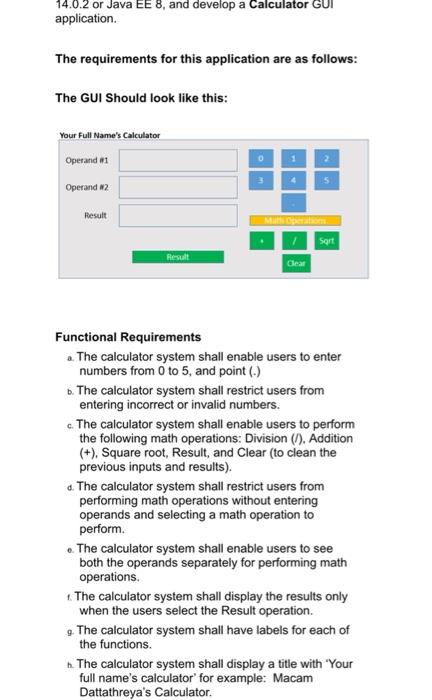
14.0.2 or Java EE 8, and develop a Calculator GUI application. The requirements for this application are as follows: The GUI Should look like this: Your Full Name's Calculator Operando 0 3 Operand 2 Result Sort Result Clear Functional Requirements . The calculator system shall enable users to enter numbers from 0 to 5, and point (.) b. The calculator system shall restrict users from entering incorrect or invalid numbers. c. The calculator system shall enable users to perform the following math operations: Division (7). Addition (+), Square root, Result and Clear (to clean the previous inputs and results). d. The calculator system shall restrict users from performing math operations without entering operands and selecting a math operation to perform The calculator system shall enable users to see both the operands separately for performing math operations 1. The calculator system shall display the results only when the users select the Result operation. 9. The calculator system shall have labels for each of the functions. n. The calculator system shall display a title with Your full name's calculator' for example: Macam Dattathreya's Calculator
Step by Step Solution
There are 3 Steps involved in it

Get step-by-step solutions from verified subject matter experts
 Study Help