







Question: On no more than one page using the database, write SQL statements for the following queries. Include the SQL statements. Information regarding the ERD diagram
On no more than one page using the database, write SQL statements for the following queries. Include the SQL statements. Information regarding the ERD diagram is attached below.
For each course, display the course name and its number of sections offered.
For each section, display its CSECID, LOCID and the occupancy rate of the classroom where the section is taught. Note: What is the definition of occupancy rate of a classroom for a particular section? It is (Current Enrollment of the section) / (Capacity of the classroom)
For each classroom, display its LOCID and its average occupancy rate in ascending order of average occupancy rate. (For example, based on the current contents of the database, average occupancy rate for classroom with LOCID being 1 is 0.5667). (Remember that faculty office rooms are not classrooms). Note: How to compute the average occupancy rate of classroom with LOCID=1? Answer: The capacity of that classroom is 150. There are 2 sections taught in that classroom: CSECID=1 with CURRENRL=135; CSECID=11 with CURRENRL=35. So, Average occupancy rate is [(135/150) + (35/150)]/2 = 0.566
Modify the previous query to include in the output both classrooms where sections are taught and classrooms where no sections are taught. (Remember that faculty office rooms are not classrooms)
Display the LOCID and CAPACITY and overall average capacity for all classrooms that have capacities that are higher than the overall average capacity. (Remember that faculty office rooms are not classrooms)
For each faculty rank, display the FRANKID, and the number of sections taught by faculty members with that rank, and the number of faculty members with that rank.
For each pair of faculty with the same rank, display their full names (FFNAME and FLNAME) and FRANKID.
For each pair of faculty members with the same rank, display their full names (FFNAME and FLNAME), FRANKID and the number of sections each faculty member teaches.
Create a new table with the name GRADE_VALUE which stores the letter grades and their corresponding numeric values. Thats, it should look like the following (Name the attributes as shown).
For each student, display the SID and his/her GPA.
If you dont have Microsoft ACCESS, then find below all necessary information about the database (ERD and table contents) (note: if a figure looks small, you can enlarge it using the zoom in Microsoft Word):
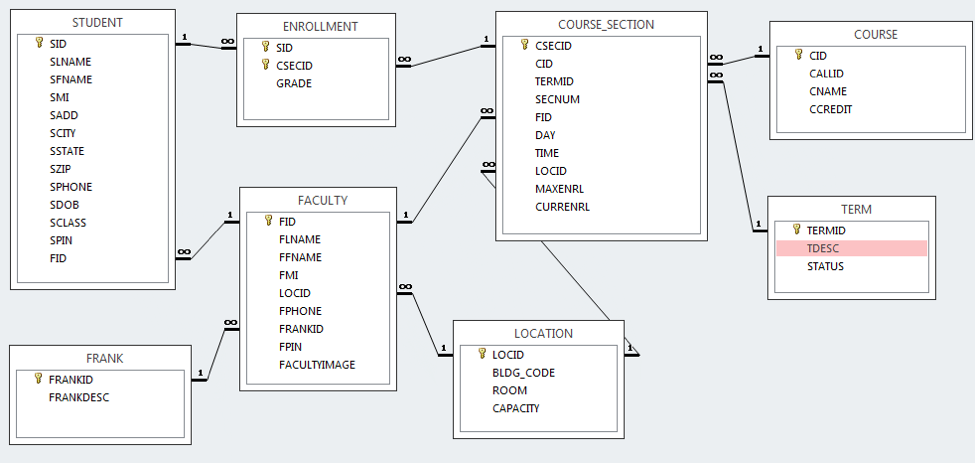
STUDENT ENROLLMENT COURSE SECTION COURSE CSECID SLNAME CSECID GRADE CALLID CNAME CCREDIT SECNUM SPHONE MAXENRL FACULTY CURRENRL TERM FID TERMID TDESC STATUS LOCATION 1LOCID FRANK FACULTYIMAGE FRANKID FRANKDESC BLDG CODE ROOM CAPACITY
Step by Step Solution
There are 3 Steps involved in it

Get step-by-step solutions from verified subject matter experts
 Study Help