



Question: On the Spring Remodel worksheet enter calculations to complete the table. In cell E 4 , use the WORKDAY function to calculate the end date
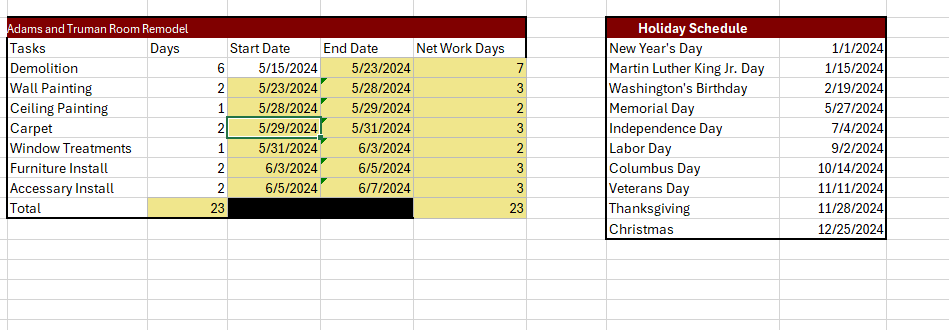
On the Spring Remodel worksheet enter calculations to complete the table.
In cell E use the WORKDAY function to calculate the end date for the Demolition task.
Reference the "Holiday Schedule" in your function.
Copy and paste down to E to calculate the end date for the other tasks.
Note the calculation will show dates for until you complete the next calculation.
In cell D reference the date you calculated in cell E as the start date for the next remodel task.
Copy and paste down to cell D to calculate the start dates for the remaining tasks.
In cell F use the NETWORKDAYS function to calculate the number of days each task will take to complete.
Reference the "Holiday Schedule" in your function.
Copy and paste the function down to cell F to calculate the number of days for the other tasks.
In cell C use a SUM function to calculate the total number of days needed to complete each of the tasks.
Copy and paste the function to cell F I have tried doing it on my own but I do not know if they are correct. Could you help me thank you.
Step by Step Solution
There are 3 Steps involved in it
1 Expert Approved Answer
Step: 1 Unlock

Question Has Been Solved by an Expert!
Get step-by-step solutions from verified subject matter experts
Step: 2 Unlock
Step: 3 Unlock