







Question: Only need form query 8 forward.** Previous project tables start at the Product table until Supply. Project Deseription: Please write SQL queries to update tables
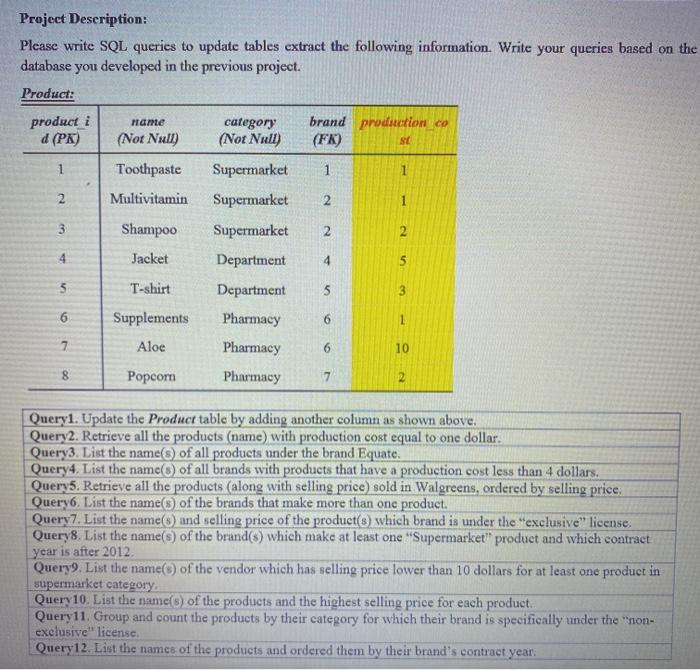
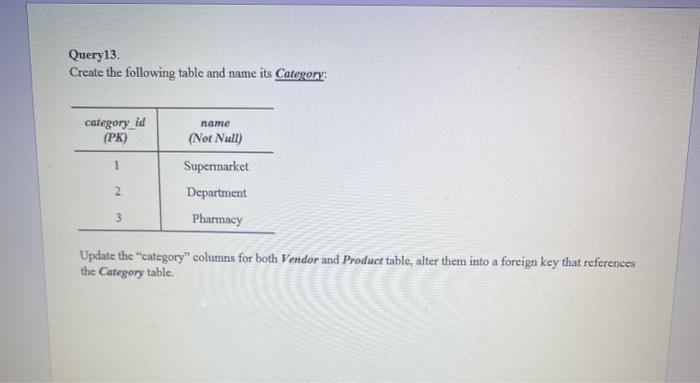
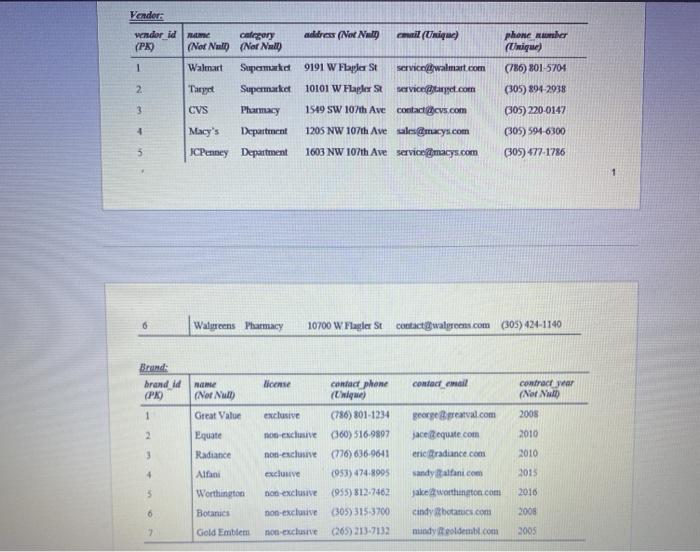
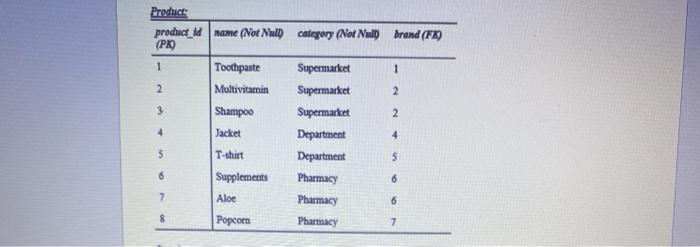
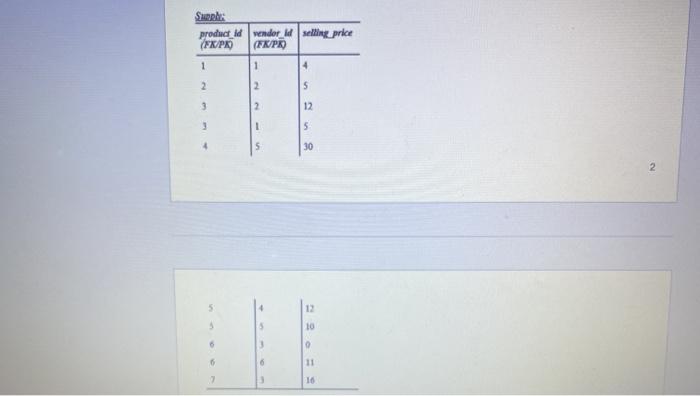
Project Deseription: Please write SQL queries to update tables extract the following information. Write your queries based on the database you developed in the previous project. Product: product i d (PK) name (Not Null) category (Not Null) brand production co (FK) 1 Toothpaste Supermarket 1 1 2 Multivitamin Supermarket 2 1 3 Shampoo Supermarket 2 2 4 Jacket Department 4 5 5 T-shirt 5 6 Supplements 6 1 Department Pharmacy Pharmacy Pharmacy 7 Aloe 6 10 8 Popcorn 7 2 Queryl. Update the Product table by adding another column as shown above. Query 2. Retrieve all the products (name) with production cost equal to one dollar. Query3. List the name(s) of all products under the brand Equate. Query4. List the name of all brands with products that have a production cost less than 4 dollars. Query5. Retrieve all the products (along with selling price) sold in Walgreens, ordered by selling price: Query6. List the name() of the brands that make more than one product. Query7. List the name and selling price of the product(s) which brand is under the "exclusive" license. Query 8. List the name(s) of the brand($) which make at least one "Supermarket" product and which contract year is after 2012 Query9. List the name(s) of the vendor which has selling price lower than 10 dollars for at least one product in supermarket category. Query10. List the names of the products and the highest selling price for each product Query11. Group and count the products by their category for which their brand is specifically under the "non- exclusive license Query12. List the names of the products and ordered them by their brand's contract year. Query13 Create the following table and name its Category: category_id (PK) name (Not Null) 1 2 Supermarket Department Pharmacy 3 Update the category" columns for both Vendor and Product table, alter them into a foreign key that references the Category table. Vender vendor id (PR phone or (Unique) 1 2 calogery address (Not Nu al (Unique) (Not Nalt (Nor Nml Walmart Supermarket 9191 W Flaplast service walmart.com Theyet Supermarket 10101 W Flapler Stservice.com CVS Pharmacy 1549 SW 107th Ave contacters.com Macy's Department 1205 NW 107th Ave sales macys.com JCPenney Department 1603 NW 107th Ave service macys.com 3 (786) 8015704 (305) 891-2938 (305) 220-0147 (305) 594-6300 (305) 477-1786 4 5 1 Walgreens Pharmacy 10700 W Flagler St contactwalgreens.com (305)424-1140 Brand: brand id (PR) contact email Home (Nor Null contractor (Nord 2008 1 2 Great Value Equate Radiance 2010 3 2016 license contact phone (Ligue) exclusive (786) 801-1234 non exclusive (60) 516-9892 non-exclusive (776) 636.9641 exclusive (953) 474-8995 non exclusive (955) 812.7462 non-exclusive (305) 315 3700 non-exclusive (265) 213.7132 4 george greaval.com jaceequate.com eric Braduance.com sandy alfani.com jakeworthington.com cindy botanics.com mundy toldembl.com 2015 5 Alfani Worthington Botanics 2010 6 2008 2 Gold Emblem 2005 Product product_id name (Not Null category (Nor Null brand (FIO (PK) 1 Toothpaste Supermarket 1 2 Multivitamin Supermarket 2 3 Shampoo Supermarket 2 4 Jacket Department 4 5 T-shirt Department S 6 Supplements Pharmacy 6 7 Aloe Pharmacy 6 8 Popcom Pharmacy 7 Sple: product_id vendor_id selling price (FK/P (FK/PR) 1 1 4 2 2 S 3 2 12 1 5 30 2 12 10 16
Step by Step Solution
There are 3 Steps involved in it

Get step-by-step solutions from verified subject matter experts
 Study Help