







Question: Only use the most basic loop such as: the 'while' loop, 'format', 'print', 'elif', 'if', 'else'. Do not use 'def divideBy2(decNumber)' or ' import java.util.Scanner'
Only use the most basic loop such as: the 'while' loop, 'format', 'print', 'elif', 'if', 'else'. Do not use 'def divideBy2(decNumber)' or 'import java.util.Scanner'
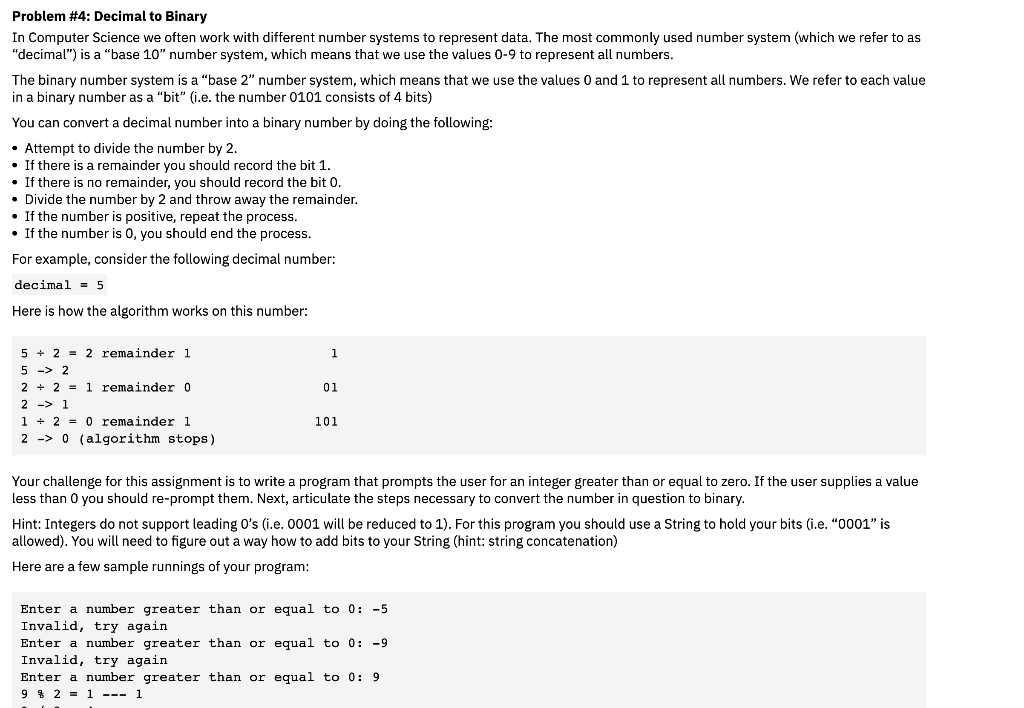
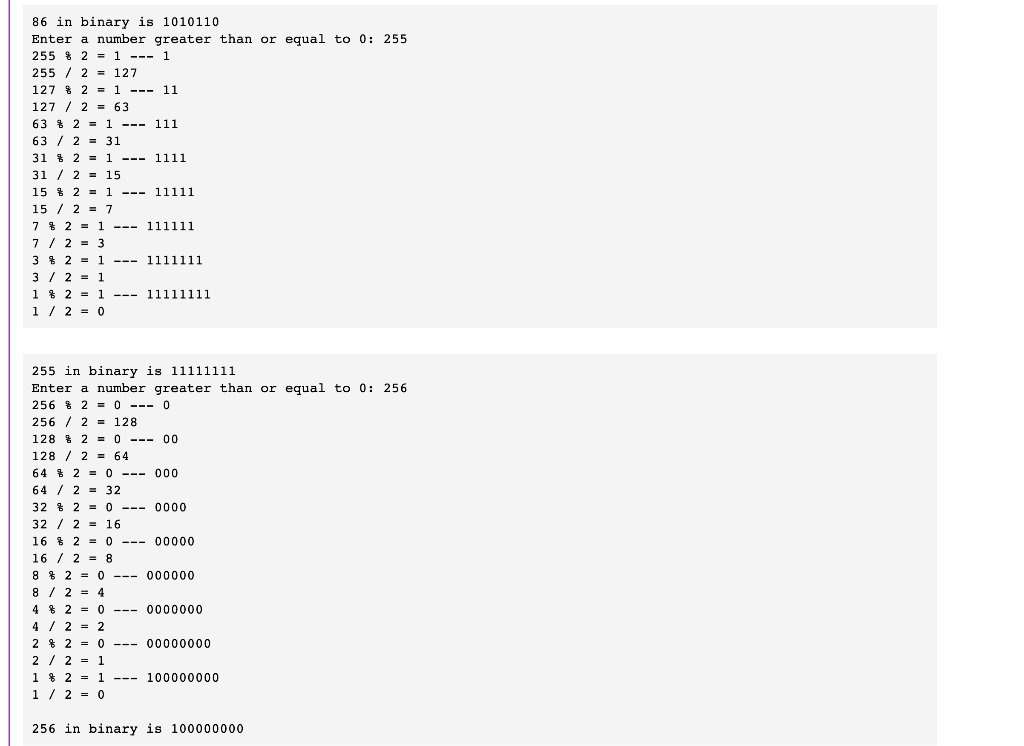
Problem \#4: Decimal to Binary In Computer Science we often work with different number systems to represent data. The most commonly used number system (which we refer to as "decimal") is a "base 10" number system, which means that we use the values 09 to represent all numbers. The binary number system is a "base 2" number system, which means that we use the values 0 and 1 to represent all numbers. We refer to each value in a binary number as a "bit" (i.e. the number 0101 consists of 4 bits) You can convert a decimal number into a binary number by doing the following: Attempt to divide the number by 2 . - If there is a remainder you should record the bit 1. - If there is no remainder, you should record the bit 0. - Divide the number by 2 and throw away the remainder. If the number is positive, repeat the process. If the number is 0 , you should end the process. For example, consider the following decimal number: decimal =5 Here is how the algorithm works on this number: 52=2 remainder 1 52 22=1 remainder 0 21 12=0 remainder 1 20 (algorithm stops) Your challenge for this assignment is to write a program that prompts the user for an integer greater than or equal to zero. If the user supplies a value ess than 0 you should re-prompt them. Next, articulate the steps necessary to convert the number in question to binary. Hint: Integers do not support leading 0's (i.e. 0001 will be reduced to 1). For this program you should use a String to hold your bits (i.e. "0001" is allowed). You will need to figure out a way how to add bits to your String (hint: string concatenation) Here are a few sample runnings of your program: Enter a number greater than or equal to 0:5 Invalid, try again Enter a number greater than or equal to 0:9 Invalid, try again Enter a number greater than or equal to 0:9 9 2=1-- 1
Step by Step Solution
There are 3 Steps involved in it

Get step-by-step solutions from verified subject matter experts
 Study Help