



Question: Only use whats discussed in class. You can not use if its not listed below: SELECT FROM WHERE GROUP BY HAVING ORDER BY LIKE SUM
Only use whats discussed in class. You can not use if its not listed below: 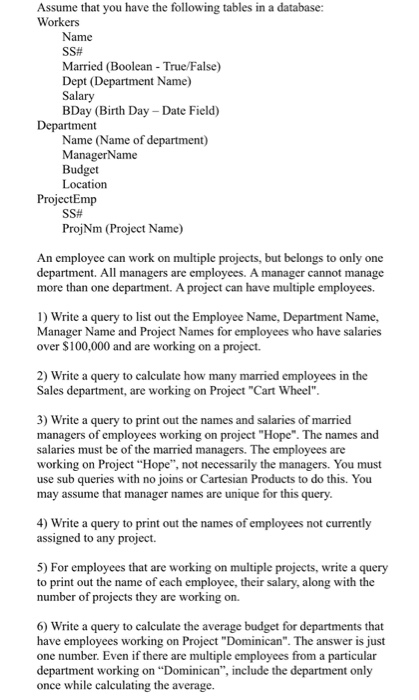 Assume that you have the following tables in a database: Workers Name SSH Married (Boolean True/False) Dept (Department Name) Salary BDay (Birth Day Date Field) Name (Name of department) ManagerName Budget Location ProjectEmp SSH ProjNm (Project Name) An employee can work on multiple projects, but belongs to only one department. All managers are employees. A manager cannot manage more than one department. A project can have multiple employees. 1) Write a query to list out the Employee Name, Department Name, Manager Name and Project Names for employees who have salaries over S100,000 and are working on a project 2) Write a query to calculate how many married employees in the Sales department, are working on Project "Cart Wheel" 3) Write a query to print out the names and salaries of married managers of employees working on project "Hope". The names and salaries must be of the married managers. The employees are working on Project "Hope", not necessarily the managers. You must use sub queries with no joins or Cartesian Products to do this. You may assume that manager names are unique for this query 4) Write a query to print out the names of employees not currently assigned to any project. 5) For employees that are working on multiple projects, write a query to print out the name of each employee, their salary, along with the number of projects they are working on. 6) Write a query to calculate the average budget for departments that have employees working on Project "Dominican". The answer is just one number. Even if there are multiple employees from a particular department working on "Dominican", include the department only once while calculating the average
SELECT
FROM
WHERE
GROUP BY
HAVING
ORDER BY
LIKE
SUM
AVG
COUNT
LEFT OUTER JOIN
RIGHT OUTER JOIN
FULL OUTER JOIN
>=
> SOME
Step by Step Solution
There are 3 Steps involved in it
1 Expert Approved Answer
Step: 1 Unlock

Question Has Been Solved by an Expert!
Get step-by-step solutions from verified subject matter experts
Step: 2 Unlock
Step: 3 Unlock