







Question: oon their job function: Users In Group Permissions user-1 S3-support Read-Only access to Amazon s3 user-2 EC2-Support Read-Only access to Amazon EC2 user-3 EC2-Admin View,
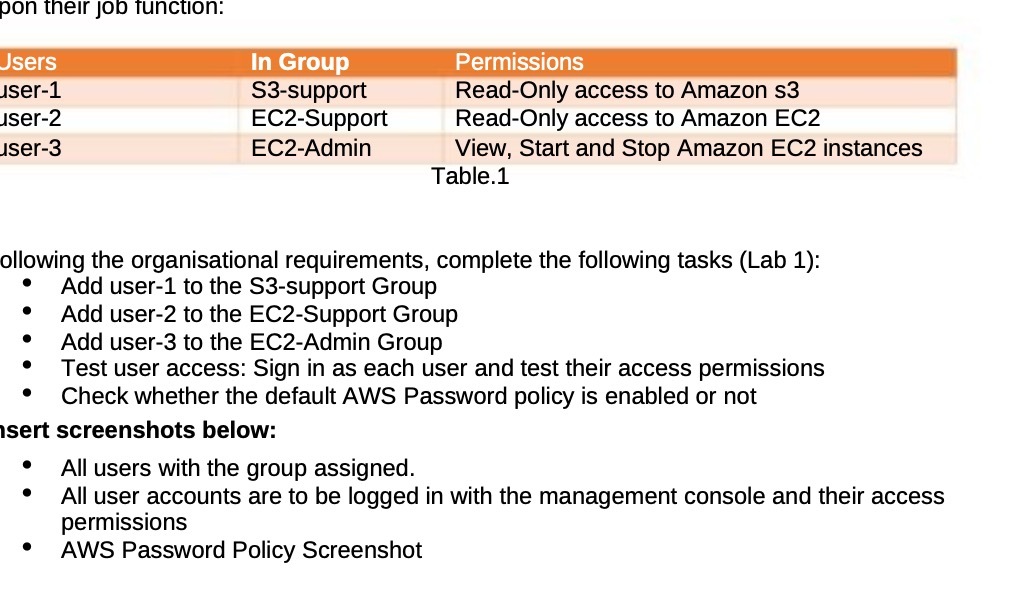
oon their job function: Users In Group Permissions user-1 S3-support Read-Only access to Amazon s3 user-2 EC2-Support Read-Only access to Amazon EC2 user-3 EC2-Admin View, Start and Stop Amazon EC2 instances Table.1 ollowing the organisational requirements, complete the following tasks (Lab 1): Add user-1 to the S3-support Group Add user-2 to the EC2-Support Group Add user-3 to the EC2-Admin Group Test user access: Sign in as each user and test their access permissions Check whether the default AWS Password policy is enabled or not sert screenshots below: All users with the group assigned. All user accounts are to be logged in with the management console and their access permissions AWS Password Policy Screenshot
Step by Step Solution
There are 3 Steps involved in it

Get step-by-step solutions from verified subject matter experts
 Study Help