







Question: Open and close files only if the user selects file input and the files were opened None of the implementations in requirements 1 through 6
Open and close files only if the user selects file input and the files were opened
None of the implementations in requirements through can be used more than once eg you
cannot compute leap year more than once, you cannot have two ifelseif statements assigning
month name, etc.
Program Documentation & Style
Declare all variables and constants that your program uses at the beginning of your program.
Your program should include two types of comments:
Header Comments at the top, including lines with:
a Your name, course name, and class time
b Program assignment number, program file name, and the due date
c A sentence or two explaining the purpose of the program
d A description of the input data needed by the program when you run it
e A description of the processing calculations done by the program
f A description of the results output produced by the program
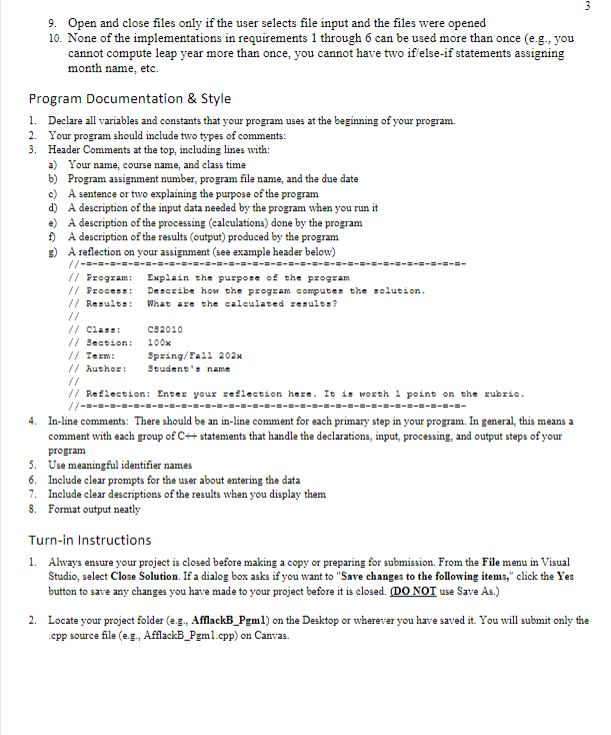
g A reflection on your assignment see example header below
Program: Explain the purpose of the program
Process: Describe hon the program computes the solution.
Results: What are the caleulated results?
Class:
Section: x
Term: SpringTax
Author: Student's name
Reflection: Enter your reflection here. It in worth point on the rubrie.
Inline comments: There should be an inline comment for each primary step in your program. In general, this means a
comment with each group of statements that handle the declarations, input, processing, and output steps of your
program
Use meaningful identifier names
Include clear prompts for the user about entering the data
Include clear descriptions of the results when you display them
Format output neatly
Turnin Instructions
Always ensure your project is closed before making a copy or preparing for submission. From the File menu in Visual
Studio, select Close Solution. If a dialog box asks if you want to "Save changes to the following items," click the Yes
button to save any changes you have made to your project before it is closed. DO NOT use Save As
Locate your project folder eg AfflackBPgml on the Desktop or wherever you have saved it You will submit only the
cpp source file eg AfflackBPgmcpp on Canvas.
Step by Step Solution
There are 3 Steps involved in it
1 Expert Approved Answer
Step: 1 Unlock

Question Has Been Solved by an Expert!
Get step-by-step solutions from verified subject matter experts
Step: 2 Unlock
Step: 3 Unlock
 Study Help