







Question: Open Excel Click Blank Workbook to open a new spreadsheet. Change the Ribbon Display Options to Show Tabs. Using the Customize Quick Access Toolbar, click
Open Excel
Click Blank Workbook to open a new spreadsheet.
Change the Ribbon Display Options to Show Tabs.
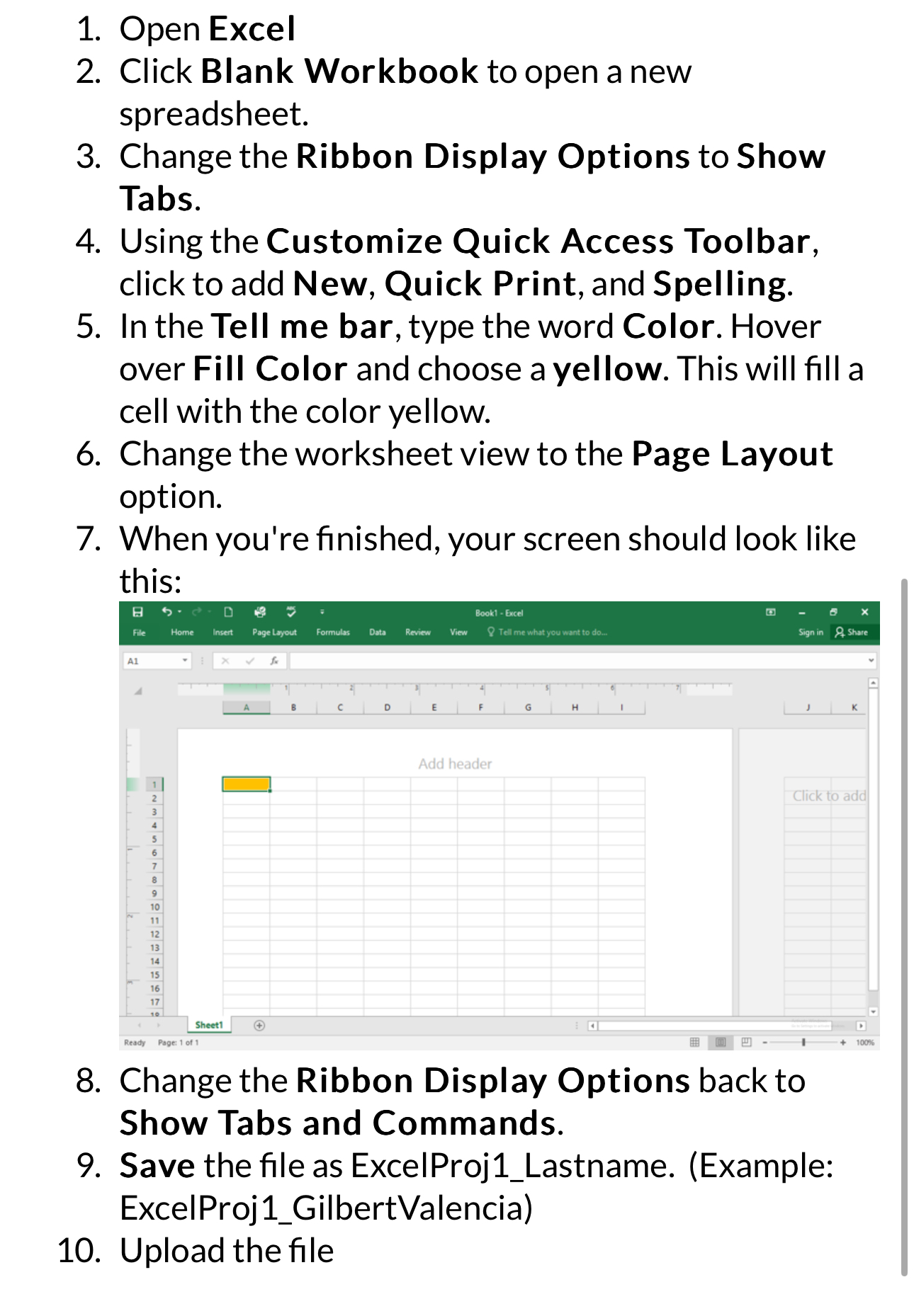
Using the Customize Quick Access Toolbar, click to add New, Quick Print, and Spelling.
In the Tell me bar, type the word Color. Hover over Fill Color and choose a yellow. This will fill a cell with the color yellow.
Change the worksheet view to the Page Layout option.
When you're finished, your screen should look like this:
Change the Ribbon Display Options back to Show Tabs and Commands.
Save the file as ExcelProjLastname. Example: ExceIProjGilbertValencia
Upload the file
Step by Step Solution
There are 3 Steps involved in it
1 Expert Approved Answer
Step: 1 Unlock

Question Has Been Solved by an Expert!
Get step-by-step solutions from verified subject matter experts
Step: 2 Unlock
Step: 3 Unlock
 Study Help