







Question: Open Processing IDE and create a new sketch. Copy-paste the code segment from Figure 1 into your sketch. 1 1 public void setup() 2 {
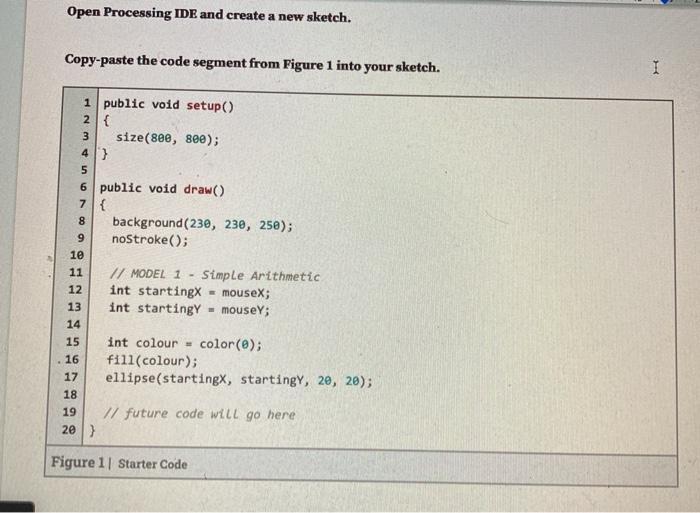

Open Processing IDE and create a new sketch. Copy-paste the code segment from Figure 1 into your sketch. 1 1 public void setup() 2 { 3 size(800, 8ee); 43 5 6 public void draw() 7{ 8 background(230, 230, 250); 9 noStroke(); 10 11 // MODEL 1 - Simple Arithmetic 12 int starting mouseX; 13 int startingy - mouseY; 14 15 int colour = color(@); 16 fill(colour); 17 ellipse(startingx, startingy, 20, 20); 18 19 // future code will go here 20) Figure 1 Starter Code What is the black circle doing as you move the cursor around the canvas? What is the black circle doing as you move the cursor around the canvas
Step by Step Solution
There are 3 Steps involved in it
1 Expert Approved Answer
Step: 1 Unlock

Question Has Been Solved by an Expert!
Get step-by-step solutions from verified subject matter experts
Step: 2 Unlock
Step: 3 Unlock
 Study Help