







Question: Open the attachment and follow the instructions to answer problems 7 and 8. Which AccountId values are advancing along the True path? 0018000000Ptpg5AAB 0018000000Ptpg9AAB 0018000000PtpgCAAR
Open the attachment and follow the instructions to answer problems 7 and 8. Which AccountId values are advancing along the True path? 0018000000Ptpg5AAB 0018000000Ptpg9AAB 0018000000PtpgCAAR
0018000000Ptpg8FG1 0018000000PtpgAAARR 0018000000PtpgCAAR
0018000000Ptpg5AAB 0018000000Ptpg9AAB 0018000000Ptpg8FG1
0018000000Ptpg8FG1 0018000000Ptpg9AAB 0018000000PtpgCAAR
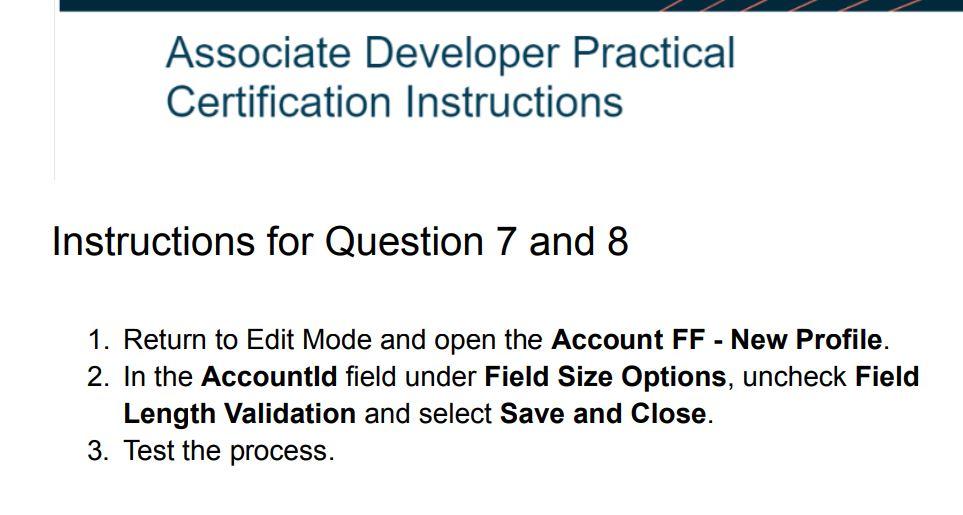
Associate Developer Practical Certification Instructions Instructions for Question 7 and 8 1. Return to Edit Mode and open the Account FF - New Profile. 2. In the Accountld field under Field Size Options, uncheck Field Length Validation and select Save and Close. 3. Test the process
Step by Step Solution
There are 3 Steps involved in it

Get step-by-step solutions from verified subject matter experts
 Study Help