







Question: OPEN THIS FILE TO SEE THE CODE DOWNLOAD IT AND OPEN IT ON ECLIPSE TO SEE THE CODE https://drive.google.com/file/d/10RXivddve4mwe0Xwm4uQvSoD7l-mGQtV/view?usp=sharing HERE'S WHAT YOU DO IN CASE
OPEN THIS FILE TO SEE THE CODE DOWNLOAD IT AND OPEN IT ON ECLIPSE TO SEE THE CODE
https://drive.google.com/file/d/10RXivddve4mwe0Xwm4uQvSoD7l-mGQtV/view?usp=sharing
HERE'S WHAT YOU DO IN CASE 3
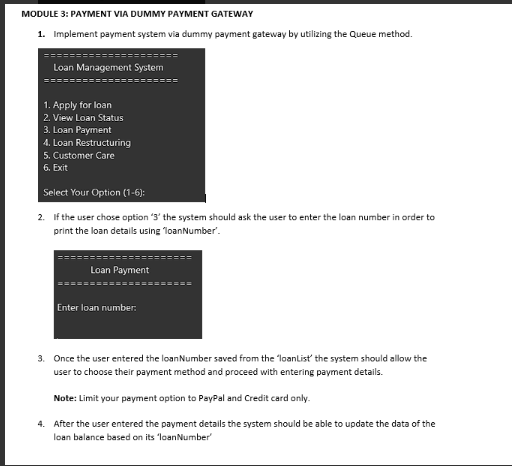
MODULE 3: PAYMENT VIA DUMMY PAYMENT GATEWAY 1. Implement payment system via dummy payment gateway by utilizing the Queue method. Loan Management System 1. Apply for loan 2. View Loan Status 3. Loan Payment 4. Loan Restructuring 5. Customer Care 6. Exit Select Your Option (1-6): 2. If the user chose option '3' the system should ask the user to enter the loan number in order to print the loan details using 'loanNumber'. Loan Payment Enter loan number: 3. Once the user entered the loanNumber saved from the 'loanList' the system should allow the user to choose their payment method and proceed with entering payment details. Note: Limit your payment option to PayPal and Credit card only. 4. After the user entered the payment details the system should be able to update the data of the loan balance based on its 'loanNumber'
Step by Step Solution
There are 3 Steps involved in it

Get step-by-step solutions from verified subject matter experts
 Study Help