







Question: operating system Assignment 2 Scheduling Culculations Type your student iD number in the link below to obeain your personulued ativify. Selomitting the activity based on
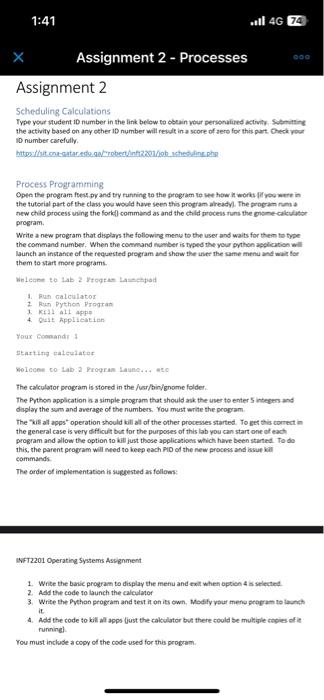
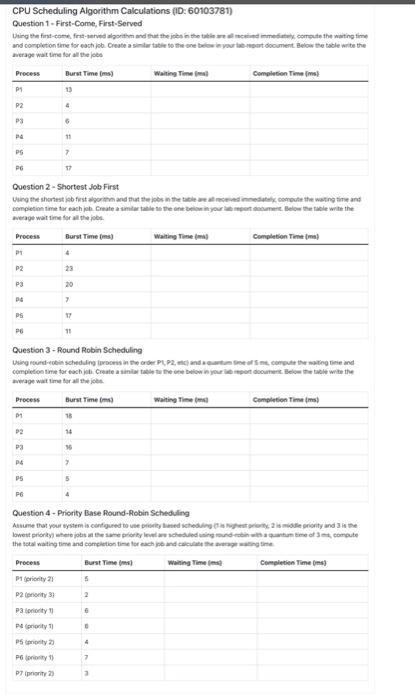
Assignment 2 Scheduling Culculations Type your student iD number in the link below to obeain your personulued ativify. Selomitting the activity based on any other 10 number will revit in a score of aere for this part Check yoar id number carefully. Process Programming. Opte the pregram foest py and try runiring to the pregeram to wet hew in works le yoe were in the tutorial part of the clawi you would have seen this propram alreadyl. The progam rum i new child process wing the forkf command as and the child process nuns the erome caltuatar pregram. Write a new preeram that displars the following menu to the user and waits for them to type the command number. When the command number is typed the your python apelication will launch an instance of the requested program and show the uier the same menu and wait for them to start more programs. Weleapen to lab 2 Vrogras Lamehped 1. Pun calculator 2. Fun Python Wrograt 1. Kial all appe 4. Quit thplieation Youx Coomandy I Starting raleulater Molccen to- Lab:2 Progran Launcus we The calculator peogram is stored in the /urr/bin/gnome folder. The Python application is a simple program that should ask the user to enter 5 intesers and diplay the sum and average of the numbers. You must write the propam. The "kil al apps" operation should kill all of the other processes started. To get this correct m the geneneral case is very difticuit but for the purposes of this lab you can start one of each program and allow the option to kill just those applications which have been started. To do this, the parent program will need to keep each PIO of the new process and kisue kal eommandx. The arder of implementation is sugeested a follom: WFF12201 Operating Systems Assignment 1. Wnte the baic program to display the menu and exit when option 4 is selected. 2. Add the code to launch the calculator 3. Write the Pythan program and teit it on its own, Wodify your meng gropram be lamysh it. 4. Add the code to kil all apps liust the calculator bot there could be multigle copies of it running]. rou must include a copy of the code used for this probram. CPU Scheduling Algorithm Calculations (1D: 60103781) Question 1 - First-Come, First-Served anerage wat time for all the jobe Question 2 - Shortest Job First neage wat ine for al the iobes. Question 3 - Round Robin Scheduling Nwage wat time for all Be jeete Question 4 - Priority Base Pound-Robin Scheduling Assignment 2 Scheduling Culculations Type your student iD number in the link below to obeain your personulued ativify. Selomitting the activity based on any other 10 number will revit in a score of aere for this part Check yoar id number carefully. Process Programming. Opte the pregram foest py and try runiring to the pregeram to wet hew in works le yoe were in the tutorial part of the clawi you would have seen this propram alreadyl. The progam rum i new child process wing the forkf command as and the child process nuns the erome caltuatar pregram. Write a new preeram that displars the following menu to the user and waits for them to type the command number. When the command number is typed the your python apelication will launch an instance of the requested program and show the uier the same menu and wait for them to start more programs. Weleapen to lab 2 Vrogras Lamehped 1. Pun calculator 2. Fun Python Wrograt 1. Kial all appe 4. Quit thplieation Youx Coomandy I Starting raleulater Molccen to- Lab:2 Progran Launcus we The calculator peogram is stored in the /urr/bin/gnome folder. The Python application is a simple program that should ask the user to enter 5 intesers and diplay the sum and average of the numbers. You must write the propam. The "kil al apps" operation should kill all of the other processes started. To get this correct m the geneneral case is very difticuit but for the purposes of this lab you can start one of each program and allow the option to kill just those applications which have been started. To do this, the parent program will need to keep each PIO of the new process and kisue kal eommandx. The arder of implementation is sugeested a follom: WFF12201 Operating Systems Assignment 1. Wnte the baic program to display the menu and exit when option 4 is selected. 2. Add the code to launch the calculator 3. Write the Pythan program and teit it on its own, Wodify your meng gropram be lamysh it. 4. Add the code to kil all apps liust the calculator bot there could be multigle copies of it running]. rou must include a copy of the code used for this probram. CPU Scheduling Algorithm Calculations (1D: 60103781) Question 1 - First-Come, First-Served anerage wat time for all the jobe Question 2 - Shortest Job First neage wat ine for al the iobes. Question 3 - Round Robin Scheduling Nwage wat time for all Be jeete Question 4 - Priority Base Pound-Robin Scheduling
Step by Step Solution
There are 3 Steps involved in it

Get step-by-step solutions from verified subject matter experts
 Study Help