







Question: OPERATING SYSTEM SHELL SCRIPTING IN LINUX QUESTION No. 03 (18) Fig 2 shows the basic hierarchy of the files. Input (read) the name of the
OPERATING SYSTEM
SHELL SCRIPTING IN LINUX
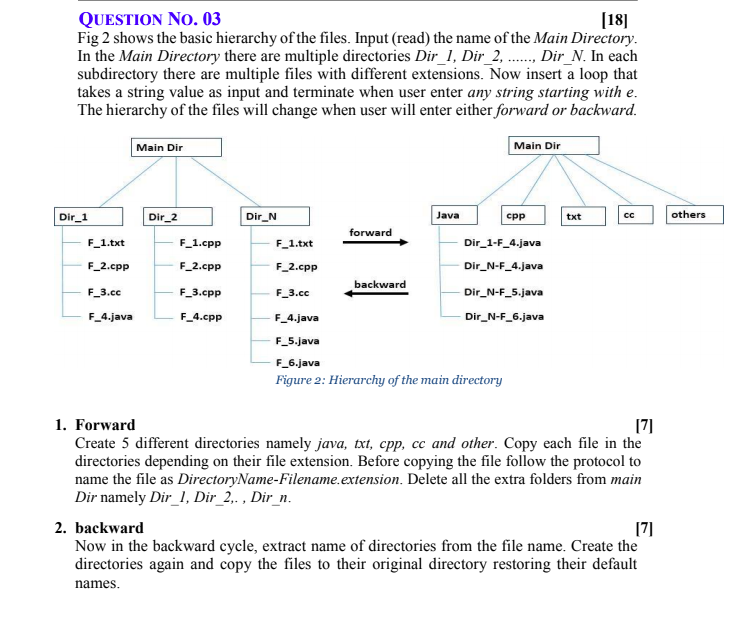
QUESTION No. 03 (18) Fig 2 shows the basic hierarchy of the files. Input (read) the name of the Main Directory In the Main Directory there are multiple directories Dir_1, Dir_2, ....... Dir_N. In each subdirectory there are multiple files with different extensions. Now insert a loop that takes a string value as input and terminate when user enter any string starting with e. The hierarchy of the files will change when user will enter either forward or backward. Main Dir Main Dir Dir_1 Dir_2 txt others F_1.cpp F_1.txt F_2.cpp F_2.cpp F_3.cc F 3.cpp Dir_N Java cpp forward F_1.txt Dir_1-F_4.java F_2.cpp Dir_N-F_4.java backward F_3.cc Dir_N-F_5.java F_4.java Dir_N-F_6.java F_5.java F_6.java Figure 2: Hierarchy of the main directory F_4.java F_4.cpp 1. Forward 171 Create 5 different directories namely java, txt, cpp, cc and other. Copy each file in the directories depending on their file extension. Before copying the file follow the protocol to name the file as DirectoryName-Filename.extension. Delete all the extra folders from main Dir namely Dir_1, Dir_2,. Dir_n. 2. backward 171 Now in the backward cycle, extract name of directories from the file name. Create the directories again and copy the files to their original directory restoring their default names. QUESTION No. 03 (18) Fig 2 shows the basic hierarchy of the files. Input (read) the name of the Main Directory In the Main Directory there are multiple directories Dir_1, Dir_2, ....... Dir_N. In each subdirectory there are multiple files with different extensions. Now insert a loop that takes a string value as input and terminate when user enter any string starting with e. The hierarchy of the files will change when user will enter either forward or backward. Main Dir Main Dir Dir_1 Dir_2 txt others F_1.cpp F_1.txt F_2.cpp F_2.cpp F_3.cc F 3.cpp Dir_N Java cpp forward F_1.txt Dir_1-F_4.java F_2.cpp Dir_N-F_4.java backward F_3.cc Dir_N-F_5.java F_4.java Dir_N-F_6.java F_5.java F_6.java Figure 2: Hierarchy of the main directory F_4.java F_4.cpp 1. Forward 171 Create 5 different directories namely java, txt, cpp, cc and other. Copy each file in the directories depending on their file extension. Before copying the file follow the protocol to name the file as DirectoryName-Filename.extension. Delete all the extra folders from main Dir namely Dir_1, Dir_2,. Dir_n. 2. backward 171 Now in the backward cycle, extract name of directories from the file name. Create the directories again and copy the files to their original directory restoring their default names
Step by Step Solution
There are 3 Steps involved in it

Get step-by-step solutions from verified subject matter experts
 Study Help