







Question: Operating Systems - Macbook Pro If you can show how to solve this hw step by step from mac or windows point of view. Part
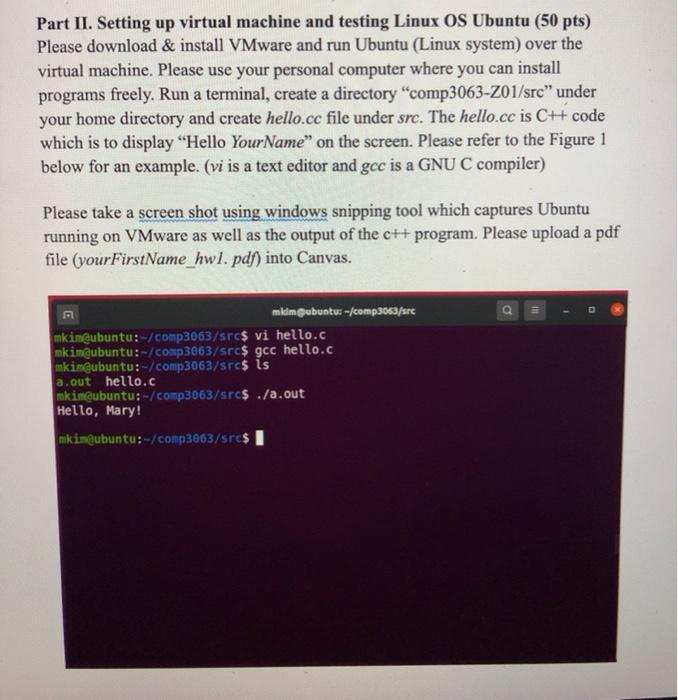
Part II. Setting up virtual machine and testing Linux OS Ubuntu (50 pts) Please download & install VMware and run Ubuntu (Linux system) over the virtual machine. Please use your personal computer where you can install programs freely. Run a terminal, create a directory "comp3063-201/src" under your home directory and create hello.cc file under src. The hello.cc is C++ code which is to display "Hello Your Name" on the screen. Please refer to the Figure 1 below for an example. (vi is a text editor and gec is a GNU C compiler) Please take a screen shot using windows snipping tool which captures Ubuntu running on VMware as well as the output of the c++ program. Please upload a pdf file (your FirstName_hwl. pdf) into Canvas. mkimubuntu: -/comp3063/src mkim@ubuntu:-/comp3063/src$ vi hello.c mkim@ubuntu:-/comp3063/src$ gcc hello.c mkim@ubuntu:-/comp3063/src$ is a.out hello.c mkin@ubuntu:-/comp3063/src$ ./a.out Hello, Mary! mkim@ubuntu:-/comp3063/src$ I Part II. Setting up virtual machine and testing Linux OS Ubuntu (50 pts) Please download & install VMware and run Ubuntu (Linux system) over the virtual machine. Please use your personal computer where you can install programs freely. Run a terminal, create a directory "comp3063-201/src" under your home directory and create hello.cc file under src. The hello.cc is C++ code which is to display "Hello Your Name" on the screen. Please refer to the Figure 1 below for an example. (vi is a text editor and gec is a GNU C compiler) Please take a screen shot using windows snipping tool which captures Ubuntu running on VMware as well as the output of the c++ program. Please upload a pdf file (your FirstName_hwl. pdf) into Canvas. mkimubuntu: -/comp3063/src mkim@ubuntu:-/comp3063/src$ vi hello.c mkim@ubuntu:-/comp3063/src$ gcc hello.c mkim@ubuntu:-/comp3063/src$ is a.out hello.c mkin@ubuntu:-/comp3063/src$ ./a.out Hello, Mary! mkim@ubuntu:-/comp3063/src$
Step by Step Solution
There are 3 Steps involved in it

Get step-by-step solutions from verified subject matter experts
 Study Help