







Question: oracle sql. use virtual data answering the questions. and try to answer it fast because i have a lab on these topics within hours. thank
oracle sql. use virtual data answering the questions. and try to answer it fast because i have a lab on these topics within hours. thank you.

DROP TABLE order_line CASCADE CONSTRAINTS;
DROP TABLE shipment_line CASCADE CONSTRAINTS;
DROP TABLE shipment CASCADE CONSTRAINTS;
DROP TABLE inventory CASCADE CONSTRAINTS;
DROP TABLE color CASCADE CONSTRAINTS;
DROP TABLE item CASCADE CONSTRAINTS;
DROP TABLE category CASCADE CONSTRAINTS;
DROP TABLE orders CASCADE CONSTRAINTS;
DROP TABLE order_source CASCADE CONSTRAINTS;
DROP TABLE customer CASCADE CONSTRAINTS;
CREATE TABLE customer
(c_id NUMBER(5),
c_last VARCHAR2(30),
c_first VARCHAR2(30),
c_mi CHAR(1),
c_birthdate DATE,
c_address VARCHAR2(30),
c_city VARCHAR2(30),
c_state CHAR(2),
c_zip VARCHAR2(10),
c_dphone VARCHAR2(10),
c_ephone VARCHAR2(10),
c_userid VARCHAR2(50),
c_password VARCHAR2(15),
CONSTRAINT customer_c_id_pk PRIMARY KEY (c_id));
CREATE TABLE order_source
(os_id NUMBER(3),
os_desc VARCHAR2(30),
CONSTRAINT order_source_os_id_pk PRIMARY KEY(os_id));
CREATE TABLE orders
(o_id NUMBER(8),
o_date DATE,
o_methpmt VARCHAR2(10),
c_id NUMBER(5),
os_id NUMBER(3),
CONSTRAINT orders_o_id_pk PRIMARY KEY (o_id),
CONSTRAINT orders_c_id_fk FOREIGN KEY (c_id) REFERENCES customer(c_id),
CONSTRAINT orders_os_id_fk FOREIGN KEY (os_id) REFERENCES order_source(os_id));
CREATE TABLE category
(cat_id NUMBER(2),
cat_desc VARCHAR2(20),
CONSTRAINT category_cat_id_pk PRIMARY KEY (cat_id));
CREATE TABLE item
(item_id NUMBER(8),
item_desc VARCHAR2(30),
cat_id NUMBER(2),
item_image BLOB,
CONSTRAINT item_item_id_pk PRIMARY KEY (item_id),
CONSTRAINT item_cat_id_fk FOREIGN KEY (cat_id) REFERENCES category(cat_id));
CREATE TABLE color
(color VARCHAR2(20),
CONSTRAINT color_color_pk PRIMARY KEY (color));
CREATE TABLE inventory
(inv_id NUMBER(10),
item_id NUMBER(8),
color VARCHAR2(20),
inv_size VARCHAR2(10),
inv_price NUMBER(6,2),
inv_qoh NUMBER(4),
CONSTRAINT inventory_inv_id_pk PRIMARY KEY (inv_id),
CONSTRAINT inventory_item_id_fk FOREIGN KEY (item_id) REFERENCES item(item_id),
CONSTRAINT inventory_color_fk FOREIGN KEY (color) REFERENCES color(color));
CREATE TABLE shipment
(ship_id NUMBER(10),
ship_date_expected DATE,
CONSTRAINT shipment_ship_id_pk PRIMARY KEY (ship_id));
CREATE TABLE shipment_line
(ship_id NUMBER(10),
inv_id NUMBER(10),
sl_quantity NUMBER(4),
sl_date_received DATE,
CONSTRAINT shipment_line_ship_id_fk FOREIGN KEY (ship_id) REFERENCES shipment(ship_id),
CONSTRAINT shipment_line_inv_id_fk FOREIGN KEY (inv_id) REFERENCES inventory(inv_id),
CONSTRAINT shipment_line_shipid_invid_pk PRIMARY KEY(ship_id, inv_id));
CREATE TABLE order_line
(o_id NUMBER(8),
inv_id NUMBER(10),
ol_quantity NUMBER(4) NOT NULL,
CONSTRAINT order_line_o_id_fk FOREIGN KEY (o_id) REFERENCES orders(o_id),
CONSTRAINT order_line_inv_id_fk FOREIGN KEY (inv_id) REFERENCES inventory(inv_id),
CONSTRAINT order_line_oid_invid_pk PRIMARY KEY (o_id, inv_id));
--- inserting records into CUSTOMER
INSERT INTO CUSTOMER VALUES
(1, 'Graham', 'Neal', 'R', to_date('12/10/1967', 'mm/dd/yyyy'), '9815 Circle Dr.', 'Tallahassee', 'FL', '32308', '9045551897', '904558599', 'grahamn', 'barbiecar');
INSERT INTO CUSTOMER VALUES
(2, 'Sanchez', 'Myra', 'T', to_date('08/14/1958', 'mm/dd/yyyy'), '172 Alto Park', 'Seattle', 'WA','42180', '4185551791', '4185556643', 'sanchezmt', 'qwert5');
INSERT INTO CUSTOMER VALUES
(3, 'Smith', 'Lisa', 'M', to_date('04/12/1960', 'mm/dd/yyyy'), '850 East Main', 'Santa Ana', 'CA', '51875', '3075557841', '3075559852', 'smithlm', 'joshua5');
INSERT INTO CUSTOMER VALUES
(4, 'Phelp', 'Paul', NULL, to_date('01/18/1981', 'mm/dd/yyyy'), '994 Kirkman Rd.', 'Northpoint', 'NY', '11795', '4825554788', '4825558219', 'phelpp', 'hold98er');
INSERT INTO CUSTOMER VALUES
(5, 'Lewis', 'Sheila', 'A', to_date('08/30/1978', 'mm/dd/yyyy'), '195 College Blvd.', 'Newton', 'GA', '37812', '3525554972', '3525551811', 'lewissa', '125pass');
INSERT INTO CUSTOMER VALUES
(6, 'James', 'Thomas', 'E', to_date('06/01/1973', 'mm/dd/yyyy'), '348 Rice Lane', 'Radcliff', 'WY', '87195', '7615553485', '7615553319', 'jamest', 'nok$tell');
--- inserting records into ORDER_SOURCE
INSERT INTO order_source VALUES (1, 'Winter 2005');
INSERT INTO order_source VALUES (2, 'Spring 2006');
INSERT INTO order_source VALUES (3, 'Summer 2006');
INSERT INTO order_source VALUES (4, 'Outdoor 2006');
INSERT INTO order_source VALUES (5, 'Children''s 2006');
INSERT INTO order_source VALUES (6, 'Web Site');
--- inserting records into orders
INSERT INTO orders VALUES
(1, TO_DATE('05/29/2006', 'MM/DD/YYYY'), 'CC', 1, 2);
INSERT INTO orders VALUES
(2, TO_DATE('05/29/2006', 'MM/DD/YYYY'), 'CC', 5, 6);
INSERT INTO orders VALUES
(3, TO_DATE('05/31/2006', 'MM/DD/YYYY'), 'CHECK', 2, 2);
INSERT INTO orders VALUES
(4, TO_DATE('05/31/2006', 'MM/DD/YYYY'), 'CC', 3, 3);
INSERT INTO orders VALUES
(5, TO_DATE('06/01/2006', 'MM/DD/YYYY'), 'CC', 4, 6);
INSERT INTO orders VALUES
(6, TO_DATE('06/01/2006', 'MM/DD/YYYY'), 'CC', 4, 3);
--- inserting records into CATEGORY
INSERT INTO category VALUES (1, 'Women''s Clothing');
INSERT INTO category VALUES (2, 'Children''s Clothing');
INSERT INTO category VALUES (3, 'Men''s Clothing');
INSERT INTO category VALUES (4, 'Outdoor Gear');
--- inserting records into ITEM
INSERT INTO item VALUES
(1, 'Men''s Expedition Parka', 3, EMPTY_BLOB());
INSERT INTO item VALUES
(2, '3-Season Tent', 4, EMPTY_BLOB());
INSERT INTO item VALUES
(3, 'Women''s Hiking Shorts', 1, EMPTY_BLOB());
INSERT INTO item VALUES
(4, 'Women''s Fleece Pullover', 1, EMPTY_BLOB());
INSERT INTO item VALUES
(5, 'Children''s Beachcomber Sandals', 2, EMPTY_BLOB());
INSERT INTO item VALUES
(6, 'Boy''s Surf Shorts', 2, EMPTY_BLOB());
INSERT INTO item VALUES
(7, 'Girl''s Soccer Tee', 2, EMPTY_BLOB());
--- inserting records into COLOR
INSERT INTO color VALUES ('Sky Blue');
INSERT INTO color VALUES ('Light Grey');
INSERT INTO color VALUES ('Khaki');
INSERT INTO color VALUES ('Navy');
INSERT INTO color VALUES ('Royal');
INSERT INTO color VALUES ('Eggplant');
INSERT INTO color VALUES ('Blue');
INSERT INTO color VALUES ('Red');
INSERT INTO color VALUES ('Spruce');
INSERT INTO color VALUES ('Turquoise');
INSERT INTO color VALUES ('Bright Pink');
INSERT INTO color VALUES ('White');
--- inserting records into INVENTORY
INSERT INTO inventory VALUES
(1, 2, 'Sky Blue', NULL, 259.99, 16);
INSERT INTO inventory VALUES
(2, 2, 'Light Grey', NULL, 259.99, 12);
INSERT INTO inventory VALUES
(3, 3, 'Khaki', 'S', 29.95, 150);
INSERT INTO inventory VALUES
(4, 3, 'Khaki', 'M', 29.95, 147);
INSERT INTO inventory VALUES
(5, 3, 'Khaki', 'L', 29.95, 0);
INSERT INTO inventory VALUES
(6, 3, 'Navy', 'S', 29.95, 139);
INSERT INTO inventory VALUES
(7, 3, 'Navy', 'M', 29.95, 137);
INSERT INTO inventory VALUES
(8, 3, 'Navy', 'L', 29.95, 115);
INSERT INTO inventory VALUES
(9, 4, 'Eggplant', 'S', 59.95, 135);
INSERT INTO inventory VALUES
(10, 4, 'Eggplant', 'M', 59.95, 168);
INSERT INTO inventory VALUES
(11, 4, 'Eggplant', 'L', 59.95, 187);
INSERT INTO inventory VALUES
(12, 4, 'Royal', 'S', 59.95, 0);
INSERT INTO inventory VALUES
(13, 4, 'Royal', 'M', 59.95, 124);
INSERT INTO inventory VALUES
(14, 4, 'Royal', 'L', 59.95, 112);
INSERT INTO inventory VALUES
(15, 5, 'Turquoise', '10', 15.99, 121);
INSERT INTO inventory VALUES
(16, 5, 'Turquoise', '11', 15.99, 111);
INSERT INTO inventory VALUES
(17, 5, 'Turquoise', '12', 15.99, 113);
INSERT INTO inventory VALUES
(18, 5, 'Turquoise', '1', 15.99, 121);
INSERT INTO inventory VALUES
(19, 5, 'Bright Pink', '10', 15.99, 148);
INSERT INTO inventory VALUES
(20, 5, 'Bright Pink', '11', 15.99, 137);
INSERT INTO inventory VALUES
(21, 5, 'Bright Pink', '12', 15.99, 134);
INSERT INTO inventory VALUES
(22, 5, 'Bright Pink', '1', 15.99, 123);
INSERT INTO inventory VALUES
(23, 1, 'Spruce', 'S', 199.95, 114);
INSERT INTO inventory VALUES
(24, 1, 'Spruce', 'M',199.95, 17);
INSERT INTO inventory VALUES
(25, 1, 'Spruce', 'L', 209.95, 0);
INSERT INTO inventory VALUES
(26, 1, 'Spruce', 'XL', 209.95, 12);
INSERT INTO inventory VALUES
(27, 6, 'Blue', 'S', 15.95, 50);
INSERT INTO inventory VALUES
(28, 6, 'Blue', 'M', 15.95, 100);
INSERT INTO inventory VALUES
(29, 6, 'Blue', 'L', 15.95, 100);
INSERT INTO inventory VALUES
(30, 7, 'White', 'S', 19.99, 100);
INSERT INTO inventory VALUES
(31, 7, 'White', 'M', 19.99, 100);
INSERT INTO inventory VALUES
(32, 7, 'White', 'L', 19.99, 100);
--inserting records into SHIPMENT
INSERT INTO shipment VALUES
(1, TO_DATE('09/15/2006', 'MM/DD/YYYY'));
INSERT INTO shipment VALUES
(2, TO_DATE('11/15/2006', 'MM/DD/YYYY'));
INSERT INTO shipment VALUES
(3, TO_DATE('06/25/2006', 'MM/DD/YYYY'));
INSERT INTO shipment VALUES
(4, TO_DATE('06/25/2006', 'MM/DD/YYYY'));
INSERT INTO shipment VALUES
(5, TO_DATE('08/15/2006', 'MM/DD/YYYY'));
--inserting records into SHIPMENT_LINE
INSERT INTO shipment_line VALUES
(1, 1, 25, TO_DATE('09/10/2006', 'MM/DD/YYYY'));
INSERT INTO shipment_line VALUES
(1, 2, 25, TO_DATE('09/10/2006', 'MM/DD/YYYY'));
INSERT INTO shipment_line VALUES
(2, 2, 25, NULL);
INSERT INTO shipment_line VALUES
(3, 5, 200, NULL);
INSERT INTO shipment_line VALUES
(3, 6, 200, NULL);
INSERT INTO shipment_line VALUES
(3, 7, 200, NULL);
INSERT INTO shipment_line VALUES
(4, 12, 100, TO_DATE('08/15/2006', 'MM/DD/YYYY'));
INSERT INTO shipment_line VALUES
(4, 13, 100, TO_DATE('08/25/2006', 'MM/DD/YYYY'));
INSERT INTO shipment_line VALUES
(5, 23, 50, TO_DATE('08/15/2006', 'MM/DD/YYYY'));
INSERT INTO shipment_line VALUES
(5, 24, 100, TO_DATE('08/15/2006', 'MM/DD/YYYY'));
INSERT INTO shipment_line VALUES
(5, 25, 100, TO_DATE('08/15/2006', 'MM/DD/YYYY'));
--- inserting records into ORDER_LINE
INSERT INTO order_line VALUES (1, 1, 1);
INSERT INTO order_line VALUES (1, 14, 2);
INSERT INTO order_line VALUES (2, 19, 1);
INSERT INTO order_line VALUES (3, 24, 1);
INSERT INTO order_line VALUES (3, 26, 1);
INSERT INTO order_line VALUES (4, 12, 2);
INSERT INTO order_line VALUES (5, 8, 1);
INSERT INTO order_line VALUES (5, 13, 1);
INSERT INTO order_line VALUES (6, 2, 1);
INSERT INTO order_line VALUES (6, 7, 3);
COMMIT;
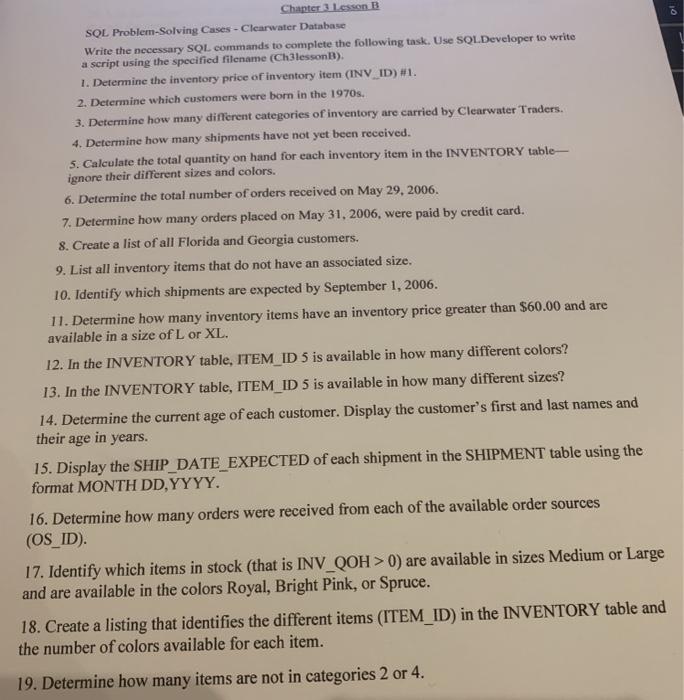
Chapter 3 lesson B SOL Problem Solving Cases - Clearwater Database Write the necessary SQL commands to complete the following task. Use SQL Developer to write a script using the specified filename (Ch3lessonB). 1. Determine the inventory price of inventory item (INV_ID)#1. 2. Determine which customers were born in the 1970s. 3. Determine how many different categories of inventory are carried by Clearwater Traders. 4. Determine how many shipments have not yet been received. 5. Calculate the total quantity on hand for each inventory item in the INVENTORY table- ignore their different sizes and colors. 6. Determine the total number of orders received on May 29, 2006. 7. Determine how many orders placed on May 31, 2006, were paid by credit card. 8. Create a list of all Florida and Georgia customers. 9. List all inventory items that do not have an associated size, 10. Identify which shipments are expected by September 1, 2006. 11. Determine how many inventory items have an inventory price greater than $60.00 and are available in a size of L or XL. 12. In the INVENTORY table, ITEM ID 5 is available in how many different colors? 13. In the INVENTORY table, ITEM_ID 5 is available in how many different sizes? 14. Determine the current age of each customer. Display the customer's first and last names and their age in years. 15. Display the SHIP_DATE_EXPECTED of each shipment in the SHIPMENT table using the format MONTH DD, YYYY. 16. Determine how many orders were received from each of the available order sources (OS_ID). 17. Identify which items in stock (that is INV_QOH > 0) are available in sizes Medium or Large and are available in the colors Royal, Bright Pink, or Spruce. 18. Create a listing that identifies the different items (ITEM_ID) in the INVENTORY table and the number of colors available for each item. 19. Determine how many items are not in categories 2 or 4. 20. List the unique ITEM_IDs along with their inventory prices from the INVENTORY table. Format the inventory prices so they are displayed in the format $999.99. Chapter 3 lesson B SOL Problem Solving Cases - Clearwater Database Write the necessary SQL commands to complete the following task. Use SQL Developer to write a script using the specified filename (Ch3lessonB). 1. Determine the inventory price of inventory item (INV_ID)#1. 2. Determine which customers were born in the 1970s. 3. Determine how many different categories of inventory are carried by Clearwater Traders. 4. Determine how many shipments have not yet been received. 5. Calculate the total quantity on hand for each inventory item in the INVENTORY table- ignore their different sizes and colors. 6. Determine the total number of orders received on May 29, 2006. 7. Determine how many orders placed on May 31, 2006, were paid by credit card. 8. Create a list of all Florida and Georgia customers. 9. List all inventory items that do not have an associated size, 10. Identify which shipments are expected by September 1, 2006. 11. Determine how many inventory items have an inventory price greater than $60.00 and are available in a size of L or XL. 12. In the INVENTORY table, ITEM ID 5 is available in how many different colors? 13. In the INVENTORY table, ITEM_ID 5 is available in how many different sizes? 14. Determine the current age of each customer. Display the customer's first and last names and their age in years. 15. Display the SHIP_DATE_EXPECTED of each shipment in the SHIPMENT table using the format MONTH DD, YYYY. 16. Determine how many orders were received from each of the available order sources (OS_ID). 17. Identify which items in stock (that is INV_QOH > 0) are available in sizes Medium or Large and are available in the colors Royal, Bright Pink, or Spruce. 18. Create a listing that identifies the different items (ITEM_ID) in the INVENTORY table and the number of colors available for each item. 19. Determine how many items are not in categories 2 or 4. 20. List the unique ITEM_IDs along with their inventory prices from the INVENTORY table. Format the inventory prices so they are displayed in the format $999.99
Step by Step Solution
There are 3 Steps involved in it

Get step-by-step solutions from verified subject matter experts
 Study Help