







Question: Othello.mat folder: https://app.box.com/embed/s/aw1ncpaw6fpfttbgaf5sm6fd9rloc0t6?view=list&sortColumn=name&sortDirection=ASC&showItemFeedActions=true&showParentPath=true Othello Description Write a program that will allow two players to play Othello. The program should prompt the player whose turn it
Othello.mat folder: https://app.box.com/embed/s/aw1ncpaw6fpfttbgaf5sm6fd9rloc0t6?view=list&sortColumn=name&sortDirection=ASC&showItemFeedActions=true&showParentPath=true
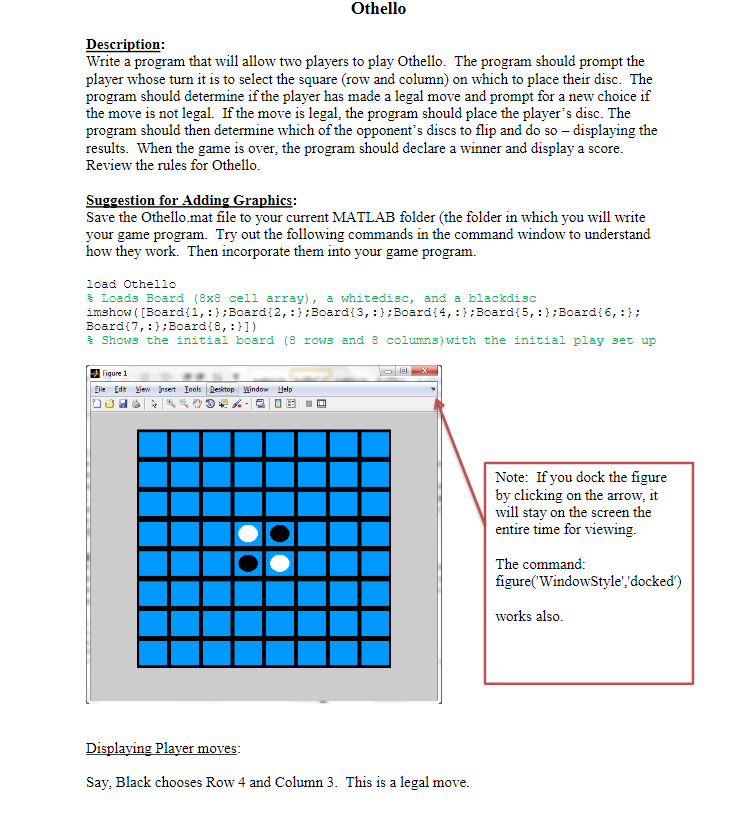
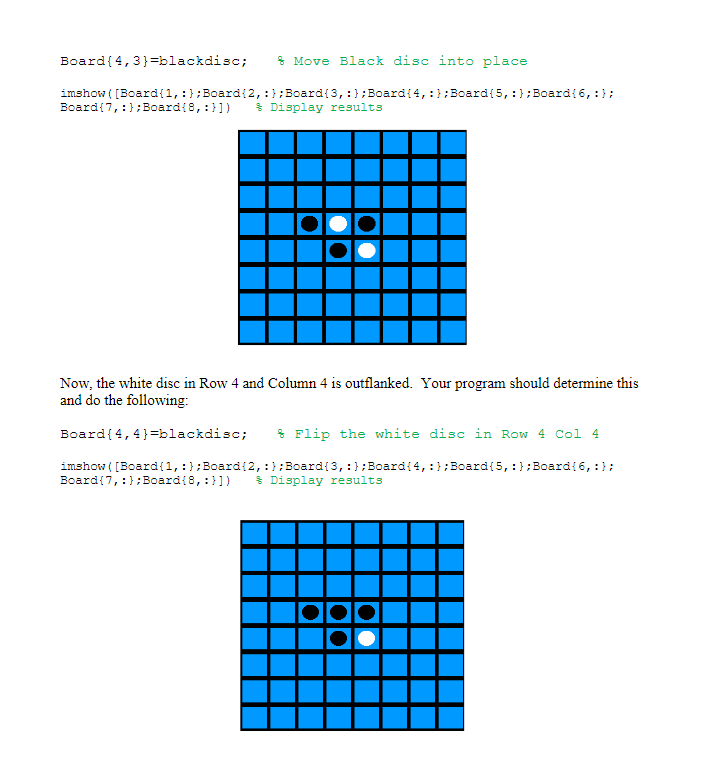
Othello Description Write a program that will allow two players to play Othello. The program should prompt the player whose turn it is to select the square (row and column) on which to place their disc. The program should determine if the player has made a legal move and prompt for a new choice if the move is not legal. If the move is legal, the program should place the player's disc. The program should then determine which of the opponent's discs to flip and do so displaying the results. When the game is over, the program Review the rules for Othello should declare a winner and display a score Suggestion for Adding Graphics: Save the Othello.mat file to your current MATLAB folder (the folder in which you will write your game program. Try out the following commands in the command window to understand how they work. Then incorpo rate them into your game program. load Othello % Load3 Board (8x8 cell array), a whitedisc, and a blackd13c imshow ([Boardf1,Boardt2,Boardi3,Boardf4,:Boardi5, :Boardi6,:; Boardi7, ::Boardi8,:1) % shows the initial board (8 row, and 8 column3 ) with the initial play 3et up Figure 1 file Edi Yiew set Iools Dektop Window Help al Note: If you dock the figure by clicking on the arrow, it will stay on the screen the entire time for viewing The command: figure(WindowStyle','docked) works also Say, Black chooses Row 4 and Column 3. This is a legal move. Othello Description Write a program that will allow two players to play Othello. The program should prompt the player whose turn it is to select the square (row and column) on which to place their disc. The program should determine if the player has made a legal move and prompt for a new choice if the move is not legal. If the move is legal, the program should place the player's disc. The program should then determine which of the opponent's discs to flip and do so displaying the results. When the game is over, the program Review the rules for Othello should declare a winner and display a score Suggestion for Adding Graphics: Save the Othello.mat file to your current MATLAB folder (the folder in which you will write your game program. Try out the following commands in the command window to understand how they work. Then incorpo rate them into your game program. load Othello % Load3 Board (8x8 cell array), a whitedisc, and a blackd13c imshow ([Boardf1,Boardt2,Boardi3,Boardf4,:Boardi5, :Boardi6,:; Boardi7, ::Boardi8,:1) % shows the initial board (8 row, and 8 column3 ) with the initial play 3et up Figure 1 file Edi Yiew set Iools Dektop Window Help al Note: If you dock the figure by clicking on the arrow, it will stay on the screen the entire time for viewing The command: figure(WindowStyle','docked) works also Say, Black chooses Row 4 and Column 3. This is a legal move
Step by Step Solution
There are 3 Steps involved in it

Get step-by-step solutions from verified subject matter experts
 Study Help