







Question: Our goal is to write a JavaScript program that generates a Fibonacci sequence of N numbers where the user specifies N using a prompt. Use
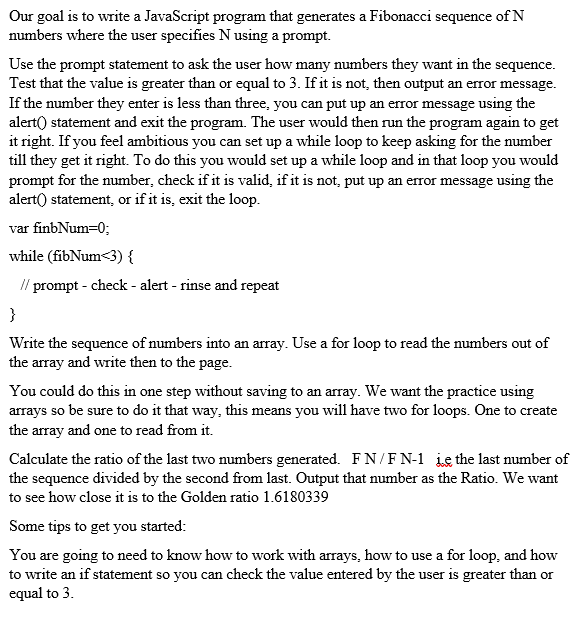
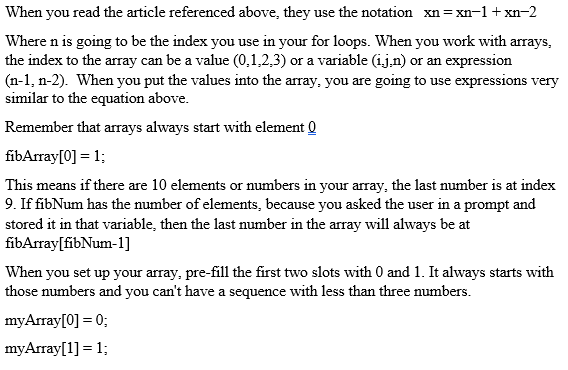
Our goal is to write a JavaScript program that generates a Fibonacci sequence of N numbers where the user specifies N using a prompt. Use the prompt statement to ask the user how many numbers they want in the sequence. Test that the value is greater than or equal to 3. If it is not, then output an error message. If the number they enter is less than three, you can put up an error message using the alert() statement and exit the program. The user would then run the program again to get it right. If you feel ambitious you can set up a while loop to keep asking for the number till they get it right. To do this you would set up a while loop and in that loop you would prompt for the number, check if it is valid, if it is not, put up an error message using the alert( statement, or if it is, exit the loop. var finbNum=0; while (fibNum3) { // prompt-check - alert - rinse and repeat } Write the sequence of numbers into an array. Use a for loop to read the numbers out of the array and write then to the page. You could do this in one step without saving to an array. We want the practice using arrays so be sure to do it that way, this means you will have two for loops. One to create the array and one to read from it. Calculate the ratio of the last two numbers generated. FN/F N-1 ie the last number of the sequence divided by the second from last. Output that number as the Ratio. We want to see how close it is to the Golden ratio 1.6180339 Some tips to get you started: You are going to need to know how to work with arrays, how to use a for loop, and how to write an if statement so you can check the value entered by the user is greater than or equal to 3. When you read the article referenced above, they use the notation xn=xn-1 + xn-2 Where n is going to be the index you use in your for loops. When you work with arrays, the index to the array can be a value (0.1.2.3) or a variable (1.j.n) or an expression (n-1, 1-2). When you put the values into the array, you are going to use expressions very similar to the equation above. Remember that arrays always start with element I fibArray[0] = 1; This means if there are 10 elements or numbers in your array, the last number is at index 9. If fibNum has the number of elements, because you asked the user in a prompt and stored it in that variable, then the last number in the array will always be at fibArray[fibNum-1] When you set up your array, pre-fill the first two slots with 0 and 1. It always starts with those numbers and you can't have a sequence with less than three numbers. myArray[0] = 0; myArray[1] = 1
Step by Step Solution
There are 3 Steps involved in it

Get step-by-step solutions from verified subject matter experts
 Study Help