







Question: our program mysh takes up to one argument. When given one argument, it will run in batch mode. When given no arguments, it will run
our program mysh takes up to one argument. When given one argument, it will run in batch mode. When given no arguments, it will run in interactive mode. For full credit, your program must have one input loop and command parsing algorithm that works for both modes. Batch mode When called with an argument, mysh will open the specified file and interpret its contents as sequence of commands (see section 2). The command are given by lines of text, separated by newlines. mysh will execute each command as soon as it is complete, before proceeding to execute the next command. 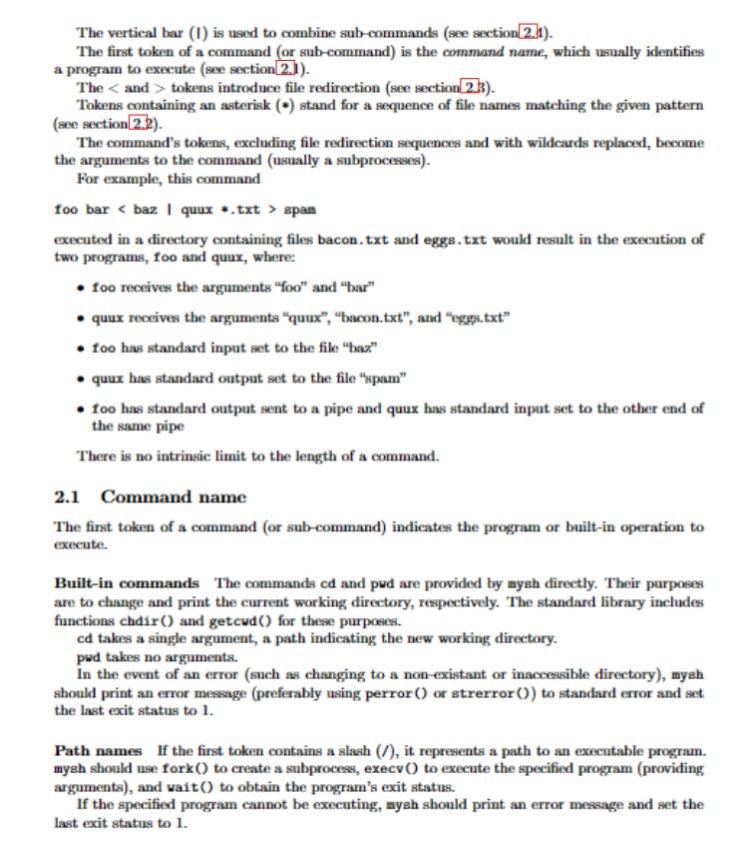
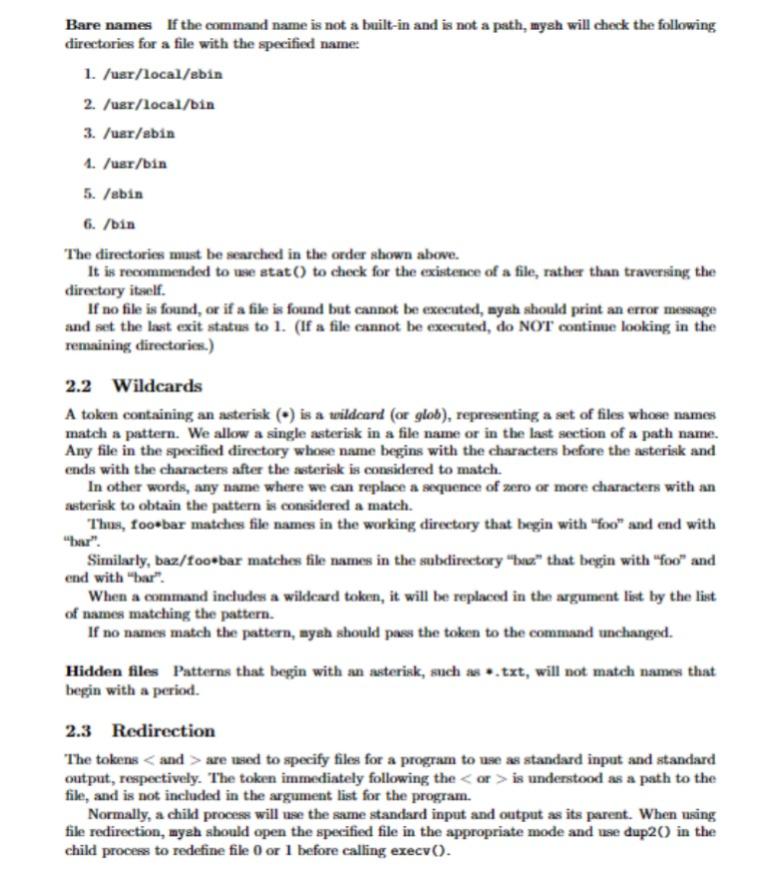
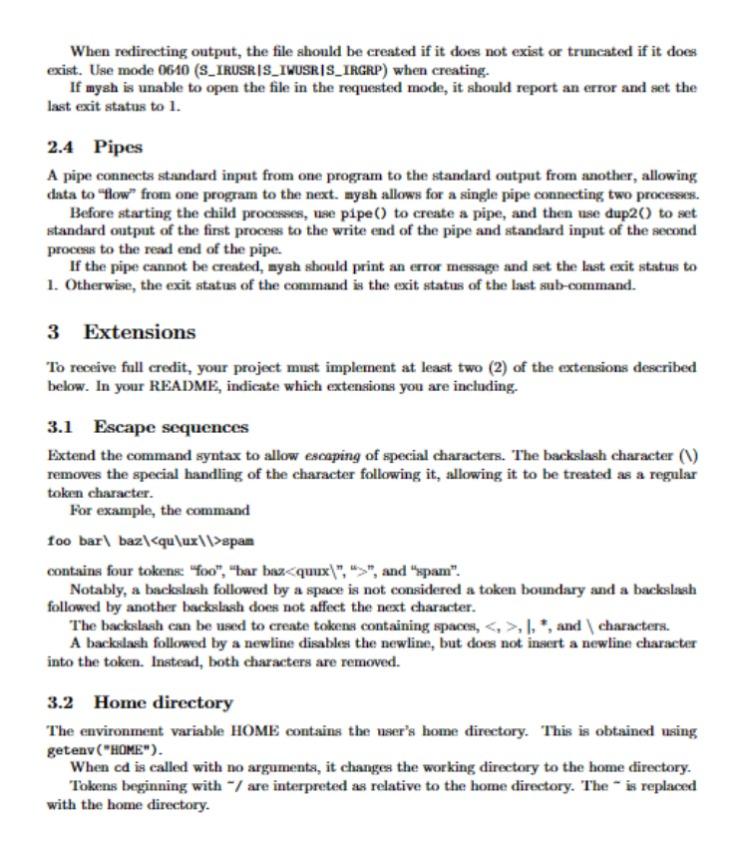
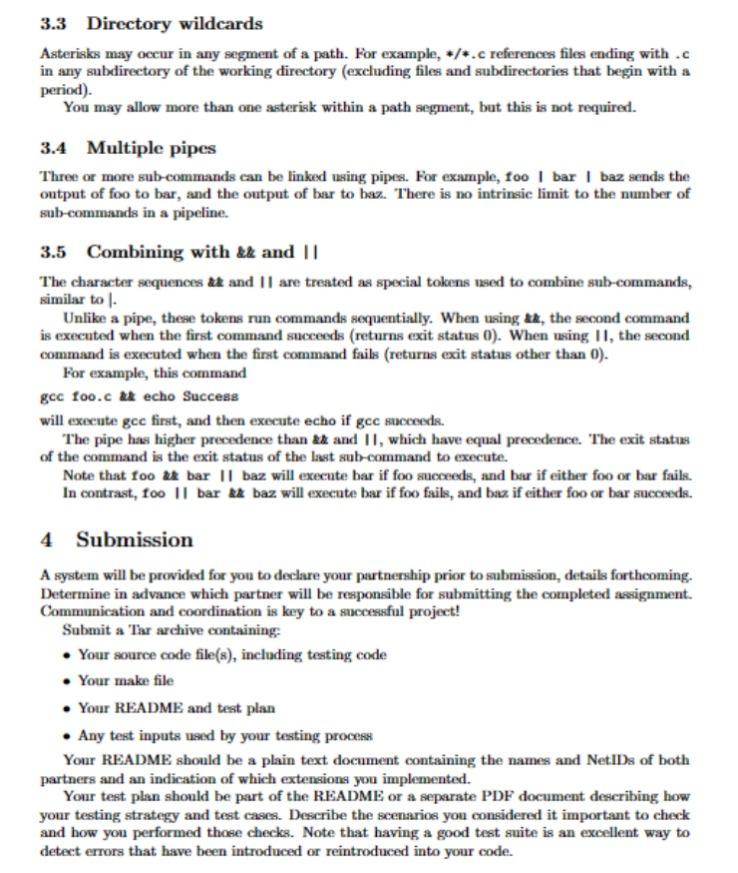
The vertical bar (1) is used to combine sub-commands (see section 2.11 ). The first token of a command (or sub-command) is the command name, which usually identifies a program to execute (see section 2.11 ). The and tokens introduce file redirection (see section 2.3 ). Tokens containing an asterisk (*) stand for a sequence of file names matehing the given pattern (see section 2.2). The command's tokens, excluding file redirection sequences and with wildcards replaced, become the arguments to the command (usually a subprocesses). For example, this command foo bar .txt > span executed in a directory containing files bacon.txt and eggs.txt would result in the execution of two programs, foo and quux, where: - too receives the arguments "foo" and "bar" - quux receives the arguments "quux", "bacon.txt", and "eggs.txt" - foo has standard input set to the file "bar" - quux has standard output set to the file "spam" - foo has standard output sent to a pipe and quux has standard input set to the other end of the same pipe There is no intrinsic limit to the length of a command. 2.1 Command name The first token of a command (or sub-command) indicates the program or built-in operation to execute. Built-in commands The commands cd and pud are provided by mysh directly. Their purposes are to change and print the current working directory, respectively. 'The standard library includes functions chdir () and getcud() for these purpoees. cd takes a single argument, a path indieating the new working directory. pud takes no arguments. In the event of an error (such as changing to a non-existant or inaccessible directory), myah should print an error message (preferably using perror ( ) or strerror (O) to standard error and set the last exit status to 1 . Path names If the first token contains a slash (/), it represents a path to an executable program. mysh should use fork ( ) to create a subprocess, execv ( ) to execute the specified program (providing arguments), and wait () to obtain the program's exit ststus. If the specified program cannot be executing, mysh should print an error message and set the last exit status to 1 . Bare names If the command name is not a built-in and is not a path, mysh will check the following directories for a file with the specified name: 1. /usr/local/ebin 2. /ugr /local/bin 3. /ugr/ebin 1. /usr/bin 5. /abin 6. /bin The directories must be searched in the order shown above. It is recommended to use atat () to check for the existence of a file, rather than traversing the directory itself. If no file is found, or if a file is found but cannot be executed, nyah should print an error mesage and set the last exit status to 1. (If a file cannot be executed, do NOT continue looking in the remaining directories.) 2.2 Wildcards A token containing an asterisk ( () is a wildcard (or glob), representing a set of files whose names match a pattern. We allow a single asterisk in a file name or in the last section of a path name. Any file in the specified directory whose name begins with the characters before the asteriak and ends with the characters after the asterisk is considered to match. In other words, any name where we can replace a sequence of aero or more characters with an asterisk to obtain the pattern is considered a mateh. Thus, foobbar matches file names in the working directory that begin with "foo" and end with "bar". Similarly, baz/foo-bar matehes file names in the subdirectory "thaz" that begin with "foo" and end with "bar". When a command includes a wildeard token, it will be replaced in the argument list by the list of names matching the pattern. If no names match the pattern, mysh should pass the token to the command unchanged. Hidden files Patterns that begin with an asterisk, such as * txt, will not match names that begin with a period. 2.3 Redirection The tokens are used to specify files for a program to use as standard input and standard output, respectively. The token immediately following the is understood as a path to the file, and is not included in the argument list for the program. Normally, a child process will use the same standard input and output as its parent. When using file redirection, myeh should open the specified file in the appropriate mode and use dup 2O in the child process to redefine file 0 or 1 before calling execv (. When redirecting output, the file should be created if it does not exist or truncated if it does exist. Use mode 0610 (S_IRUSR|S_IWUSR/S_IRGRP) when creating. If mysh is unable to open the file in the requested mode, it should report an error and set the last exit status to 1. 2.4 Pipes A pipe connects standard input from one program to the standard output from another, allowing data to "flow" from one program to the next. mysh allows for a single pipe connecting two proceses. Before starting the child processes, use pipe() to create a pipe, and then use dup2() to set standard output of the first process to the write end of the pipe and standard input of the second process to the read end of the pipe. If the pipe cannot be created, myah should print an error message and set the last exit status to 1. Otherwise, the exit status of the command is the exit status of the last sub-command. 3 Extensions To receive full credit, your project must implement at least two (2) of the extensions described below. In your README, indicate which extensions you are including. 3.1 Escape sequences Extend the command syntax to allow escaping of special characters. The backslash character (V) removes the special handling of the character following it, allowing it to be treated as a regular token character. For example, the command foo bar \ baz \ \> span contains four tokense "foo", "bar bax ", and "pam". Notably, a backslash followed by a space is not considered a token boundary and a backslash followed by another backsiash does not affect the next character. The backsiash ean be used to create tokens containing spaces, ,1,, and \characters. A backolash followed by a newline disables the newline, but does not insert a newline character into the token. Instead, both characters are removed. 3.2 Home directory The environment variable HOME contains the user's home directory. This is obtained using getenv("HoNE"). When cd is called with no arguments, it changes the working directory to the home directory. Tokens beginning with / are interpreted as relative to the home directory. The is replaced with the home directory. 3.3 Directory wildcards Asterisks may occur in any segment of a path. For example, /. c references files ending with .c in any subdirectory of the working directory (excluding files and subdirectories that begin with a period). You may allow more than one asterisk within a path segment, but this is not required. 3.4 Multiple pipes Three or more sub-commands can be linked using pipes. For example, foo I bar I baz sends the output of foo to bar, and the output of bar to baz. There is no intrinsic limit to the number of sub-commands in a pipeline. 3.5 Combining with atz and || The character sequences at and 11 are treated as special tokens used to combine sub-commands, similar to 1 . Unlike a pipe, these tokens run commands sequentially. When using at, the second command is executed when the first command succeeds (returns exit status 0 ). When using 11 , the second command is executed when the first command fails (returns exit status other than 0 ). For example, this command gec foo.c at echo Success will execute gce first, and then execute echo if gec sacceeds. The pipe has higher precedence than and II, which have equal precedence. The exit status of the command is the exit status of the last sub-command to execute. Note that foo at bar 11 baz will execute bar if foo succeeds, and bar if either foo or bar faile. In contrast, foo II bar baz will execute bar if foo fails, and baz if either foo or bar succeeds. 4 Submission A system will be provided for you to declare your partnership prior to submiseion, details forthcoming. Determine in advance which partner will be responsible for submitting the completed assignment. Communication and coordination is key to a successful project! Submit a Tar archive containing: - Your source code file(s), including testing code - Your make file - Your README and test plan - Any test inputs used by your testing process Your README should be a plain text document containing the names and NetIDs of both partners and an indication of which extensions you implemented. Your test plan should be part of the README or a separate PDF document describing how your testing strategy and test cases. Describe the scenarios you considered it important to check and how you performed those checks. Note that having a good test suite is an excellent way to detect errors that have been introduced or reintroduced into your code
Step by Step Solution
There are 3 Steps involved in it

Get step-by-step solutions from verified subject matter experts
 Study Help