







Question: Output and MatLAB script is needed. Will give thumbs up for correct answers. Problem 4: Under-Over 7 Dice Game Under-Over 7 is a very simple
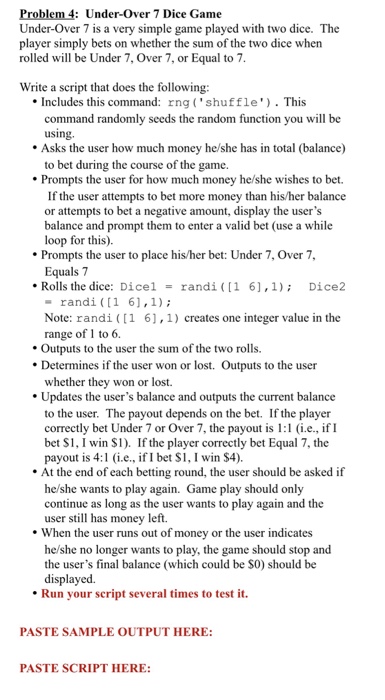
Problem 4: Under-Over 7 Dice Game Under-Over 7 is a very simple game played with two dice. The player simply bets on whether the sum of the two dice when rolled will be Under 7, Over 7, or Equal to7 Write a script that does the following Includes this command: rng ('shuffle). This command randomly seeds the random function you will be using Asks the user how much money he/she has in total (balance) to bet during the course of the game. Prompts the user for how much money he/she wishes to bet If the user attempts to bet more money than his/her balance or attempts to bet a negative amount, display the user's balance and prompt them to enter a valid bet (use a while loop for this). Prompts the user to place his/her bet: Under 7, Over 7, Equals 7 * Rolls the dice: Dice 1 = randi ( [ 1 6], 1); Dice2 randi (1 61,1) Note: randi (1 6],1) creates one integer value in the range of 1 to 6. . Outputs to the user the sum of the two rolls. Determines if the user won or lost. Outputs to the user whether they won or lost. Updates the user's balance and outputs the current balance to the user. The payout depends on the bet. If the player correctly bet Under 7 or Over 7, the payout is :1 i.e., if I bet S1, I win S1). If the player correctly bet Equal 7, the payout is 4: i.e., if I bet S1, I win S4). At the end of each betting round, the user should be asked if he/she wants to play again. Game play should only continue as long as the user wants to play again and the user still has money left. . When the user runs out o f money or the user indicates he/she no longer wants to play, the game should stop and the user's final balance (which could be S0) should be displayed. Run your script several times to test it. PASTE SAMPLE OUTPUT HERE: PASTE SCRIPT HERE
Step by Step Solution
There are 3 Steps involved in it

Get step-by-step solutions from verified subject matter experts
 Study Help