







Question: Overview: You will create a Matlab script to model a purchase on a credit card. In Matlab, you will save your script as an m
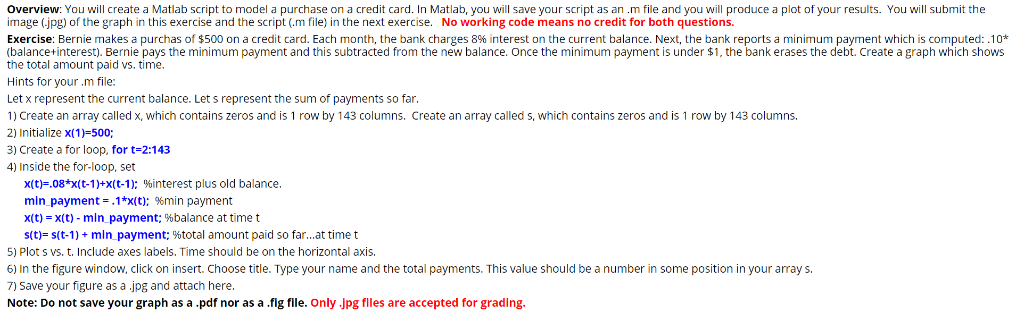

Overview: You will create a Matlab script to model a purchase on a credit card. In Matlab, you will save your script as an m file and you will produce a plot of your results. You will submit the image (.jpg) of the graph in this exercise and the script (.m file) in the next exercise. No working code means no credit for both questions. Exercise: Bernie makes a purchas of $500 on a credit card. Each month, the bank charges 8% interest on the current balance. Next, the bank reports a minimum payment which is computed: .10* (balancetinterest). Bernie pays the minimum payment and this subtracted from the new balance. Once the minimum payment is under $1, the bank erases the debt. Create a graph which shows the total amount paid vs. time Hints for your m file: Let x represent the current balance. Let s represent the sum of payments so far 1) create an array called x, which contains zeros and is 1 row by 143 columns. Create an array called s. which contains zeros and is 1 row by 143 columns. 2) Initialize x(1) 500; 3) Create a for loop, for t-2:143 4) Inside the for-loop, set x(t)-.08*x(t-1)+x(t-1); %interest plus old balance min payment-,1*x(t); %min payment x(t)-x(t)-min payment; %balance at time t st)-s(t-11+ min payment; %total amount paid so far at time t 5) Plot s vs. t. Include axes labels, Time should be on the horizontal axis. 6) In the figure window, click on insert. Choose title. Type your name and the total payments. This value should be a number in some position in your array s. 7) Save your figure as a jpg and attach here Note: Do not save your graph as a .pdf nor as a .fig flle. Only .Jpg flles are accepted for grading. Attach your script (as a Matlab.m file)
Step by Step Solution
There are 3 Steps involved in it

Get step-by-step solutions from verified subject matter experts
 Study Help