







Question: ownload the Excel Assignment # 2 File and save the file as your Last Name _ Assignment # 2 ( be sure to save it
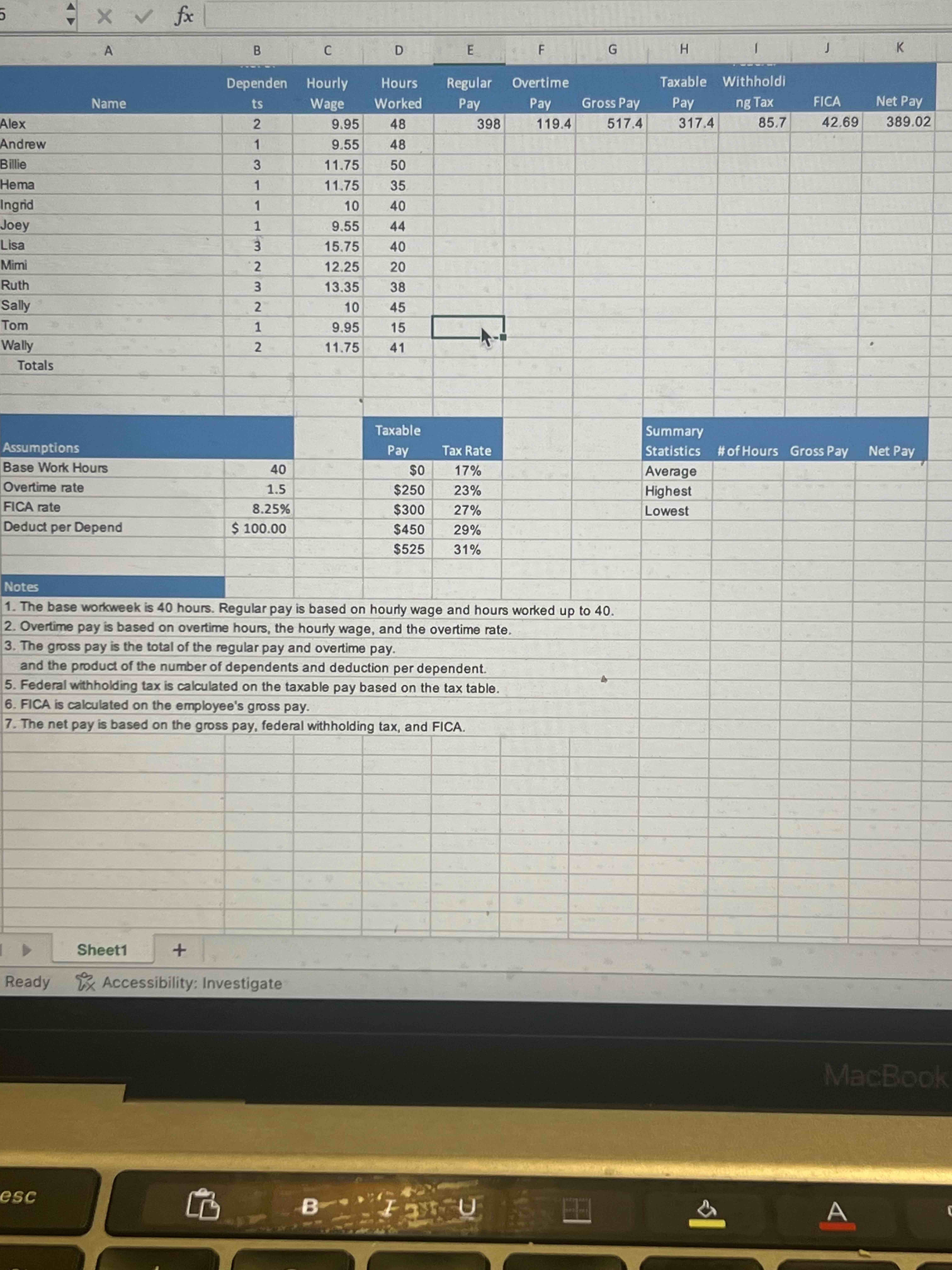
ownload the Excel Assignment # File and save the file as your Last NameAssignment #be sure to save it as an Excel worksheet, not a CSV type! Use IF functions to calculate the regular pay and overtime pay based on a regular hour workweek in cells E and F Pay overtime only for overtime hours. In cell G calculate the gross pay based on the regular and overtime pay. Alexs regular pay is $ With overtime hours, Alexs overtime pay is $ Create a formula in cell H to calculate the taxable pay. Multiply the number of dependents column B by the deduction per dependent B and subtract that from the gross pay. With two dependents, Alexs taxable pay is $ Use a VLOOKUP function in cell I to identify and calculate the federal withholding tax. Use the tax rates from the range D:E The VLOOKUP function returns the applicable tax rate, which you must then multiply by the taxable pay. Calculate FICA in cell J based on gross pay and the FICA rate cell B and calculate the net pay in cell K Copy all formulas down their respective columns to row With the range E:K selected, use Quick Analysis tools to calculate the total regular pay, overtime pay, gross pay, taxable pay, withholding tax, FICA, and net pay on row Note, Mac users, with the range selected, on the Home tab, in the Editing group, click AutoSum. Apply Accounting Number Format to the range C:C Apply Accounting Number Format to the first row of monetary data and to the total row. Apply the Comma style to the monetary values for the other employees. Apply the Total cell styles format to the range E:K Insert appropriate functions to calculate the average, highest, and lowest values in the Summary Statistics area the range I:K of the worksheet. Format the # of hours calculations as Number format with one decimal and the remaining calculations with Accounting number format. Insert a footer with your name on the left side, the sheet name code in the center, and the file name code on the right side of the worksheet.
Step by Step Solution
There are 3 Steps involved in it
1 Expert Approved Answer
Step: 1 Unlock

Question Has Been Solved by an Expert!
Get step-by-step solutions from verified subject matter experts
Step: 2 Unlock
Step: 3 Unlock
 Study Help