







Question: p PLese use javafx not java Swing My Grade - x Display Grade Clear Exit Your Average Activity Weighted Assignments 20 Review Quizzes 10 90
p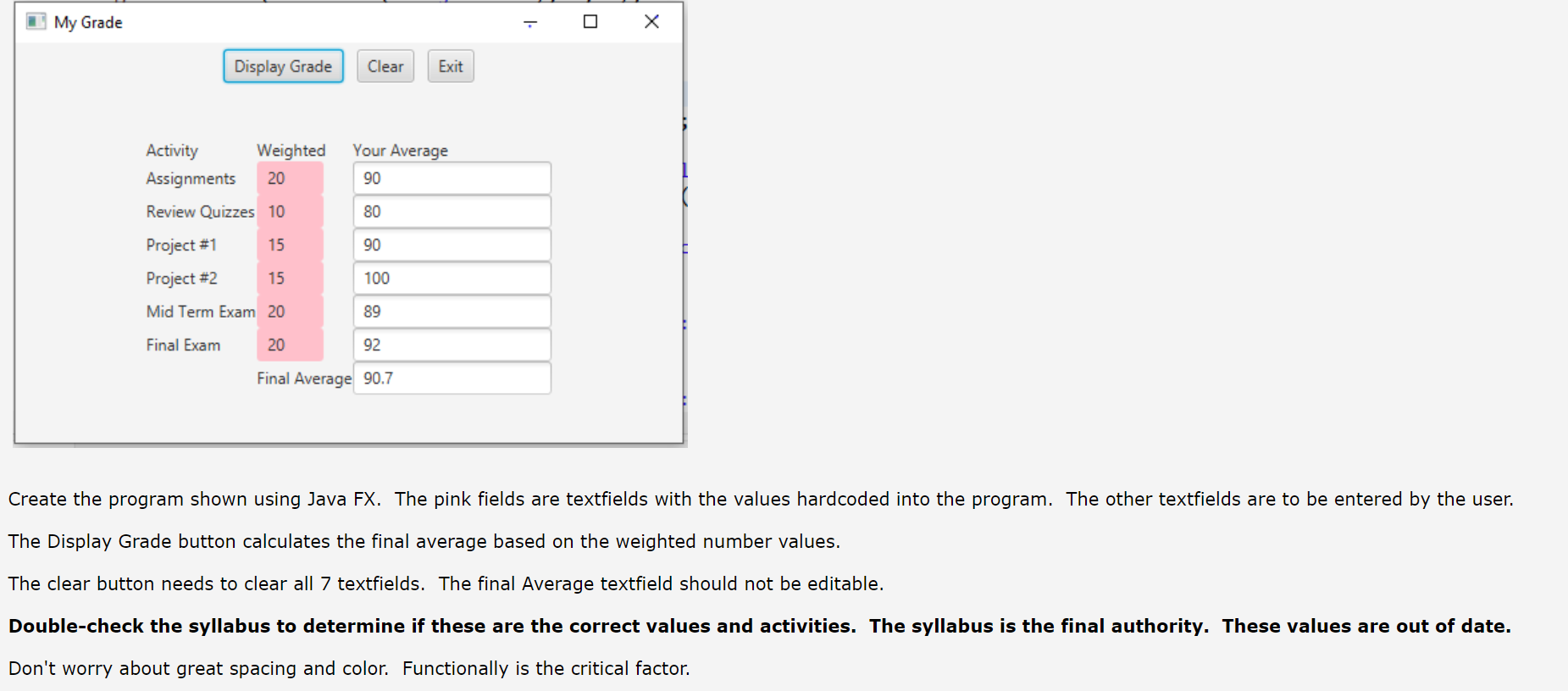
PLese use javafx not java Swing
My Grade - x Display Grade Clear Exit Your Average Activity Weighted Assignments 20 Review Quizzes 10 90 7 80 15 90 Project #1 Project #2 15 100 Mid Term Exam 20 89 Final Exam 20 92 Final Average 90.7 Create the program shown using Java FX. The pink fields are textfields with the values hardcoded into the program. The other textfields are to be entered by the user. The Display Grade button calculates the final average based on the weighted number values. The clear button needs to clear all 7 textfields. The final Average textfield should not be editable. Double-check the syllabus to determine if these are the correct values and activities. The syllabus is the final authority. These values are out of date. Don't worry about great spacing and color. Functionally is the critical factor
Step by Step Solution
There are 3 Steps involved in it

Get step-by-step solutions from verified subject matter experts
 Study Help