







Question: package com.grossmont.ws; // Classes for reading web service. import java.io.BufferedReader; import java.io.InputStreamReader; import java.net.URL; // Classes for JSON conversion to java objects using Google's gson.
package com.grossmont.ws;
// Classes for reading web service.
import java.io.BufferedReader;
import java.io.InputStreamReader;
import java.net.URL;
// Classes for JSON conversion to java objects using Google's gson.
import java.io.IOException;
import java.io.InputStreamReader;
import java.io.Reader;
import com.google.gson.Gson;
import com.google.gson.GsonBuilder;
public class WeatherServiceManager{
private Weather m_oWeather = null;
private String m_sWeatherJson;
// Gets the overall weather JSON string from the 3rd party web
service.
public void callWeatherWebService(String sCity){
String sServiceReturnJson = "";
try {
// Call weather API.
URL url = new
URL("http://api.openweathermap.org/data/2.5/weather?q=" +
sCity +
"&appid=1868f2463a960613c0a78b66a99b5e5f&units=imperial");
BufferedReader br = new BufferedReader(new
InputStreamReader(url.openStream()));
String strTemp = "";
while (null != (strTemp = br.readLine())) {
sServiceReturnJson += strTemp;
}
// sServiceReturnJson now looks something like this:
/*
{"coord":{"lon":-116.96,"lat":32.79},
"weather":[{"id":802,"main":"Clouds","description":"scattered
clouds","icon":"03n"}],
"base":"cmc stations",
"main":{"temp":62.65,"pressure":1007.4,"humidity":93,"temp_min
":62.65,"temp_max":62.65,"sea_level":1028.19,"grnd_level":1007.4},
"wind":{"speed":7.29,"deg":310.501},"clouds":{"all":32},"dt":1
463026609,
"sys":{"message":0.0078,"country":"US","sunrise":1463057430,"s
unset":1463107097},
"id":5345529,"name":"El Cajon","cod":200}
*/
// *****************
// UNCOMMENT THIS if you wish to print out raw json that came
back from web service during testing.
// System.out.println("Returned json:");
// System.out.println(sServiceReturnJson);
// *****************
} catch (Exception ex) {
ex.printStackTrace();
System.out.println("An error occurred in
callWeatherWebService() in WeatherServiceManager: " + ex.toString());
}
m_sWeatherJson = sServiceReturnJson;
// Turn raw json into java object heirarchy using Google's gson.
convertJsonToJavaObject();
}
// Uses Google's gson library to convert json into filled java
objects
// using the java object heirarchy that you already created.
private void convertJsonToJavaObject(){
Gson gson = new GsonBuilder().create();
m_oWeather = gson.fromJson(m_sWeatherJson, Weather.class);
}
// This uses Google's gson library for parsing json.
public float getCurrentTemp(){
return m_oWeather.main.temp;
}
// ###################################
// ###### BEGIN: YOUR CODE HERE ######
//
// Add three methods... (Use getCurrentTemp as a template):
//
// getCityName
// - input: nothing.
// - output: return the city name as a String (this is in
m_oWeather.name).
//
// getHighTemp
// - input: nothing.
// - output: return the high temp as a float.
//
// getLowTemp
// - input: nothing.
// - output: return the low temp as a float.
//
// ###### END: YOUR CODE HERE ######
// #################################
// If you are running this in Tomcat, then this main method
// can be used when developing if you want to test the functions
directly
// in your IDE to make sure these classes work first before calling
from JSP...
// which is quicker than restarting Tomcat every time
// you make an adjustment to your class.
// Also, it's handy to use the System.out.println tool to print out
values
// to the console when testing or use break points and run in debug
mode.
public static void main(String[] args){
// If you are NOT incorporating these classes into
Tomcat, then do the following for the lab:
// ###### BEGIN: YOUR CODE HERE ######
// 1. Instantiate two instances of this class:
WeatherServiceManager
// - Each object will represent each city.
// 2. Get user input two different times to get 2 cities.
// 3. IMPORTANT: Take any space in the city of user input
with %20 (e.g. "san diego, california" becomes "san%20diego,california").
// - To do this, simply use the replaceAll
method on your city string like this:
sCity1 = sCity1.replaceAll("
","%20");
// 3. Call callWeatherWebService on each
WeatherServiceManager instance passing in each city.
// 4. Then make comparisons of temps between cities on
each WeatherServiceManager instance by using the get methods created
above:
// - Print out which city has the HIGHEST
CURRENT TEMP (NOTE: you can get city name from your m_oWeather.
// - Print out which city has the GREATEST RANGE
between low and high.
// ###### END: YOUR CODE HERE ######
}
// -----------------------------------------------------------------
-------------------------------------------
// ***********************************
// *** BEGIN: NOT PART OF THIS LAB ***
// Only included here just as an example of how the raw json
// could be parsed directly w/o using 3rd party library like gson.
public float getTempManualParse(){
String sTemp = "";
float fTemp;
// Parse "temp" out of JSON reply.
int iTempIndex = m_sWeatherJson.indexOf("\"temp\":") + 7;
sTemp = m_sWeatherJson.substring(iTempIndex);
sTemp = sTemp.substring(0, sTemp.indexOf(","));
fTemp = Float.parseFloat(sTemp);
return fTemp;
}
// *** END: NOT part of lab ***
}
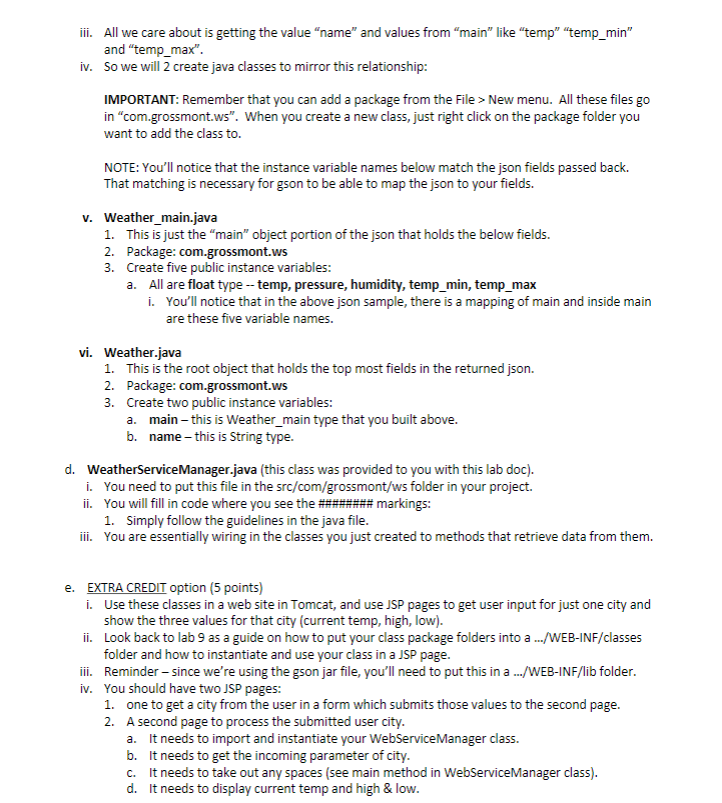
Please make a mark that need put new code on this code in.
This gson jar filehttps://drive.google.com/open?id=1M9HzByjZQFRIX52DFUTNnxO_nOfC4Nmo
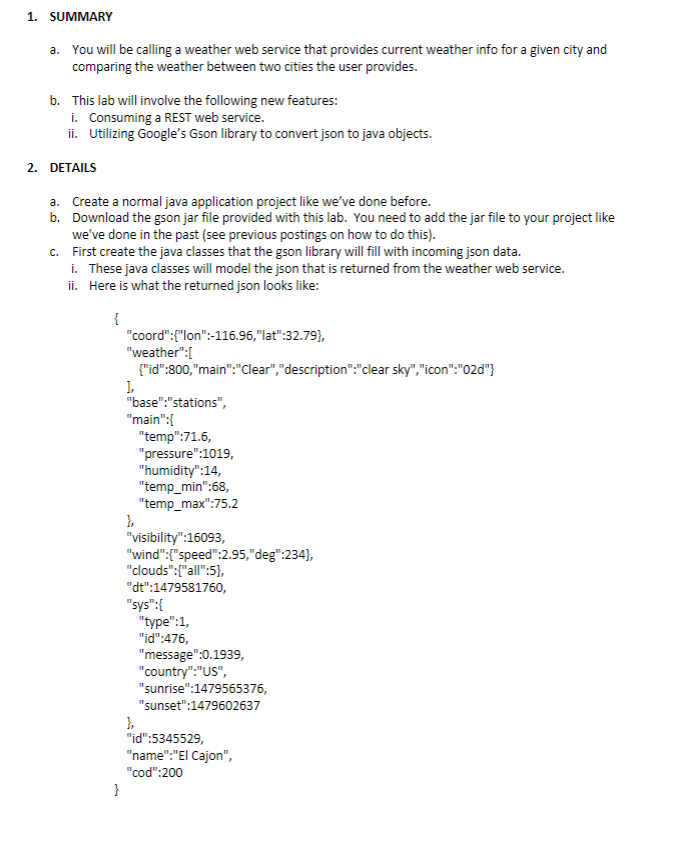
1. SUMMARY You will be calling a weather web service that provides current weather info for a given city and comparing the weather between two cities the user provides. a. b. This lab will involve the following new features: i. Consuming a REST web service i. Utilizing Google's Gson library to convert json to java objects. 2. DETAILS a. Create a normal java application project like we've done before b. Download the gson jar file provided with this lab. You need to add the jar file to your project like we've done in the past (see previous postings on how to do this). First create the java classes that the gson library will fill with incoming json data. i. c. These java classes will model the json that is returned from the weather web service Here is what the returned ison looks like: ii. "coord "lon:-116.96,"lat":32.79), "weather": ["id":800,"main": "Clear,"description": clear sky", "icon": "02d"] "base": "stations" main "temp" :71.6, pressure :1019, humidity":14, temp_min":68, temp_max :75.2 visibility":16093, wind:f"speed" :2.95,"deg:2341, "clouds": "all":5), "dt":1479581760, sys: type:1, id":476, "message":0.1939, country:"Us sunrise" :1479565376, sunseth:1479602637 d:5345529, name:"El Cajon "cod:200 1. SUMMARY You will be calling a weather web service that provides current weather info for a given city and comparing the weather between two cities the user provides. a. b. This lab will involve the following new features: i. Consuming a REST web service i. Utilizing Google's Gson library to convert json to java objects. 2. DETAILS a. Create a normal java application project like we've done before b. Download the gson jar file provided with this lab. You need to add the jar file to your project like we've done in the past (see previous postings on how to do this). First create the java classes that the gson library will fill with incoming json data. i. c. These java classes will model the json that is returned from the weather web service Here is what the returned ison looks like: ii. "coord "lon:-116.96,"lat":32.79), "weather": ["id":800,"main": "Clear,"description": clear sky", "icon": "02d"] "base": "stations" main "temp" :71.6, pressure :1019, humidity":14, temp_min":68, temp_max :75.2 visibility":16093, wind:f"speed" :2.95,"deg:2341, "clouds": "all":5), "dt":1479581760, sys: type:1, id":476, "message":0.1939, country:"Us sunrise" :1479565376, sunseth:1479602637 d:5345529, name:"El Cajon "cod:200
Step by Step Solution
There are 3 Steps involved in it

Get step-by-step solutions from verified subject matter experts
 Study Help