







Question: package console_apps; import java.util.Scanner; import model.Utilities; public class TaxComputationApp { public static void main(String[] args) { Scanner input = new Scanner(System.in); // prompt the user
![static void main(String[] args) { Scanner input = new Scanner(System.in); // prompt](https://dsd5zvtm8ll6.cloudfront.net/si.experts.images/questions/2024/09/66f306e779c23_04666f306e6e6043.jpg)
package console_apps;
import java.util.Scanner;
import model.Utilities;
public class TaxComputationApp {
public static void main(String[] args) { Scanner input = new Scanner(System.in);
// prompt the user for their name System.out.println("Enter your name:"); String name = input.nextLine();
// prompt the user for their filing status System.out.print(name + ", enter your filing status"); System.out.println(" (1 -- Single Filing; 2 -- Married Filing):"); int status = input.nextInt(); System.out.println(name + ", enter your taxable income (an integer value):"); int income = input.nextInt(); /* Get report from the utility method. */ String report = Utilities.getTaxReport(status, income); System.out.println(report);
input.close(); }
}
PLS NOTE THE CODE ABOVE IS TaxComputationApp. DO NOT MODIFY!!!!!!!
package model;
public class Utilities { /* * Input parameters: * - `status` is the filing status (which should be 1 for Single Filing or 2 for Married Filing) * - `income` is the tax payer's income (an integer value) * * Assumptions: * - `income` passed by user is always positive (> 0) * * Refer to you lab instructions for what the method should return. * * See this short tutorial video illustrating how to compute tax: * https://www.youtube.com/watch?v=q2NT5x77hdg&list=PL5dxAmCmjv_7YgI2LgcwjWTHiNZSR-aQX&index=1 */ public static String getTaxReport(int status, int income) { String result = "";
/* Your implementation of this method starts here. * Recall from Week 1's tutorial videos: * 1. No System.out.println statements should appear here. * Instead, an explicit, final `return` statement is placed for you. * 2. No Scanner operations should appear here (e.g., input.nextInt()). * Instead, refer to the input parameters of this method. */
/* Your implementation ends here. */
return result; }
PLS NOTE THE CODE ABOVE SHOULD BE MODIFIED TO DO THE TASK
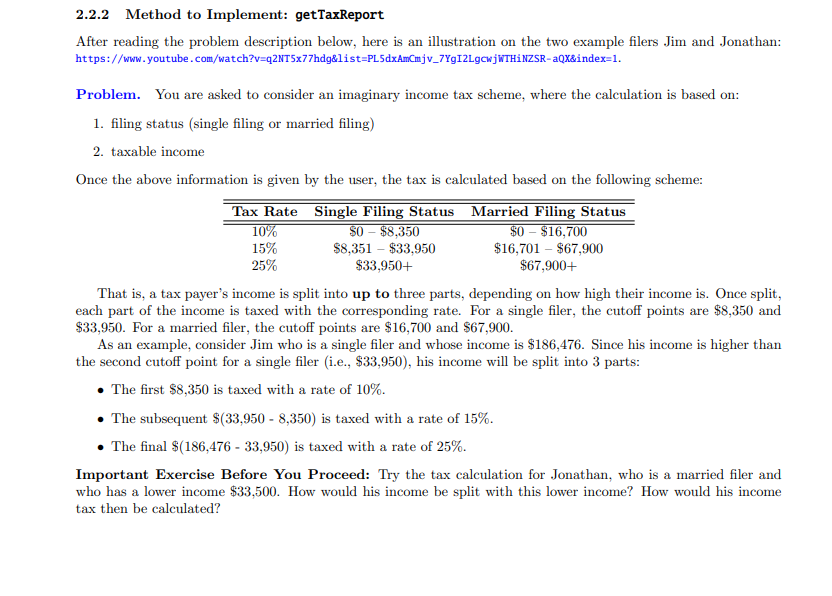
2.2.2 Method to Implement: getTaxReport After reading the problem description below, here is an illustration on the two example filers Jim and Jonathan: https://www.youtube.com/watch?v=q2NT5x77hdg&list=PL5dxAmCmjv_7YG12LgcwjWTHINZSR-aQX&index=1. Problem. You are asked to consider an imaginary income tax scheme, where the calculation is based on: 1. filing status (single filing or married filing) 2. taxable income Once the above information is given by the user, the tax is calculated based on the following scheme: Tax Rate Single Filing Status Married Filing Status 10% $0 - $8,350 $0 - $16,700 15% $8,351 - $33,950 $16,701 - $67,900 25% $33,950+ $67,900+ That is, a tax payer's income is split into up to three parts, depending on how high their income is. Once split, each part of the income is taxed with the corresponding rate. For a single filer, the cutoff points are $8,350 and $33,950. For a married filer, the cutoff points are $16,700 and $67,900. As an example, consider Jim who is a single filer and whose income is $186,476. Since his income is higher than the second cutoff point for a single filer (i.e., $33,950), his income will be split into 3 parts: The first $8,350 is taxed with a rate of 10%. The subsequent $(33,950 - 8,350) is taxed with a rate of 15%. The final $(186,476 - 33,950) is taxed with a rate of 25%. Important Exercise Before You Proceed: Try the tax calculation for Jonathan, who is a married filer and who has a lower income $33,500. How would his income be split with this lower income? How would his income tax then be calculated? Testing. Your goal is to pass all tests related to this method in the JUnit test class TestUtilities. These tests document the expected values on various cases: study them while developing your code. However, use the console application class TaxComputationApp if you wish (e.g., use the input and expected values from the JUnit tests). Here are two example runs: 1. Enter your name: Alan Alan, enter your filing status (1 Single Filing; 2 Married Filing): 1 Alan, enter your taxable income (an integer value): 186476 Single Filing: $42806.50 (Part I: $835.00, Part II: $3840.00, Part III: $38131.50) 2. Enter your name: Mark Mark, enter your filing status (1 Single Filing; 2 Married Filing): 2 Mark, enter your taxable income (an integer value): 33500 Married Filing: $4190.00 (Part I: $1670.00, Part II: $2520.00) Todo. Implement the Utilities.getTaxReport method. See the comments there for the input parameters and requirements. The String return value must conform to the expected format: . Do not modify the console application class TaxComputationApp given to you: the string return value of the utility method getTaxReport must be a string like: Married Filing: $4190.00 (Part I: $1670.00, Part II: $2520.00) If an income is split into less than 3 parts, the missing part(s) will not be included in the string report. You should first calculate the part(s) of tax of a given income, then calculate its sum, and then you must format each part and the sum as floating-point numbers with exactly two digits following the decimal point (e.g., 800.00, 789.10). Hint. Use String.format(%.2f, someNumber) as shown in Week 1's Java tutorials for this purpose
Step by Step Solution
There are 3 Steps involved in it

Get step-by-step solutions from verified subject matter experts
 Study Help