







Question: package edu.wit.cs.comp1050; //TODO: document this class import javafx.application.Application; import javafx.stage.Stage; import javafx.scene.control.TextField; import javafx.scene.layout.GridPane; import javafx.scene.Scene; public class PA5c extends Application { @Override public void
package edu.wit.cs.comp1050;
//TODO: document this class
import javafx.application.Application;
import javafx.stage.Stage;
import javafx.scene.control.TextField;
import javafx.scene.layout.GridPane;
import javafx.scene.Scene;
public class PA5c extends Application {
@Override
public void start(Stage primaryStage) {
// TODO: write your code here
//Hint: You can use: GridPane() and TextField
// you can hard code the width and height of your scene
}
/**
* Put on a show
* @param args
*/
public static void main(String[] args) {
Application.launch(args);
}
}
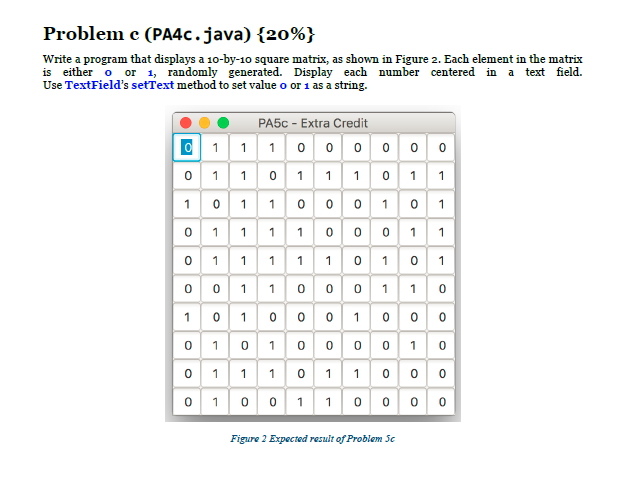
Problem c (PA4c. java) {20%) Write a program that displays a 10-by-10 square matrix, as shown in Figure 2. Each element in the matrix is either o or i, randomly generated. Display each number centered in a text field. Use TextField's setText method to set value o or 1 as a string. PA5c-Extra Credit 01 1 0 1 1 101 1 1 01 1 0 0 0 1 0 1 0111 0 0 0 1 1 0 01 1 00 01 1 0 1 01 0 0 0 0 0 0 0101 0 0 001 0 01 1 1 0 11 0 0 0 0100 1 1 00 0 0 Figure 2 Expected result of Problem Sc
Step by Step Solution
There are 3 Steps involved in it

Get step-by-step solutions from verified subject matter experts
 Study Help