







Question: package gui; import javax.swing.JButton; import javax.swing.JOptionPane; /** * * @author crist */ public class TicTacToe extends javax.swing.JFrame { private Object[][] buttonArray; /** * Creates new
package gui;
import javax.swing.JButton; import javax.swing.JOptionPane;
/** * * @author crist */ public class TicTacToe extends javax.swing.JFrame {
private Object[][] buttonArray;
/** * Creates new form TicTacToe */ public TicTacToe() { initComponents(); xTurn = true; grid = new JButton[8][8]; grid[0][0] = jButton1; grid[0][1] = jButton2; grid[0][2] = jButton3; grid[0][3] = jButton4; grid[0][4] = jButton5; grid[0][5] = jButton6; grid[0][6] = jButton7; grid[0][7] = jButton8; grid[1][0] = jButton9; grid[1][1] = jButton10; grid[1][2] = jButton11; grid[1][3] = jButton12; grid[1][4] = jButton13; grid[1][5] = jButton14; grid[1][6] = jButton15; grid[1][7] = jButton16; grid[2][0] = jButton17; grid[2][1] = jButton18; grid[2][2] = jButton19; grid[2][3] = jButton20; grid[2][4] = jButton21; grid[2][5] = jButton22; grid[2][6] = jButton23; grid[2][7] = jButton24; grid[3][0] = jButton25; grid[3][1] = jButton26; grid[3][2] = jButton27; grid[3][3] = jButton28; grid[3][4] = jButton29; grid[3][5] = jButton30; grid[3][6] = jButton31; grid[3][7] = jButton32; grid[4][0] = jButton33; grid[4][1] = jButton34; grid[4][2] = jButton35; grid[4][3] = jButton36; grid[4][4] = jButton37; grid[4][5] = jButton38; grid[4][6] = jButton39; grid[4][7] = jButton40; grid[5][0] = jButton41; grid[5][1] = jButton42; grid[5][2] = jButton43; grid[5][3] = jButton44; grid[5][4] = jButton45; grid[5][5] = jButton46; grid[5][6] = jButton47; grid[5][7] = jButton48; grid[6][0] = jButton49; grid[6][1] = jButton50; grid[6][2] = jButton51; grid[6][3] = jButton52; grid[6][4] = jButton53; grid[6][5] = jButton54; grid[6][6] = jButton55; grid[6][7] = jButton56; grid[7][0] = jButton57; grid[7][1] = jButton58; grid[7][2] = jButton59; grid[7][3] = jButton60; grid[7][4] = jButton61; grid[7][5] = jButton62; grid[7][6] = jButton63; grid[7][7] = jButton64; }
private void jButton1ActionPerformed(java.awt.event.ActionEvent evt) { // TODO add your handling code here: JButton button = (JButton) evt.getSource(); selectButton(button); }
private void jButton2ActionPerformed(java.awt.event.ActionEvent evt) { // TODO add your handling code here: JButton button = (JButton) evt.getSource(); selectButton(button);
private void jButton65ActionPerformed(java.awt.event.ActionEvent evt) { // TODO add your handling code here: }
private void selectButton(JButton button) { if (button.getText().equals("")) { if (xTurn) { button.setText("X"); } else { button.setText("O"); } xTurn = !xTurn; } checkForTheWin(); } void checkForTheWin() { String moves = getRCD(); if (moves.contains("XXXX")) { JOptionPane.showMessageDialog(this, "The winner is: X"); } if (moves.contains("OOOO")) { JOptionPane.showMessageDialog(this, "The winner is: O"); } } private String getRCD() { String result = ""; // getting the rows into the result for (int row = 0; row
// getting the columns into the result for (int col = 0; col
result = result.concat(grid[row][col].getText()); } result = result + " "; }
// get diagonal left top to right bottom int col = 0; for (int row = 0; row
return result; }
boolean xTurn; JButton grid[][];
This is my design:
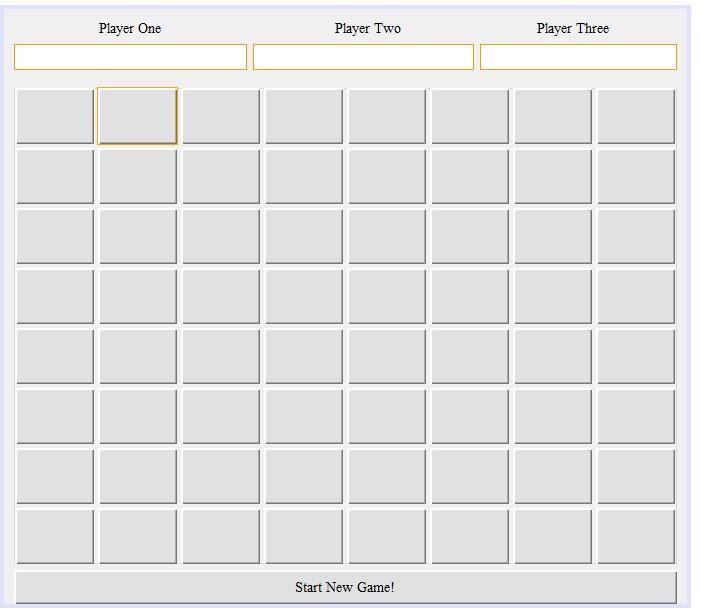
I need some help with my code and all JButtons have actions performed in them.
Here are the instructions:
Design and code in Java Swing a graphical game that allows three players to play a simple board game. This game allows the players to take turns placing their mark on the 8x8 game board. The game is won by the player who successfully places 4 of their marks adjacent to one another in a straight line. The group of marks can be oriented vertically, horizontally or diagonally.
Design the form so that the players can pick the character that will indicate their squares on the game board. Do not allow players to play on the board until all three players have determined their character. For each players turn devise some method to show whose turn it happens to be and once they select an unused square the turn passes to the next player. Game play continues until any player has 4 adjacent squares or until the board is full.
Guideline:
GUI is designed well / allows frame to be resizable with no adverse effects
Code follows conventions / commented appropriately / formatted nicely
Prevents players from selecting the same character
Only allows placement after all players have specified a character
Determines and indicates when a player has won.
Player One Player Two Player Three Start New Game! Player One Player Two Player Three Start New Game
Step by Step Solution
There are 3 Steps involved in it

Get step-by-step solutions from verified subject matter experts
 Study Help