







Question: Package mediaRentalManager Interface MediaRentalManagerInt public interface MediaRentalManagerInt Interface that defines the functionality expected from the media rental manager. The two possible media we can have
Package mediaRentalManager
Interface MediaRentalManagerInt
public interface MediaRentalManagerInt
Interface that defines the functionality expected from the media rental manager. The two possible media we can have are movies and music albums. A movie has a title, a number of copies that are available for rent, and a rating egPG An album has a title, a number of copies, an artist, and a list of songs String with title of songs separated by commas
IMPORTANT:The database of the media rental manager, must define and use two ArrayList. One stores the media both Movies and Album information and one stores Customer information. You will lose significant credit if you do not define and use these ArrayList objects.
Author:
cmsc
Method Summary
All MethodsInstance MethodsAbstract Methods
Modifier and Type Method Description
void addAlbumjavalang.String title, int copiesAvailable, java.lang.String artist, java.lang.String songs
Adds the specified album to the database.
void addCustomerjavalang.String name, java.lang.String address, java.lang.String plan
Adds the specified customer to the database.
void addMoviejavalang.String title, int copiesAvailable, java.lang.String rating
Adds the specified movie to the database.
boolean addToQueuejavalang.String customerName, java.lang.String mediaTitle
Adds the specified media title to the queue associated with a customer.
java.lang.String getAllCustomersInfo
Returns information about the customers in the database.
java.lang.String getAllMediaInfo
Returns information about all the media movies and albums that are part of the database.
java.lang.String processRequests
Processes the requests queue of each customer.
boolean removeFromQueuejavalang.String customerName, java.lang.String mediaTitle
Removes the specified media title from the customer's queue.
boolean returnMediajavalang.String customerName, java.lang.String mediaTitle
This is how a customer returns a rented media.
java.util.ArrayList searchMediajavalang.String title, java.lang.String rating, java.lang.String artist, java.lang.String songs
Returns a SORTED ArrayList with media titles that satisfy the provided parameter values.
void setLimitedPlanLimitint value
This set the number of media associated with the LIMITED plan.
Method Details
addCustomer
void addCustomerjavalang.String name,
java.lang.String address,
java.lang.String plan
Adds the specified customer to the database. The address is a physical address not email The plan options available are: LIMITED and UNLIMITED. LIMITED defines a default maximum of two media that can be rented.
Parameters:
name
address
plan
addMovie
void addMoviejavalang.String title,
int copiesAvailable,
java.lang.String rating
Adds the specified movie to the database. The possible values for rating are PGRNR
Parameters:
title
copiesAvailable
rating
addAlbum
void addAlbumjavalang.String title,
int copiesAvailable,
java.lang.String artist,
java.lang.String songs
Adds the specified album to the database. The songs String includes a list of the title of songs in the album song titles are separated by commas
Parameters:
title
copiesAvailable
artist
songs
setLimitedPlanLimit
void setLimitedPlanLimitint value
This set the number of media associated with the LIMITED plan.
Parameters:
value
getAllCustomersInfo
java.lang.String getAllCustomersInfo
Returns information about the customers in the database. The information is presented sorted by customer name. See the public tests for the format to use.
Returns:
getAllMediaInfo
java.lang.String getAllMediaInfo
Returns information about all the media movies and albums that are part of the database. The information is presented sorted by media title. See the public tests for the format to use.
Returns:
addToQueue
boolean addToQueuejavalang.String customerName,
java.lang.String mediaTitle
Adds the specified media title to the queue associated with a customer.
Parameters:
customerName
mediaTitle
Returns:
false if the mediaTitle is already part of the queue it will not be added
removeFromQueue
boolean removeFromQueuejavalang.String customerName,
java.lang.String mediaTitle
Removes the specified media title from the customer's queue.
Parameters:
customerName
mediaTitle
Returns:
false if removal failed for any reason eg customerName not found
processRequests
java.lang.String processRequests
Processes the requests queue of each customer. The customers will be processed in alphabetical order. For each customer, the requests queue will be checked and media will be added to the rented queue, if the plan associated with the customer allows it and if there is a copy of the media available. For UNLIMITED plans the media will be added to the rented queue always, as long as there are copies associated
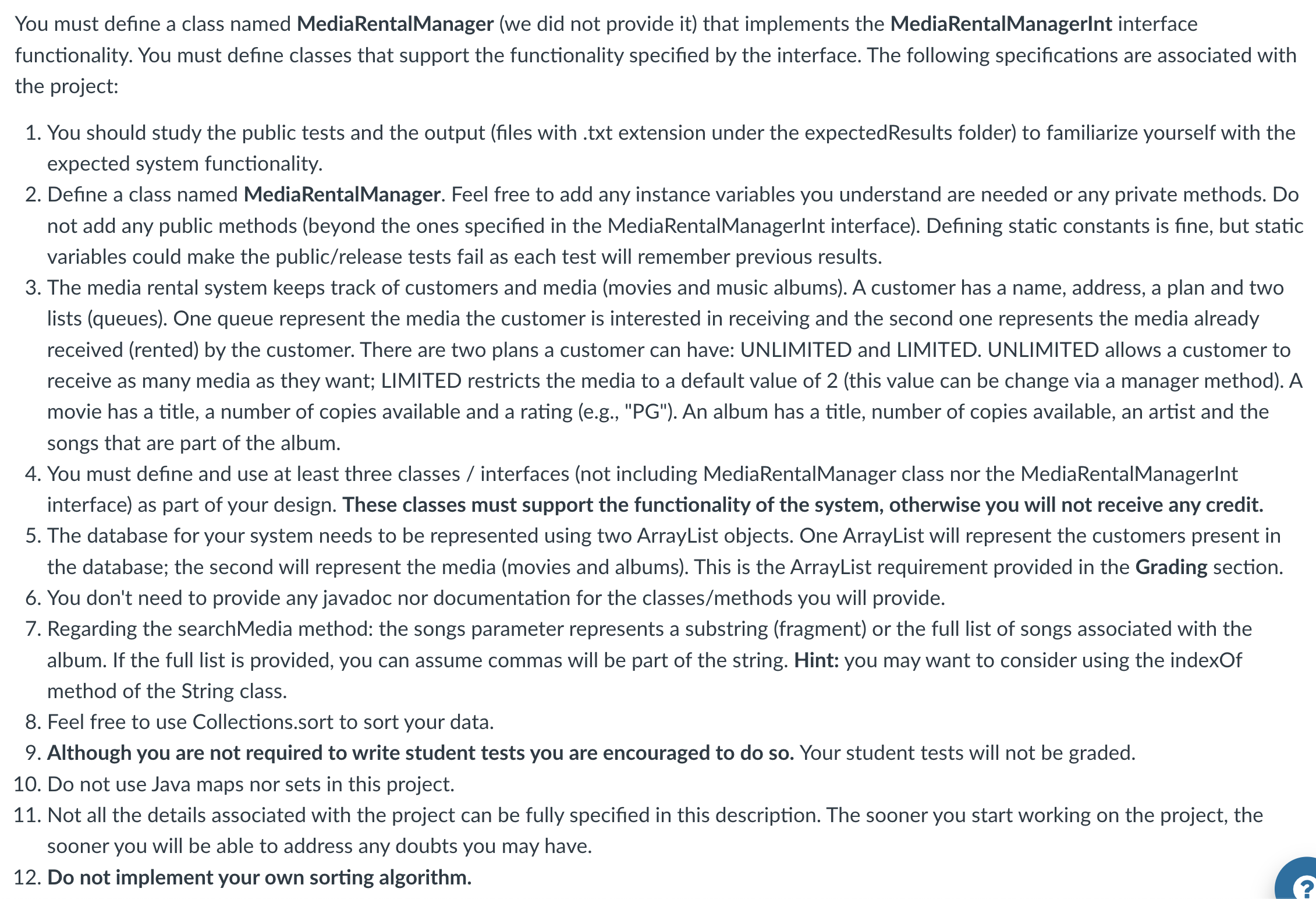
You must define a class named MediaRentalManager we did not provide it that implements the MediaRentalManagerInt in
Step by Step Solution
There are 3 Steps involved in it
1 Expert Approved Answer
Step: 1 Unlock

Question Has Been Solved by an Expert!
Get step-by-step solutions from verified subject matter experts
Step: 2 Unlock
Step: 3 Unlock
 Study Help