







Question: package model; public class Utilities { /* * Input parameters: * - `lower` is the lower bound * - `upper` is the upper bound *
package model;
public class Utilities { /* * Input parameters: * - `lower` is the lower bound * - `upper` is the upper bound * * Use of arrays or any Java library class (e.g., ArrayList) is strictly forbidden. * Violation of this will result in a 50% penalty on your marks. * Try to solve this problem using loops only. * * Refer to you lab instructions for what the method should return. */ public static String getNumbers(int lower, int upper) { String result = ""; /* Your implementation of this method starts here. * Recall from Week 1's tutorial videos: * 1. No System.out.println statements should appear here. * Instead, an explicit, final `return` statement is placed for you. * 2. No Scanner operations should appear here (e.g., input.nextInt()). * Instead, refer to the input parameters of this method. */ /* Your implementation ends here. */ return result; }
JUnit tests
package junit_tests;
import static org.junit.Assert.*;
import org.junit.Test;
import model.Utilities;
public class TestUtilities { /* * Tests related to getNumbers */ @Test public void test_getNumbers_01a() { String result = Utilities.getNumbers(-5, -1); assertEquals("Error: both bounds must be non-negative", result); } @Test public void test_getNumbers_01b() { String result = Utilities.getNumbers(-2, -7); assertEquals("Error: both bounds must be non-negative", result); } @Test public void test_getNumbers_01c() { String result = Utilities.getNumbers(-13, 4); assertEquals("Error: both bounds must be non-negative", result); } @Test public void test_getNumbers_01d() { String result = Utilities.getNumbers(7, -20); assertEquals("Error: both bounds must be non-negative", result); } @Test public void test_getNumbers_02a() { String result = Utilities.getNumbers(46, 29); assertEquals("Error: lower bound 46 is not less than or equal to upper bound 29", result); } @Test public void test_getNumbers_02b() { String result = Utilities.getNumbers(99, 0); assertEquals("Error: lower bound 99 is not less than or equal to upper bound 0", result); } @Test public void test_getNumbers_03a() { String result = Utilities.getNumbers(63, 63); assertEquals("1 number between 63 and 63: ", result); } @Test public void test_getNumbers_03b() { String result = Utilities.getNumbers(76, 76); assertEquals("1 number between 76 and 76: ", result); } @Test public void test_getNumbers_03c() { String result = Utilities.getNumbers(83, 83); assertEquals("1 number between 83 and 83: ", result); } @Test public void test_getNumbers_04a() { String result = Utilities.getNumbers(0, 8); assertEquals("9 numbers between 0 and 8: ", result); } @Test public void test_getNumbers_04b() { String result = Utilities.getNumbers(10, 16); assertEquals("7 numbers between 10 and 16: ", result); } @Test public void test_getNumbers_04c() { String result = Utilities.getNumbers(29, 36); assertEquals("8 numbers between 29 and 36: ", result); } /* * Tests related to getIntermediateStats */ @Test public void test_getIntermediateStats_01() { String result = Utilities.getIntermediateStats(7, 3, 0); assertEquals("{}", result); }
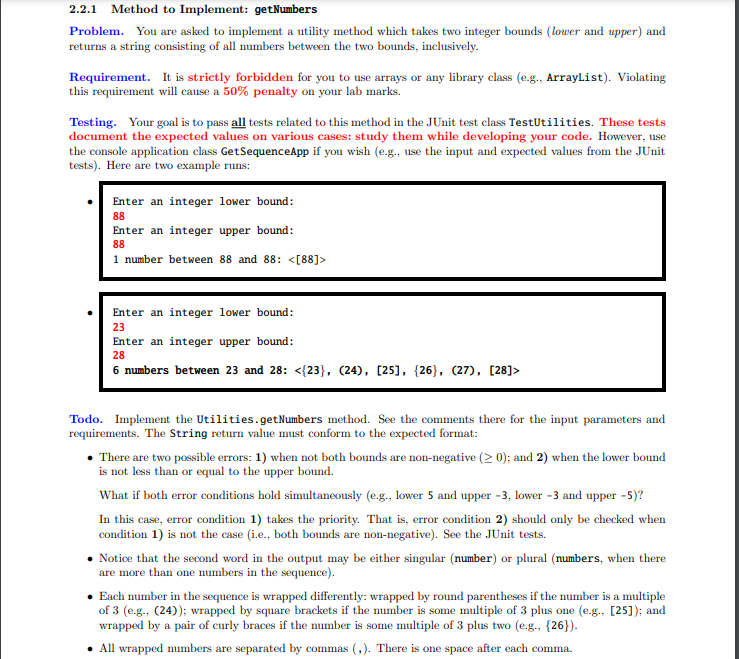
2.2.1 Method to Implement: getNumbers Problem. You are asked to implement a utility method which takes two integer bounds (lower and upper) and returns a string consisting of all numbers between the two bounds, inclusively. Requirement. It is strictly forbidden for you to use arrays or any library class (e-g., ArrayList). Violating this requirement will cause a 50% penalty on your lab marks. Testing. Your goal is to pass all tests related to this method in the JUnit test class TestUtilities. These tests document the expected values on various cases: study them while developing your code. However, use the console application class Get SequenceApp if you wish (e.g., use the input and expected values from the JUnit tests). Here are two example runs: Enter an integer lower bound: 88 Enter an integer upper bound: 88 1 number between 88 and 88: Enter an integer lower bound: 23 Enter an integer upper bound: 6 numbers between 23 and 28: 28 Todo. Implement the Utilities.getNumbers method. See the comments there for the input parameters and requirements. The String return value must conform to the expected format: There are two possible errors: 1) when not both bounds are non-negative ( 0); and 2) when the lower bound is not less than or equal to the upper bound. What if both error conditions hold simultaneously (e.g., lower 5 and upper -3, lower - 3 and upper - 5)? In this case, error condition 1) takes the priority. That is, error condition 2) should only be checked when condition 1) is not the case (i.e., both bounds are non-negative). See the JUnit tests. Notice that the second word in the output may be either singular (number) or plural numbers, when there are more than one numbers in the sequence). Each number in the sequence is wrapped differently: wrapped by round parentheses if the number is a multiple of 3 (e.g., (24)); wrapped by square brackets if the number is some multiple of 3 plus one (e.g., [25]); and wrapped by a pair of curly braces if the number is some multiple of 3 plus two (e.g., {26}). . All wrapped numbers are separated by commas (,). There is one space after each comma
Step by Step Solution
There are 3 Steps involved in it

Get step-by-step solutions from verified subject matter experts
 Study Help