







Question: package testingSearching; public class Word { private String word; private String def; public Word(String word, String def) { this.word = word; this.def = def; }
package testingSearching;
public class Word {
private String word;
private String def;
public Word(String word, String def) {
this.word = word;
this.def = def;
}
public String getWord() {
return word;
}
public void setWord(String word) {
this.word = word;
}
public String getDef() {
return def;
}
public void setDef(String def) {
this.def = def;
}
@Override
public String toString() {
return "Word [word=" + word + ", def=" + def + "]";
}
/eed these methods to use for our searches
public int compareTo(String key) {
//System.out.println(word + " " + " key " +
word.compareTo(key));
return word.compareTo(key);
}
public boolean equals(String key) {
return word.equals(key);
}
}
package testingSearching;
import java.io.File;
import java.io.FileNotFoundException;
import java.util.Scanner;
public class TestingSearches2 {
public static void main(String[] args) {
final int SIZE = 48040;
// Make an arrays of type Word to read in your data
Word[] word = new Word[SIZE];//make the array the exact
size we need
//reading in data from a text file is "copy and paste"
code
String fileName = "dictionary.txt";
Scanner inputStream = null;
System.out.println("The file " + fileName +
" contains the following lines: ");
try
{
inputStream = new Scanner(new
File(fileName));
}
catch(FileNotFoundException e)
{
System.out.println("Error opening the file "
+
fileName);
System.exit(0);
}
//make an index to index in the array
int index = 0;
while (inputStream.hasNextLine())
{
//testing that we are connecting and reading
from file
//String line = inputStream.nextLine();
//System.out.println(line);
//read the data into the 2 arrays
String wordFromFile = inputStream.next();
String def = inputStream.nextLine();
word[index++] = new Word(wordFromFile, def);
}
//close the inputStream because we are done with the file
inputStream.close();
//test that we read the data into the arrays correctly
/*
for(int i = 0; i
System.out.println(word[i] + ": " + def[i]);
}
*/
//testing that linear and binary search work by searching
for a word
System.out.println("searching for zombies using linear
search");
int indexReturned = linearSearch(word, "zombies");
System.out.println(word[indexReturned]);
System.out.println("searching for zombies using linear
search");
indexReturned = binarySearch(word, "zombies");
System.out.println(indexReturned);
System.out.println(word[indexReturned]);
System.out.println("Num Of Times, Linear, Binary");
for(int n = 1; n
long startTime = System.nanoTime();
for(int i = 0; i
linearSearch(word, "zombies");
long endTime = System.nanoTime();
System.out.print( n + " , " + (endTime -
startTime));
long startTime2 = System.nanoTime();
for(int i = 0; i
binarySearch(word, "zombies");
long endTime2 = System.nanoTime();
System.out.println(" , " + (endTime2 -
startTime2));
}
}//end main
public static int linearSearch(Word[] array, String key) {
int index = 0;
//int countSteps = 0;
int numOfElements = array.length;
while(index
//countSteps++;
//comparing Strings so need to use equals and
not ==
if(array[index].equals(key)) {
//System.out.println("The number of
steps for linear search is " + countSteps);
return index;
}
index++;
}
//System.out.println("The number of steps for linear
search is " + countSteps);
return -1;
}
public static int binarySearch(Word[] array, String key) {
int low = 0;
int high = array.length - 1;
//int countSteps = 0;
while (high >= low) {
//countSteps++;
int mid = (low + high) / 2;
if (array[mid].compareTo(key) > 0)
//comparing Strings so need to use compareTo method
high = mid - 1;
else if (array[mid].equals(key)) {
//comparing Strings so need to use equals and not ==
//System.out.println("The number of
steps for binary search is " + countSteps);
return mid;
}
else
low = mid + 1;
}
//System.out.println("The number of steps for binary
search is " + countSteps);
return -1; // Not found
}
}//end class
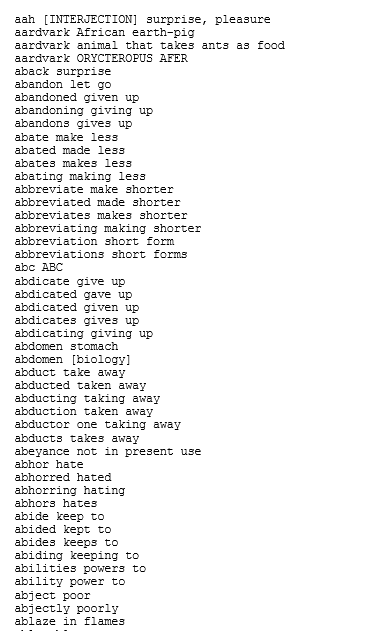
dictionary.txt file uploaded to google drive.
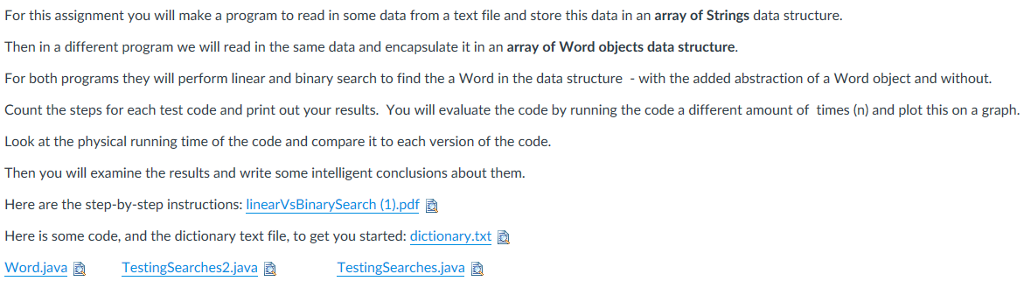
For this assignment you will make a program to read in some data from a text file and store this data in an array of Strings data structure. Then in a different program we will read in the same data and encapsulate it in an array of Word objects data structure For both programs they will perform linear and binary search to find the a Word in the data structure with the added abstraction of a Word object and without. Count the steps for each test code and print out your results. You will evaluate the code by running the code a different amount of times (n) and plot this on a graph. Look at the physical running time of the code and compare it to each version of the code. Then you will examine the results and write some intelligent conclusions about them Here are the step-by-step instructions: linearVsBinarySearch (1).pdf Here is some code, and the dictionary text file, to get you started: dictionary.txt Word.java TestingSearches2.iava TestingSearches.java For this assignment you will make a program to read in some data from a text file and store this data in an array of Strings data structure. Then in a different program we will read in the same data and encapsulate it in an array of Word objects data structure For both programs they will perform linear and binary search to find the a Word in the data structure with the added abstraction of a Word object and without. Count the steps for each test code and print out your results. You will evaluate the code by running the code a different amount of times (n) and plot this on a graph. Look at the physical running time of the code and compare it to each version of the code. Then you will examine the results and write some intelligent conclusions about them Here are the step-by-step instructions: linearVsBinarySearch (1).pdf Here is some code, and the dictionary text file, to get you started: dictionary.txt Word.java TestingSearches2.iava TestingSearches.java
Step by Step Solution
There are 3 Steps involved in it

Get step-by-step solutions from verified subject matter experts
 Study Help