







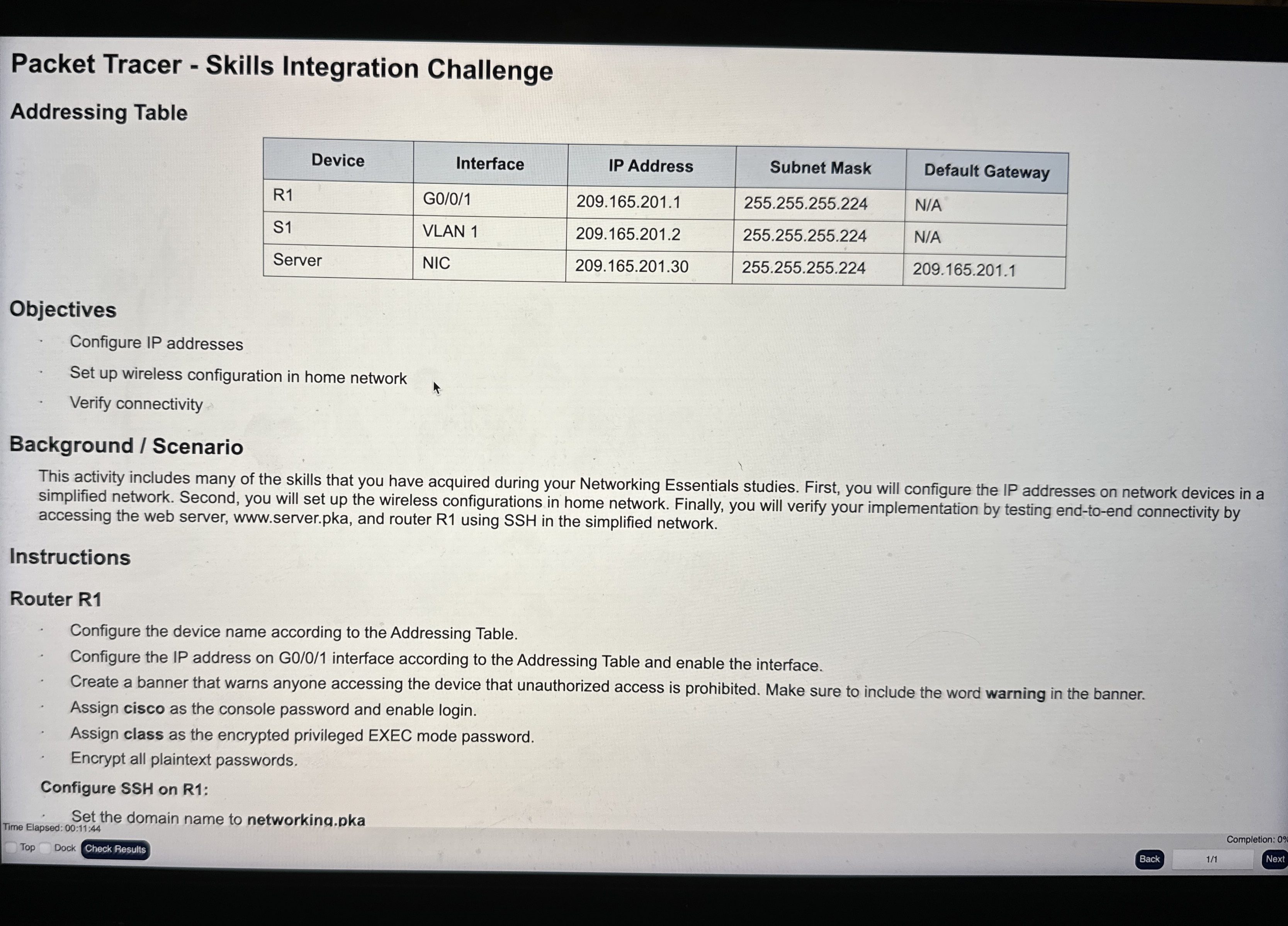
Question: Packet Tracer - Skills Integration Challenge Addressing Table table [ [ Device , Interface,IP Address,Subnet Mask,Default Gateway ] , [ R 1 , G
Packet Tracer Skills Integration Challenge
Addressing Table
tableDeviceInterface,IP Address,Subnet Mask,Default GatewayRGNASVLAN NAServerNIC,
Objectives
Configure IP addresses
Set up wireless configuration in home network
Verify connectivity
Background Scenario
This activity includes many of the skills that you have acquired during your Networking Essentials studies. First, you will configure the IP addresses on network devices in a simplified network. Second, you will set up the wireless configurations in home network. Finally, you will verify your implementation by testing endtoend connectivity by accessing the web server, wwwserver.pka, and router R using SSH in the simplified network.
Instructions
Router R
Configure the device name according to the Addressing Table.
Configure the IP address on G interface according to the Addressing Table and enable the interface.
Create a banner that warns anyone accessing the device that unauthorized access is prohibited. Make sure to include the word warning in the banner.
Assign cisco as the console password and enable login
Assign class as the encrypted privileged EXEC mode password.
Encrypt all plaintext passwords.
Configure SSH on R:
Set the domain name to networking.pka
Time Elapsed: ::
Top
Dock
Back
Completion:
Next
Step by Step Solution
There are 3 Steps involved in it
1 Expert Approved Answer
Step: 1 Unlock

Question Has Been Solved by an Expert!
Get step-by-step solutions from verified subject matter experts
Step: 2 Unlock
Step: 3 Unlock
 Study Help