



Question: Page In-Class 5: Turtles and Loops and Modules, Oh My! (10 points) Objectives: Practice with turtle graphics, for loops, and modules Start: Create a file
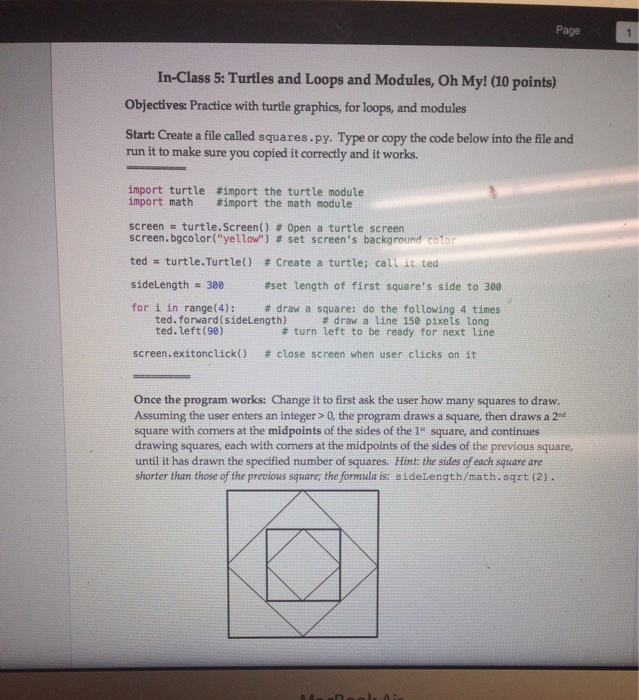
Page In-Class 5: Turtles and Loops and Modules, Oh My! (10 points) Objectives: Practice with turtle graphics, for loops, and modules Start: Create a file called squares.py. Type or copy the code below into the file and run it to make sure you copied it correctly and it works. import turtle #inport the turtle module import math #inport the math module screen turtle. Screen() # Open a turtle screen screen.bgcolor("yellou") # set screen's background cotor ted = turtleTurtle() # Create a turtle; cali it tea sideLength 300 for i in range(4): # draw a square: do the following 4 times #set length of first square's side to 300 ted. forward(sideLength) ted. left (98) # draw a line 150 pixels long # turn left to be ready for next line screen . exitonctick() # close screen when user clicks on it Once the program works: Change it to first ask the user how many squares to draw. Assuming the user enters an integer > 0, the program draws a square, then draws a 2d square with corners at the midpoints of the sides of the 1" square, and continues drawing squares, each with corners at the midpoints of the sides of the previous square until it has drawn the specified number of squares. Hint: the sides of each square are shorter than those of the previous square; the formula is: sideLength/math. sqrt (2)
Step by Step Solution
There are 3 Steps involved in it

Get step-by-step solutions from verified subject matter experts