



Question: Page > of 3 ZOOM+ I I/Fig. 3.13: NameDialog.java 2 // Obtaining user input from a dialog 3 import javax.swing.J OptionPane; 5 public class NameDialog
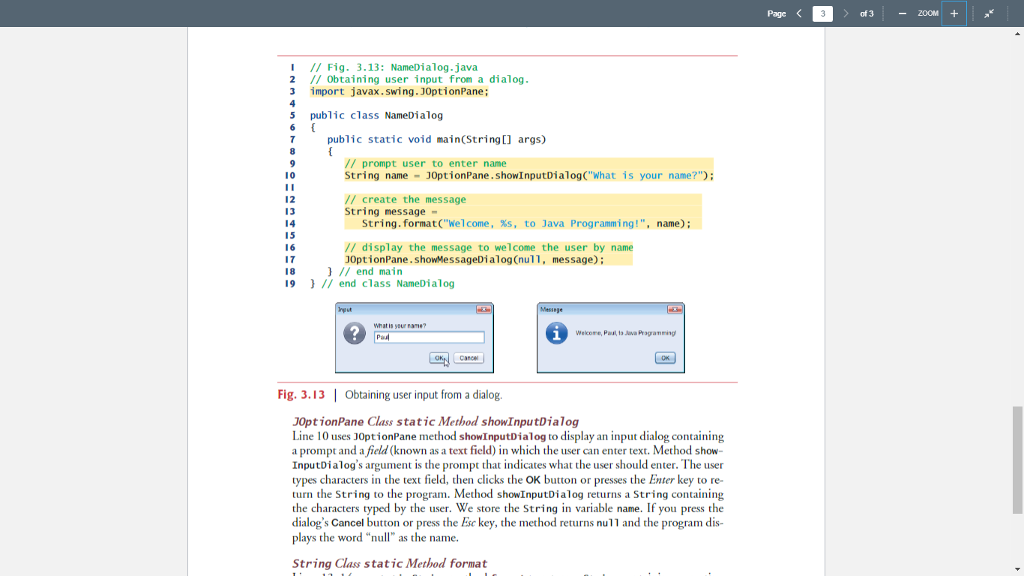
![class NameDialog 7 public static void main(String[] args) // prompt user to](https://dsd5zvtm8ll6.cloudfront.net/si.experts.images/questions/2024/09/66f509a0a8619_81666f509a024412.jpg)
Page > of 3 ZOOM+ I I/Fig. 3.13: NameDialog.java 2 // Obtaining user input from a dialog 3 import javax.swing.J OptionPane; 5 public class NameDialog 7 public static void main(String[] args) // prompt user to enter name String name J0ptionPane. showInputDialog("What is your name?") 10 12 13 // create the message String message String. format("Welcome, s, to Java Programming!",name) 15 16 17 18 19I end class NameDialog // display the message to welcome the user by name 0ptionPane. showMessageDialog (null, message): /end main What is yau Fig. 3.13 | Obtaining user input from a dialog. J0ptionPane Class static Method showInputDialog Line 10 uses J0ptionPane method showInputDialog to display an input dialog containing a prompt and a field (known as a text field) in which the user can enter text. Method show InputDialog's argument is the prompt types characters in the text field, then clicks the OK button or presses the Enter key to re- turn the String to the program. the characters typed by the user. We store the String in variable name. If you press the dialog's Cancel button or press the Ese key, the method returns nu11 and the program dis- plays the word "null" as the name. t that indicates what the user should enter. The user Method showInputDialog returns a String containing String Class static Method format Page > of 3 ZOOM+ I I/Fig. 3.13: NameDialog.java 2 // Obtaining user input from a dialog 3 import javax.swing.J OptionPane; 5 public class NameDialog 7 public static void main(String[] args) // prompt user to enter name String name J0ptionPane. showInputDialog("What is your name?") 10 12 13 // create the message String message String. format("Welcome, s, to Java Programming!",name) 15 16 17 18 19I end class NameDialog // display the message to welcome the user by name 0ptionPane. showMessageDialog (null, message): /end main What is yau Fig. 3.13 | Obtaining user input from a dialog. J0ptionPane Class static Method showInputDialog Line 10 uses J0ptionPane method showInputDialog to display an input dialog containing a prompt and a field (known as a text field) in which the user can enter text. Method show InputDialog's argument is the prompt types characters in the text field, then clicks the OK button or presses the Enter key to re- turn the String to the program. the characters typed by the user. We store the String in variable name. If you press the dialog's Cancel button or press the Ese key, the method returns nu11 and the program dis- plays the word "null" as the name. t that indicates what the user should enter. The user Method showInputDialog returns a String containing String Class static Method format
Step by Step Solution
There are 3 Steps involved in it

Get step-by-step solutions from verified subject matter experts