







Question: Paragraph Insert Text Boxes in the diagram to show internal IP numbers for the technologies below. To insert a text box: on the menu tab
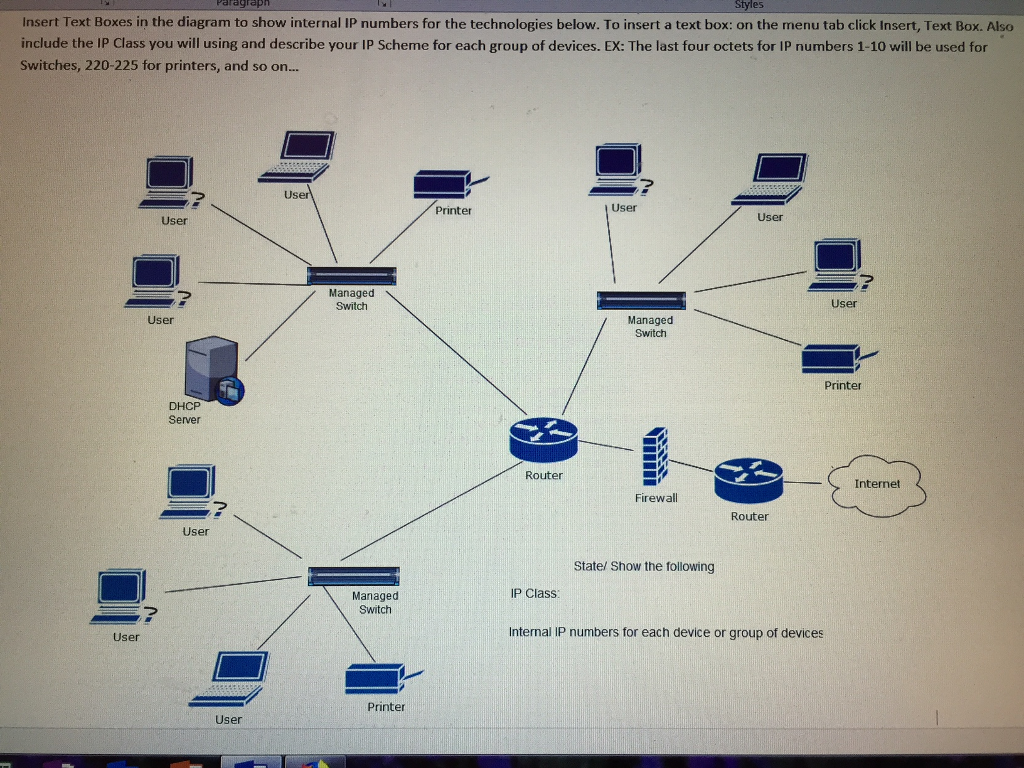
Paragraph Insert Text Boxes in the diagram to show internal IP numbers for the technologies below. To insert a text box: on the menu tab click Insert, Text Box. Also include the IP Class you will using and describe your IP Scheme for each group of devices. EX: The last four octets for IP numbers 1-10 will be used for Switches, 220-225 for printers, and so on... User Printer User User User Managed Switch User Managed Switch User Printer Server Router (> Internet Firewall Router User State/ Show the following IP Class Managed Switch User Internal IP numbers for each device or group of devices Printer User
Step by Step Solution
There are 3 Steps involved in it
1 Expert Approved Answer
Step: 1 Unlock

Question Has Been Solved by an Expert!
Get step-by-step solutions from verified subject matter experts
Step: 2 Unlock
Step: 3 Unlock
 Study Help