







Question: Paragraph scale Styles Default value Table name Client Column name Data Type C Number Numeric C Name Variable character C Address Variable character C City
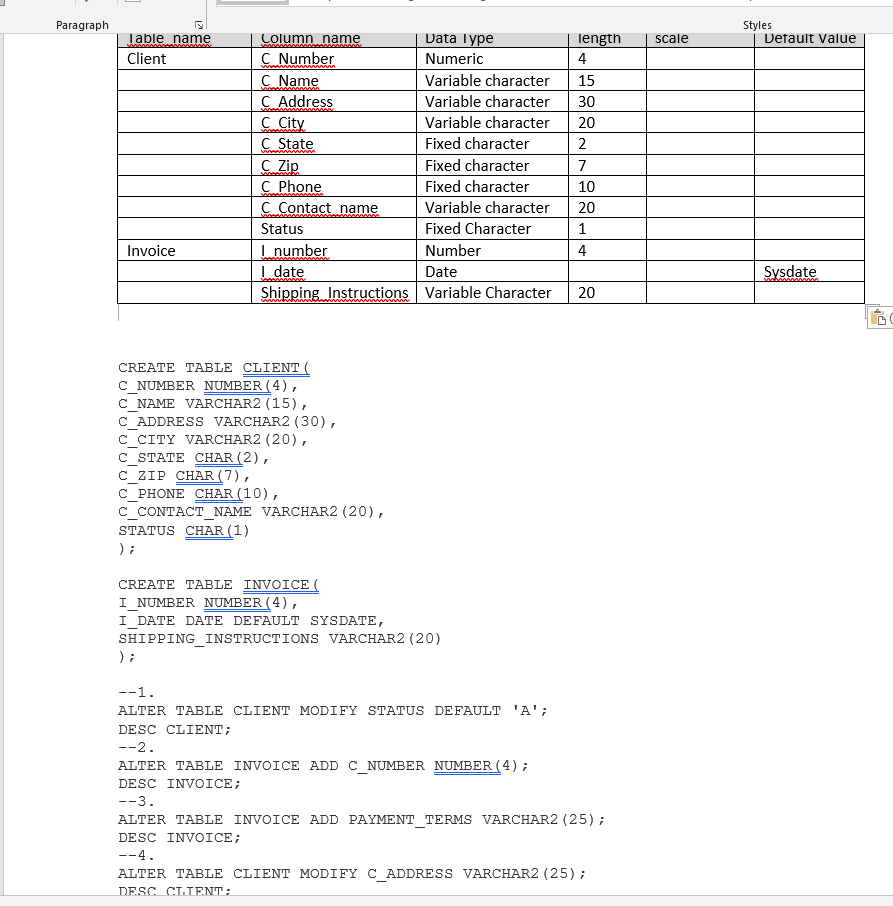
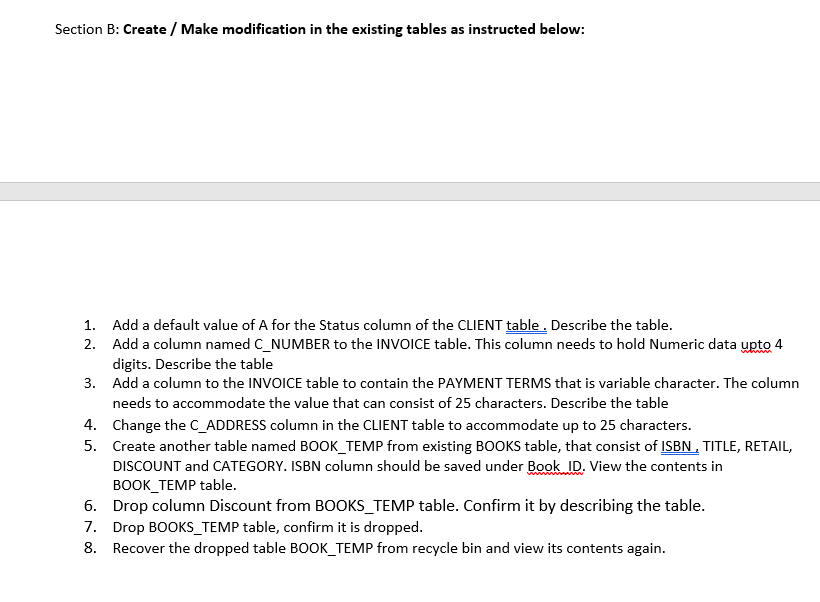
Paragraph scale Styles Default value Table name Client Column name Data Type C Number Numeric C Name Variable character C Address Variable character C City Variable character C State Fixed character Zip Fixed character C Phone Fixed character C Contact name Variable character Status Fixed Character | number Number I date Date Shipping Instructions Variable Character length 4 15 30 20 2 7 10 20 1 4 Invoice Sysdate 20 CREATE TABLE CLIENT C_NUMBER NUMBER (4), C NAME VARCHAR2 (15), C_ADDRESS VARCHAR2 (30), C_CITY VARCHAR2 (20), C_STATE CHAR (2), C_ZIP CHAR (7), C PHONE CHAR(10), C_CONTACT_NAME VARCHAR2 (20), STATUS CHAR (1) ); CREATE TABLE INVOICE I_NUMBER NUMBER (4), I DATE DATE DEFAULT SYSDATE, SHIPPING_INSTRUCTIONS VARCHAR2 (20) ); --1. ALTER TABLE CLIENT MODIFY STATUS DEFAULT 'A'; DESC CLIENT; --2. ALTER TABLE INVOICE ADD C_NUMBER NUMBER (4); DESC INVOICE; --3. ALTER TABLE INVOICE ADD PAYMENT_TERMS VARCHAR2 (25); DESC INVOICE; --4. ALTER TABLE CLIENT MODIFY C_ADDRESS VARCHAR2 (25); DESC CLIENT; Section B: Create / Make modification in the existing tables as instructed below: 1. Add a default value of A for the Status column of the CLIENT table. Describe the table. 2. Add a column named C_NUMBER to the INVOICE table. This column needs to hold Numeric data upto 4 digits. Describe the table 3. Add a column to the INVOICE table to contain the PAYMENT TERMS that is variable character. The column needs to accommodate the value that can consist of 25 characters. Describe the table 4. Change the C_ADDRESS column in the CLIENT table to accommodate up to 25 characters. 5. Create another table named BOOK_TEMP from existing BOOKS table, that consist of ISBN , TITLE, RETAIL, DISCOUNT and CATEGORY. ISBN column should be saved under Book. ID. View the contents in BOOK_TEMP table. 6. Drop column Discount from BOOKS_TEMP table. Confirm it by describing the table. 7. Drop BOOKS_TEMP table, confirm it is dropped. 8. Recover the dropped table BOOK_TEMP from recycle bin and view its contents again
Step by Step Solution
There are 3 Steps involved in it

Get step-by-step solutions from verified subject matter experts
 Study Help