







Question: Part 1: Below you are asked to practice Equal Size Subnetting and then configure the devices R1, Switch 0, PC0, PC1, and the Server0. Apply
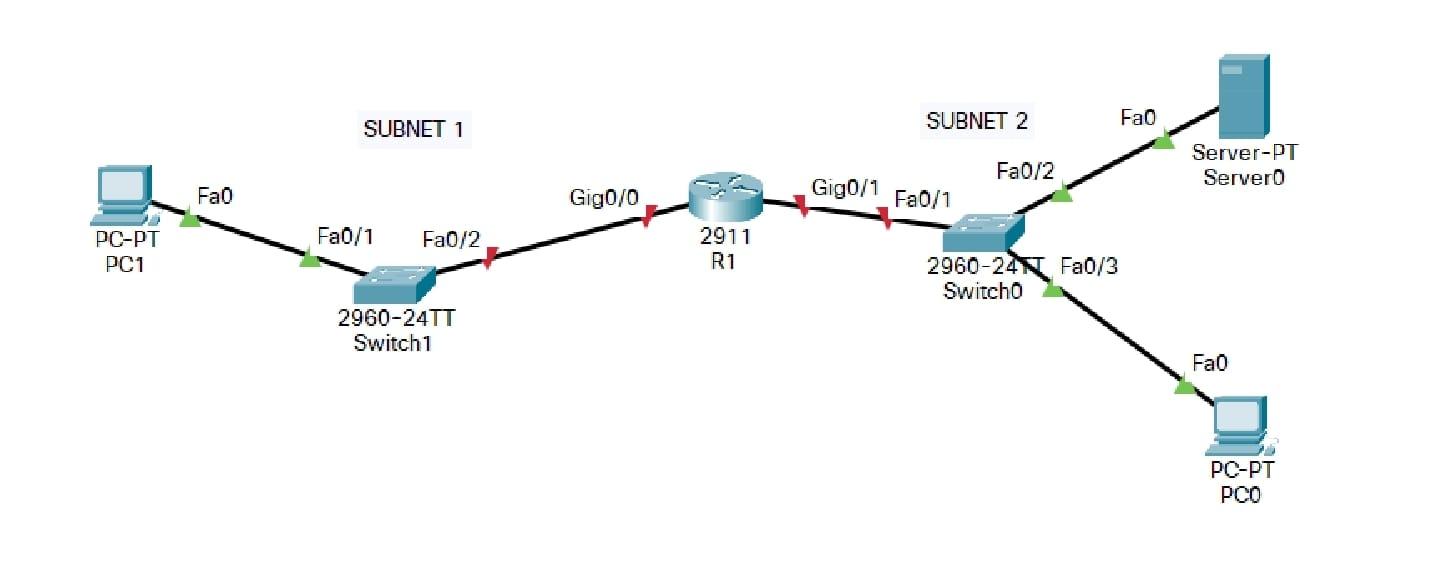 Part 1:
Below you are asked to practice Equal Size Subnetting and then configure the devices R1, Switch 0, PC0, PC1, and the Server0.
Apply Equal Size subnetting on network 192.168.192.0/23 to create 4 networks. The first network address you get from subnetting will be the Network Address of Subnet 1 and the second network address you get from subnetting will be that of Subnet 2.
P.S: you can solve this part on a paper (no need to submit it)
Part 2:
Relying on the results you got from Part 1 you are asked to configure the below devices as follows:
Router R1
Set the hostname of R1 to be Myrouter. Give interface G0/0 the last valid ip address from Subnet 1. Activate the interface. Give interface G0/1 the first valid ip address from Subnet 2. Activate the interface. Set the privileged mode secret to NoAccess. Save your configurations Switch 0
Set the hostname to mySwitch. Set the console password to Ciscopass. Configure interface Vlan 1 with the second valid ip address in Subnet 2. Set the appropriate default gateway address. Set a banner message "Authorized Access Only" Encrypt all configured passwords. Save your configurations
Configure PC0 with the 3rd valid ip address in Subnet 2, a subnet mask and a default gateway. Configure PC1 with the first valid ip address in Subnet 1, subnet mask and default gateway. Configure the Server0 with the 10th valid ip address in Subnet 2, a subnet mask, and a default gateway. Verify all the above devices are able to ping each other
Fao SUBNET 1 SUBNET 2 Fa0/2 Server-PT Servero Fao Gig0/0 Gig0/1 Fa0/1 Fa0/1 Fa0/2 PC-PT PC1 2911 R1 2960-240 Fa0/3 Switcho 2960-24TT Switch1 Fao PC-PT PCO
Step by Step Solution
There are 3 Steps involved in it

Get step-by-step solutions from verified subject matter experts
 Study Help