


Question: Part 1 - Computation of Salaries using Excel (20 marks) Time-in-Motion Pte Ltd is a fast-growing local watch retailer that offers a wide range of
Part 1 - Computation of Salaries using Excel (20
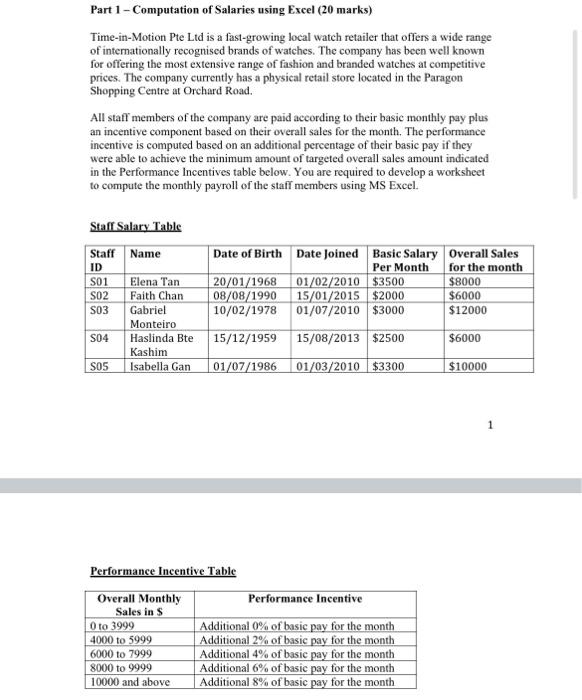
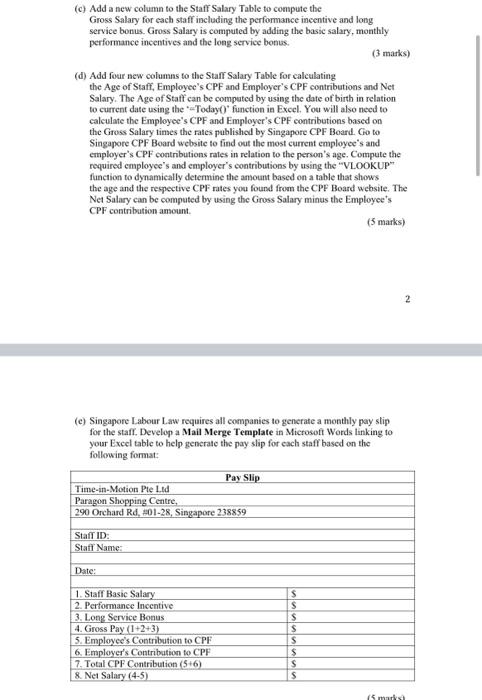
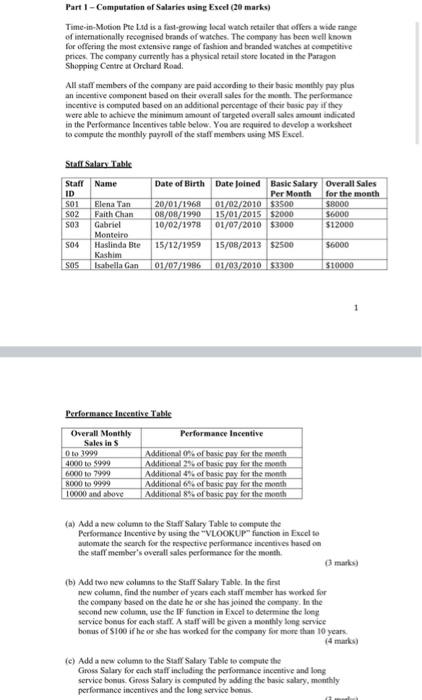
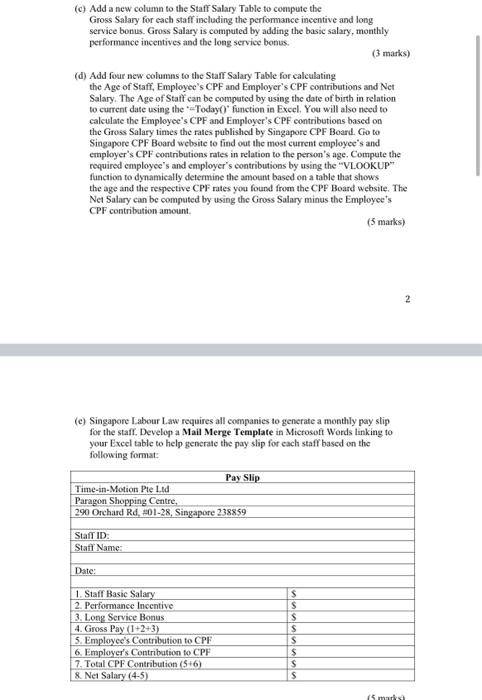
Part 1 - Computation of Salaries using Excel (20 marks) Time-in-Motion Pte Ltd is a fast-growing local watch retailer that offers a wide range of internationally recognised brands of watches. The company has been well known for offering the most extensive range of fashion and branded watches at competitive prices. The company currently has a physical retail store located in the Paragon Shopping Centre at Orchard Road. All staff members of the company are paid according to their basic monthly pay plus an incentive component based on their overall sales for the month. The performance incentive is computed based on an additional percentage of their basic pay if they were able to achieve the minimum amount of targeted overall sales amount indicated in the Performance Incentives table below. You are required to develop a worksheet to compute the monthly payroll of the staff members using MS Excel. Sfaff Salary Table Performance Incentive Table 1 (c) Add a new column to the Staff Salary Table to conpute the Gross Salary for each staff including the performance incentive and long service bonus. Gross Salary is computed by adding the basic salary, monthly performance incentives and the long service bonus. (3 marks) (d) Add four new columns to the Staff Salary Table for calculating the Age of Staff, Employec's CPF and Employer's CPF contributions and Net Salary. The Age of Staff can be computed by using the date of birth in relation to current date using the "-Today()" function in Excel. Yot will also need to calculate the Employec's CPF and Employer's CPF contributions based on the Gross Salary times the rates puhlished by Singapore CPF Board. Go to Singapore CPF Board website to find out the most current cmployec's and ermployer's CPE contributions rates in relation to the person's age. Compute the required employee"s and employer's contributions by using the "VL.OOKUP" function to dynamically determine the amount based on a table that shows the age and the respective CPF rates you found from the CPF Board wehsite. The Net Salary can be computed by using the Gross Salary minus the Eimployee's CPF contribation amount. (5 marks) 2 (c) Singapore L.abour Law requires all companies to gencrate a monthly pay slip for the staff. Develop a Mail Merge Template in Microsoft Words linking to your Excel table to help generate the pay slip for cach staff based on the following format: Part 1 - Computation ef Salaries using Excel (20 marks) Time-in-Motion Phe LAd is a fasl-grewing local watch retailer that offers a wide range of iaternationally recognised beands of watehes. The company has becn w ell known for offering the most cxiensive range of faskion and beanded watches at coanpetitive prices. The company currently has a physical retail store located in the Paragon Shoppinte Cemure af Orchard Road. All staff members of the company are paid according is their basic monthly pay plan an incentive component based an their everall sales for the moeth. The performance incentive is computed based on an additional percentage of their hasic pay if they were ahle to achicve the minimum amocat of targeted everall sales amouat indicated ia the Performance lncestives table below, You are required to develop a worksheet to compute the monthly puyroll of the staff menhers using MS Eucel. Siaff Silary Table Perforimance Insentive Table (a) Add a new column to the Staff Salary Table to cenpute the 1 Perfoemance Incentive by using the "VLLOOKUP" function in Fucel to automate the search for the respective performance incentives hased on the waff member's overall sales performance for the month (3) marks) (b) Add twe new columns to the Staff Salary Table. In the fins new colsamn, find the namber of ycars cach staff member has workod for the coanpany based on the dase he or she has jeined the cenpany. In the second new column, use the fF function in Excel bo dstermine the long service boeus for each staff. A staff will be gived a monthly krng service bomas of $100 if he or she has worked for the company fir more than 10 years. (4 markic) (c) Add a ecw column to the Siaff Salary Table we compate the Gross Salary for cach staft including the performance incentive and long service bonus. Gioss Salary is computcd by adding the hasic salary, monthly. performance incentives and the long service beens. (c) Add a new column to the Staff Salary Table to conpute the Gross Salary for each staff including the performance incentive and long service bonus. Gross Salary is computed by adding the basic salary, monthly performance incentives and the long service bonus. (3 marks) (d) Add four new columns to the Staff Salary Table for calculating the Age of Staff, Employec's CPF and Employer's CPF contributions and Net Salary. The Age of Staff can be computed by using the date of birth in relation to current date using the "-Today()" function in Excel. Yot will also need to calculate the Employec's CPF and Employer's CPF contributions based on the Gross Salary times the rates puhlished by Singapore CPF Board. Go to Singapore CPF Board website to find out the most current cmployec's and ermployer's CPE contributions rates in relation to the person's age. Compute the required employee"s and employer's contributions by using the "VL.OOKUP" function to dynamically determine the amount based on a table that shows the age and the respective CPF rates you found from the CPF Board wehsite. The Net Salary can be computed by using the Gross Salary minus the Eimployee's CPF contribation amount. (5 marks) 2 (c) Singapore L.abour Law requires all companies to gencrate a monthly pay slip for the staff. Develop a Mail Merge Template in Microsoft Words linking to your Excel table to help generate the pay slip for cach staff based on the following format
Step by Step Solution

There are 3 Steps involved in it

1 Expert Approved Answer
Step: 1 Unlock blur-text-image

Question Has Been Solved by an Expert!

Get step-by-step solutions from verified subject matter experts

Step: 2 Unlock
Step: 3 Unlock

Students Have Also Explored These Related General Management Questions!