







Question: As a first step, you should discuss with your internship supervisor regarding a potential project to complete during your Internship. Your supervisor or manager may
As a first step, you should discuss with your internship supervisor regarding a potential project to complete during your Internship. Your supervisor or manager may not actually call your internship work a “project," but if it is a piece of work that will produce at least one defined deliverable (a product, service or result) and has an expected delivery date (i.e. it is not Helpdesk work or similar ongoing work) then it is still a 'Project'. If your internship does not have a clear ‘Project’ definition or does involve a more ongoing functional role, then you need to work with your supervisor to agree upon a small project with a more limited and defined scope that can operate effectively within your broader internship role definition/agreement.
Consider
From a Project Management point of view, it is more likely that you will be a project team member in a given situation and not the Project Manager. However, for this assessment activity, you may be required to take on the project manager role. No matter how huge or overwhelming your project may seem at the beginning, it will, at most, be a SFIA Level 4 project and “manageable” in normal Project Management terms. Meaning, it is best managed by an “agile” Project Management method, i.e. one that focuses more on the result than the means of getting there.
Understanding and Agreeing to Your Project Scope
At the start of a project, you (as Project Manager) will discuss with the client what they expect the project to deliver, then you will document the client’s expectations in detail. This detailed document is called the Scope Statement, and it includes both the items that have to be produced by the project (the deliverables), and the work required to produce them. You will then discuss the scope statement with the client to ensure that you are in agreement with what will be produced, and eventually, when an agreement is reached, you and the project sponsor (probably your internship manager), and the client sign the scope statement (it is now authorised). The signed scope statement is also known as the "scope baseline". You will then prepare a schedule (showing what will happen and when) and a budget for controlling costs, as well as other plans. All these plans need to be authorised too, and then they will become baselines as well.
Project Scope Statement
Your project does not have to be big, but it cannot be routine, everyday work, such as working on Help Desk, assembling PC’s, fixing bugs in programs, and so on. You will use this project to produce an RMP (Risk Management Plan) over the next two weeks.
Once agreed, you can create your 'Scope Statement' for your project. To do this:
Complete the EXCEL's first tab, Project Scope Statement. Take care to enter information in ALL required fields.
- You should have at least 3 constraints, 3 assumptions, and 3 risks
- Write at least a paragraph (several sentences) for the Project Description and the Business Benefit.
- You should have at least 3 constraints, 3 assumptions, and 3 risks
- Write at least a paragraph (several sentences) for the Project Description and the Business Benefit.
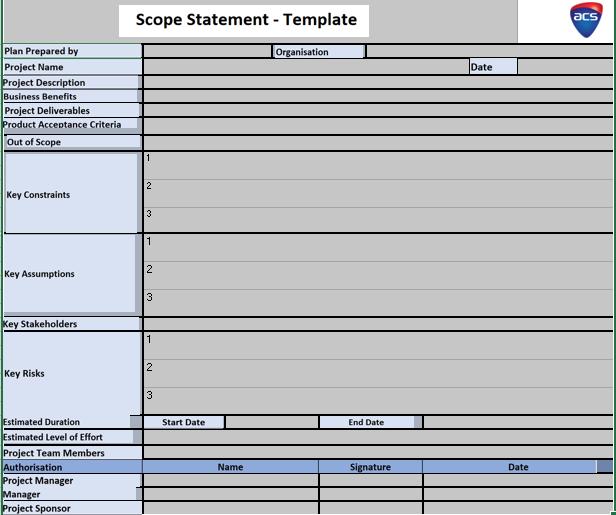
Scope Statement - Template acs Plan Prepared by Organisation Project Name Project Description Business Benefits Project Deliverables Product Acceptance Criteria Date Out of Scope 2 Key Constraints 3 1 Key Assumptions 3 Key Stakeholders 1 Key Risks 3 Estimated Duration Estimated Level of Effort Start Date End Date Project Team Members Authorisation Project Manager Manager Project Sponsor Name Signature Date 2.
Step by Step Solution
There are 3 Steps involved in it
Plan prepared by Edgar Davids Organisation Blatnoi Inc Project Name PMB Application development Date ... View full answer

Get step-by-step solutions from verified subject matter experts
Document Format (2 attachments)

6364630d32ec4_239100.pdf
180 KBs PDF File

6364630d32ec4_239100.docx
120 KBs Word File
 Study Help