







Question: PART 1 : GANTT CHART Page 4 2 8 - # 4 : LAN Selection for Geo - HabitusGeo - Habitus is a company that
PART : GANTT CHART
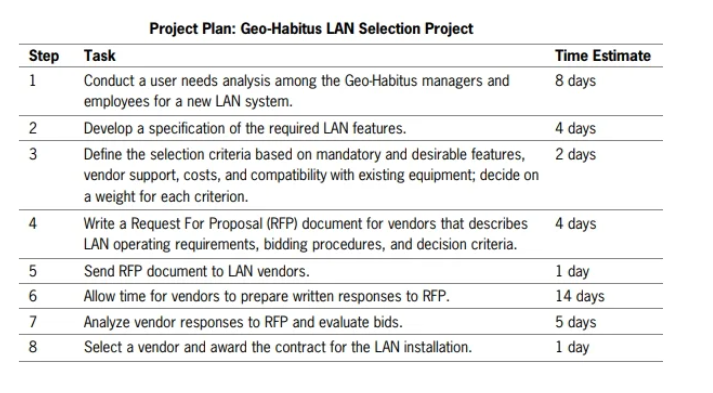
Page #: LAN Selection for GeoHabitusGeoHabitus is a company that sells kits used to build vacation cabins shaped like geodesic domes. The company has identified a need for a local area network LAN to facilitate communication among workers and permit collaboration on tasks. Bridgette Petrang, the technology supervisor at GeoHabitus, has asked you to develop a project plan with Microsoft Project. For this project, you can use Microsoft Project or Project To learn the basic features of project management software, you will input the tasks for a LAN acquisition project at GeoHabitus, shown in the outline below. The goal of the project is to select a new LAN for the company.
Project Plan: GeoHabitus LAN Selection Project
Watch the videos provided in the lecture for MS Project Tutorials After becoming familiar with some of the basic features of Microsoft Project, install the trial version of Microsoft Project using the guidelines in the appendix at the end of this chapter. If you already have access to a version of Microsoft Project where you work or attend classes, you can skip the appendix.
Start Microsoft Project and then enter the project planning steps for the GeoHabitus LANselection project above. As you work on Project, remember that it is part of the Microsoft office suite. Many menu commands and icons in Project have the same functions as in other office programs, including the Undo icon on the Quick Access Toolbar. Your task is to learn enough about Microsoft Project to prepare a Gantt chart similar to the ones illustrated in the chapter. Save your work often, as you would with any new software tool. Experiment with the other features of the Project if you would like, but keep focused on the objective to prepare a project plan so the management at GeoHabitus can understand the project timeline.
Your task is to learn enough about Microsoft Project to prepare a Gantt chart similar to the ones illustrated in the chapter. Save your work often, as you would with any new software tool. Experiment with the other features of the Project if you would like, but keep focused on the objective to prepare a project plan so the management at GeoHabitus can understand the project timeline.
OR
Open the WBS Excel sheet then enter the project planning steps for the GeoHabitus LAN selection project above. As you work on the Excel document, remember that it is part of the Microsoft Office suite. Your task is to prepare a Gantt chart similar to the ones illustrated in the chapter. Save your work often, as you would with any new software tool. Keep focused on the objective to prepare a project plan so the management at GeoHabitus can understand the project timeline.
PART : CRITICAL PATH
Watch the video on Critical Paths, and develop the forward and backward path for the LAN Selection Project using the above in the goals of the project.
PART : Develop training guidelines.
Based on your personal experiences as a trainee or student a recipient of training describe some common mistakes you have observed trainers or instructors make that you would add to the suggestions for trainers listed in Figure Which of the guidelines in the chapter or ones you added do you think will be the most difficult for you when you lead a training activity?
Step by Step Solution
There are 3 Steps involved in it
1 Expert Approved Answer
Step: 1 Unlock

Question Has Been Solved by an Expert!
Get step-by-step solutions from verified subject matter experts
Step: 2 Unlock
Step: 3 Unlock
 Study Help