







Question: Part 1 - Gauss Elimination Function Develop a MATLAB function called GaussElimination that solves a given system of linear equations of the form A x
Part Gauss Elimination Function
Develop a MATLAB function called GaussElimination that solves a given system of linear equations of the form using the Gauss Elimination method. The function should take three input arguments, which must be listed in this order: the coefficient matrix the rightside vector and a truefalse value. If the third value is true, the function should perform partial pivoting while solving the linear system. If the third value is false, the function should not perform partial pivoting. The function should return the vector You must create your own implementation of the Gauss Elimination method; you may not use MATLAB's builtin matrix solvers eg you may not use the left division operator However, while developing your code, you may want to use the builtin matrix solvers to check the answers your code produces.
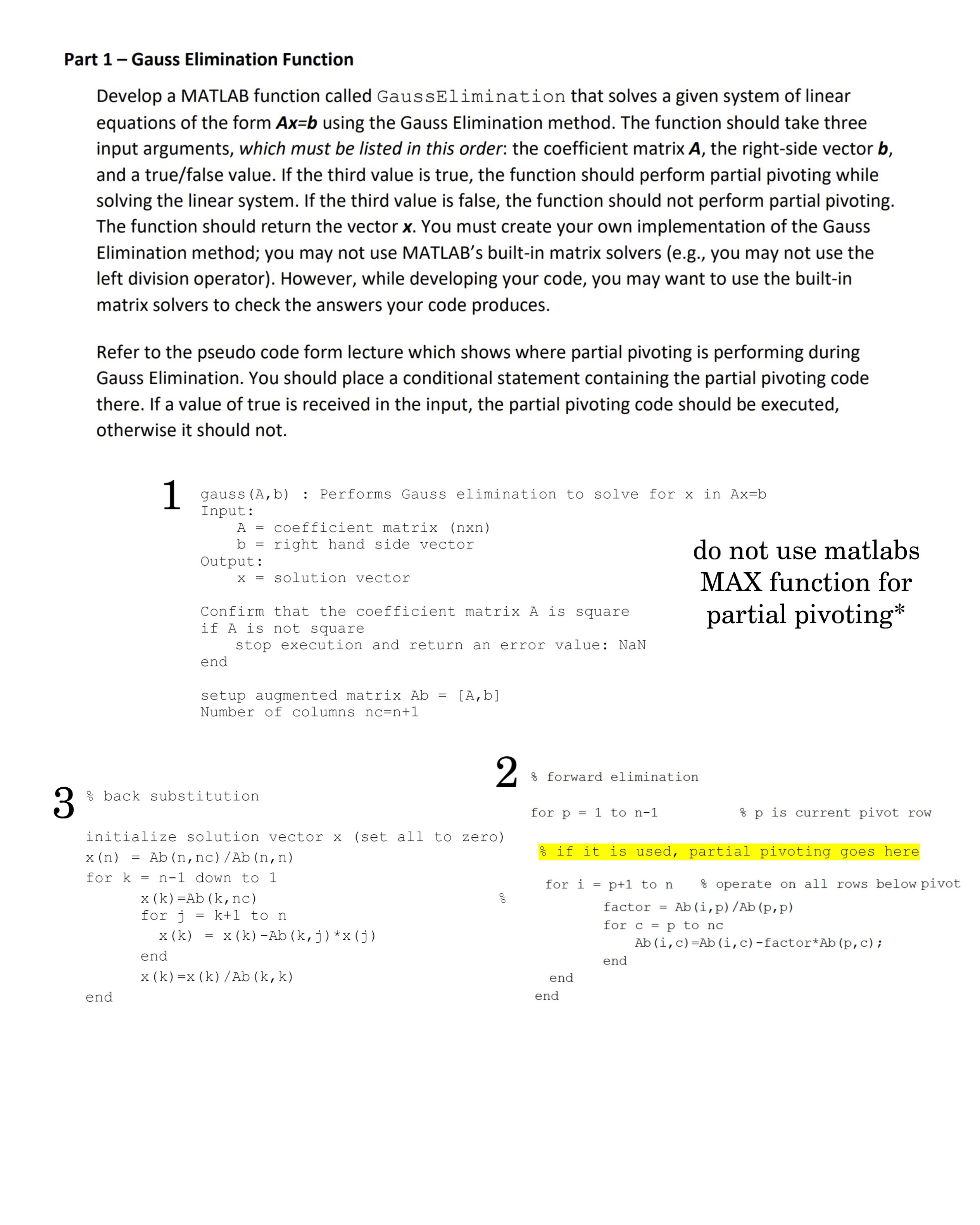
Refer to the pseudo code form lecture which shows where partial pivoting is performing during Gauss Elimination. You should place a conditional statement containing the partial pivoting code there. If a value of true is received in the input, the partial pivoting code should be executed, otherwise it should not.
gaussAb : Performs Gauss elimination to solve for in
Input:
coefficient matrix nxn
right hand side vector
Output:
solution vector
Confirm that the coefficient matrix is square
if is not square
stop execution and return an error value: NaN
end
setup augmented matrix
Number of columns
do not use matlabs MAX function for partial pivoting
back substitution
initialize solution vector set all to zero
for down to
for to
end
end
Step by Step Solution
There are 3 Steps involved in it
1 Expert Approved Answer
Step: 1 Unlock

Question Has Been Solved by an Expert!
Get step-by-step solutions from verified subject matter experts
Step: 2 Unlock
Step: 3 Unlock
 Study Help