







Question: PART 1: (HAVE TO USE HTML ON NOTEPAD) Overview: Create a user login page (using HTML and CSS) for a receptionist at a local Pet
PART 1:
(HAVE TO USE HTML ON NOTEPAD)
Overview: Create a user login page (using HTML and CSS) for a receptionist at a local Pet Hotel called Happy Tails Hotel (HTH).
Task Description: Scenario
Suppose that you have been hired to design the new web-based interface for a local Pet Hotel, Happy Tails Hotel (HTH). A receptionist will be given a commission for bookings. Therefore for each pet stay transaction, they will need to log in to their account, thus making a connection between the receptionist and the pet owner. The interface gives receptionist access to their accounts where they can book a stay, cancel a stay, request additional perks during a stay, cancel perks, change perks, or create a new client account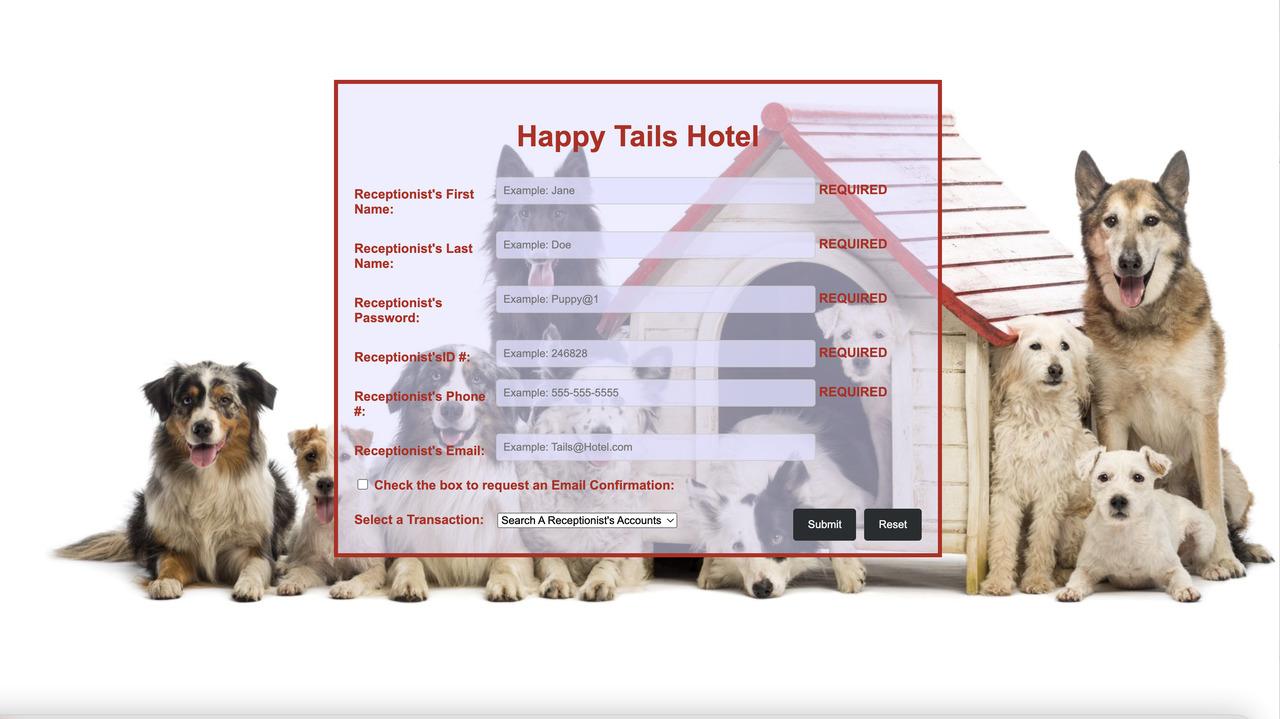 .(
.(
PART 2: (PLEASE MAKE SURE TO DO 1ST CODE IN ORDER, THEN DO THIS ONE ALL TOGETHER IN THE SEQUENCE GIVEN)
(ALSO LOOKS LIKE THIS ONE HAS TO BE IN JAVASCRIPT SO PLEASE ADD IT TO THE HTML CODE FROM THE FIRST PART)
Overview: Using the user login form you created for a local Pet Hotel called Happy Tails Hotel (HTH) you will enhance it so that validates a receptionists data and verifies the receptionists name, the receptionists password, the receptionists ID and the receptionists email (only if confirmation requested).
Task Description: Scenario
In order to access THTs site, a receptionist must login with a valid username, user password, user ID and user phone number. A users email address is also required only if the user wants an email confirmation of any transaction (The user will indicate this by checking a box signifying the user wants email confirmation). Develop the login script using JavaScript that first validates and then verifies the user input.
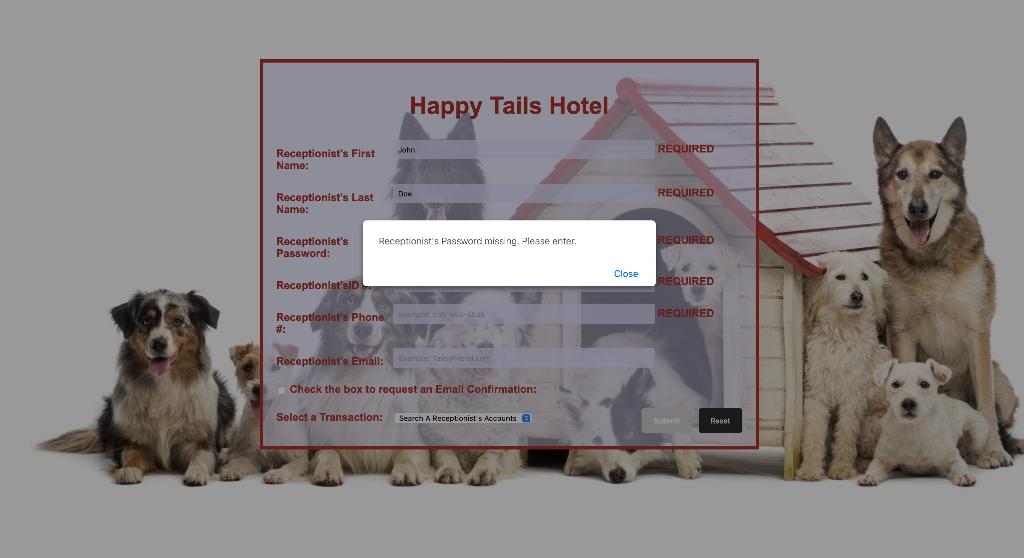
Validation ensure that the receptionist has entered all the required data: user name, user password, user ID, user phone number and user email address (if confirmation requested). The user password should contain a max of 14 characters and have at least 1 uppercase letter, one special character and one numeric character, the user ID field should contain a 6-digit number, the user phone number should consist of 10 digits which can be delineated either by spaces or dashes and the email address must contain an @ followed by a period and an email domain that consists of 3 to 6 characters. If the input is invalid, an alert should be issued to the user to correct the particular error in the appropriate box. The alert should be specific regarding what the error is and how it can be corrected.
Alerts MUST be issued one at a time (meaning only a single error appears in the alert). No new alert should be displayed before the previous issue is rectified. After the alert is issued the user should be brought back to the field that had invalid data entered so it can be re-entered.
Verification checks that the receptionist has an account, i.e., that the user name, user password, user ID and user email (if confirmation requested) match the name, password, ID and email (if confirmation requested ) for one of THTs receptionist. If the input is not verified, alert the user that an account for them cannot be found. The alert should contain a message indicating the name of receptionist (first and last) and that they cannot be found. Once the input is both validated and verified, alert the user with a simple welcome message that they have entered the system indicating the receptionists name (first and last) and the transaction chosen (Book A Stay, Cancel A Stay, Request Additional Perks During A Stay, Cancel Additional Perks, Update Perks, or Create A New Client Account.).
Program Design and Implementation
The design for the HTML interface was developed in Assignment 1. It consisted of the following fields: receptionists name (first and last), receptionists password, receptionists ID, receptionists phone number, receptionists email address, a checkbox for indicating an email confirmation is requested, a drop-down list allowing the receptionist to indicate what type of transaction they wish to perform, and buttons as input elements.
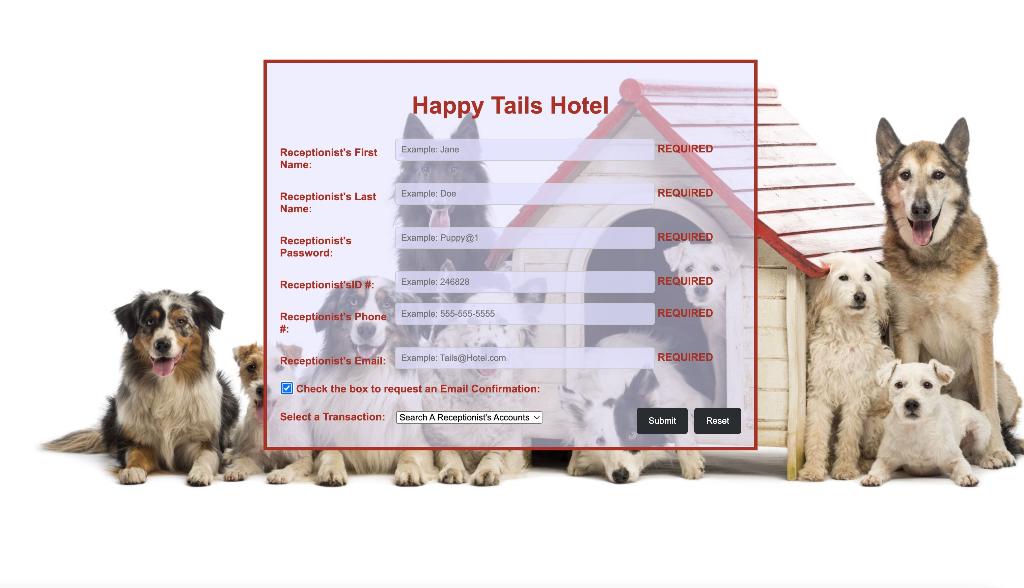
In this assignment you will need to implement the functionality for email checkbox which consists of requiring an email address is entered when the checkbox is checked.
The figures below illustrate some of the various concepts discussed for implementation of this assignment.
(BELOW ARE EXAMPLES OF HOW THE OUTPUT SHOULD LOOK):
Step by Step Solution
There are 3 Steps involved in it

Get step-by-step solutions from verified subject matter experts
 Study Help