







Question: Part 1 : Initial Setup of the Documents Objective: Set up the initial AIA G 7 0 2 and AIA G 7 0 3 documents,
Part : Initial Setup of the Documents
Objective:
Set up the initial AIA G and AIA G documents, including the schedule of values, for a
simple construction project.
Instructions:
Your company has been awarded a contract to construct a new residence for the Munster
residence at Mockingbird Lane, Mockingbird Heights, GA
Project Overview:
o Contract Value: $
o Start Date:
o Project Duration: months
o Work Breakdown: line items listed below
o Retainage Percentage: on both completed work and stored materials.
Steps:
o Step : Review the AIA GContinuation Sheet form.
Create a schedule of values based on the provided line items and contract
value.
Enter the scheduled value for each line item provided below into the
AIA G form.
o Step : Review the AIA GApplication and Certificate for Payment form.
Set up the document by entering the contract value and other basic
information leave columns for work completed, previous payments, and
stored materials blank for now
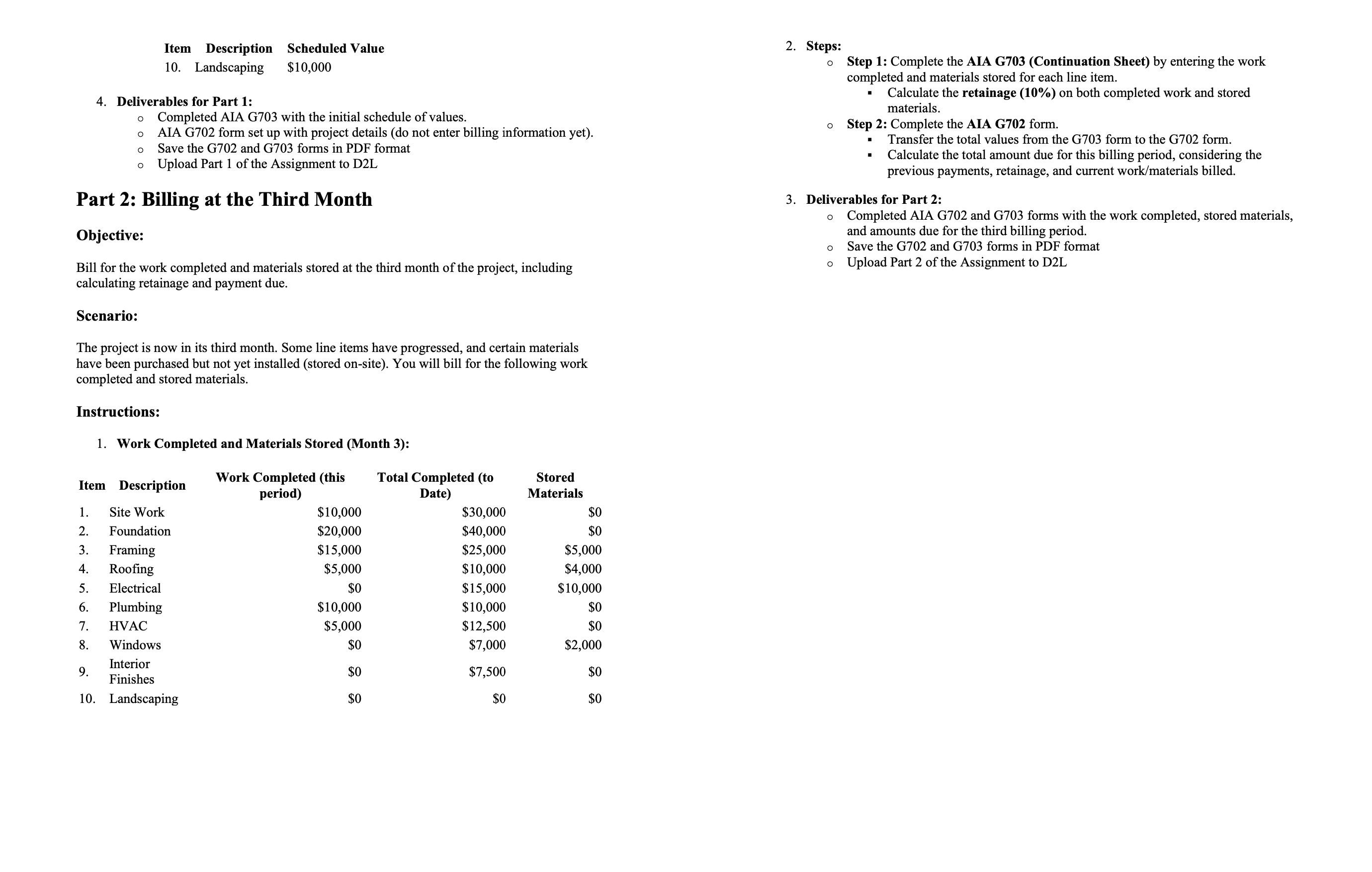
Line Items for Schedule of Values:
Item Description Scheduled Value
Site Work $
Foundation $
Framing $
Roofing $
Electrical $
Plumbing $
HVAC $
Windows $
Interior Finishes $Steps:
Landscaping $
Step : Complete the AIA GContinuation Sheet by entering the work
completed and materials stored for each line item.
Calculate the retainage on both completed work and stored
materials.
Step : Complete the AIA G form.
Transfer the total values from the G form to the G form.
Calculate the total amount due for this billing period, considering the
previous payments, retainage, and current workmaterials billed.
Deliverables for Part :
Completed AIA G and G forms with the work completed, stored materials,
and amounts due for the third billing period.
Save the G and G forms in PDF format
Upload Part of the Assignment to DL
Step by Step Solution
There are 3 Steps involved in it
1 Expert Approved Answer
Step: 1 Unlock

Question Has Been Solved by an Expert!
Get step-by-step solutions from verified subject matter experts
Step: 2 Unlock
Step: 3 Unlock
 Study Help