







Question: Part 1 Interfaces, Abstract Classes, Lambdas and Exceptions [10 points total] In this project, you will be implementing a game (Rodents Revenge)to evict rodents who
Part 1 Interfaces, Abstract Classes, Lambdas and Exceptions
[10 points total] In this project, you will be implementing a game (Rodents Revenge)to evict rodents who are invading the Mathematics, Business and Computing Center (MBCC) because of food being eaten in the classroom! Players may dodge rodents by moving around a two-dimensional board, or drop pellets that will evict the rodents. The game is over when either all rodents have been evicted (all rodents have eaten a pellet) or a rodent comes in contact with the player and the player perishes from bubonic plague.
From Project #02, please download P02_RodentsRevenge.zip and import this existing project into Eclipse (you do not need to unzip the file).
Note: the only worthwhile code in the package is a file named GameDemo.java, which you can use to test the final version of your project.
Implement the following components for this assignment:
GameActions: This interface provides one method:
public abstract void move(Board board) This method provides a mechanism by which each character in the game can move. A Player object can move in 4 directions (Up, Down, Left or Right), while a Rodent object may move in 8 directions (Up, Down, Left, Right, Diagonally Up Right, Diagonally Down Right, Diagonally Up Left, Diagonally Down Left). A Pellet object does not move.
Character: This is the abstract parent (base) class of Player, Rodent and Pellet. Here are the specifications:
Make it an abstract class (cannot be instantiated).
Create member variables for mRow (int keeps track of the characters row in the game) and mCol (int keeps track of characters column on the board)
Create accessors/mutators for all member variables.
Create an equals() and hashCode() method to compare all instance variables for equality.
Create a protected constructor to facilitate code reuse among derived classes.
Player: This one of the concrete child (derived) classes of Character. Here are the specifications:
No new member variables
Override the move(Board board) method such that the user is prompted to enter a move for the player, which can be:
What action would you like the player to take?
U: Move Up
D: Move Down
L: Move Left
R: Move Right
P: Pellet
Read the input using a Scanner. If the user chooses (U, D, L or R), check to see if the Players row and column allow that move (e.g. Is the move within the bounds of the Board?) If the move is allowed, change the players row and column accordingly. Otherwise, inform the user that the player cannot move in the direction specified and loses their turn. For example:
Player currently cannot move DOWN and loses turn.
If the user chooses P (Pellet), add a Pellet object to the Board at the Players current row and column. Do not change the Players position after dropping the Pellet.
If the player does not choose (U, D, L, R or P), display the message:
Unrecognized action, please enter U, D, L, R or P. Player loses turn.
Override the toString() method to return the mIcon of the Player. (e.g. return P)
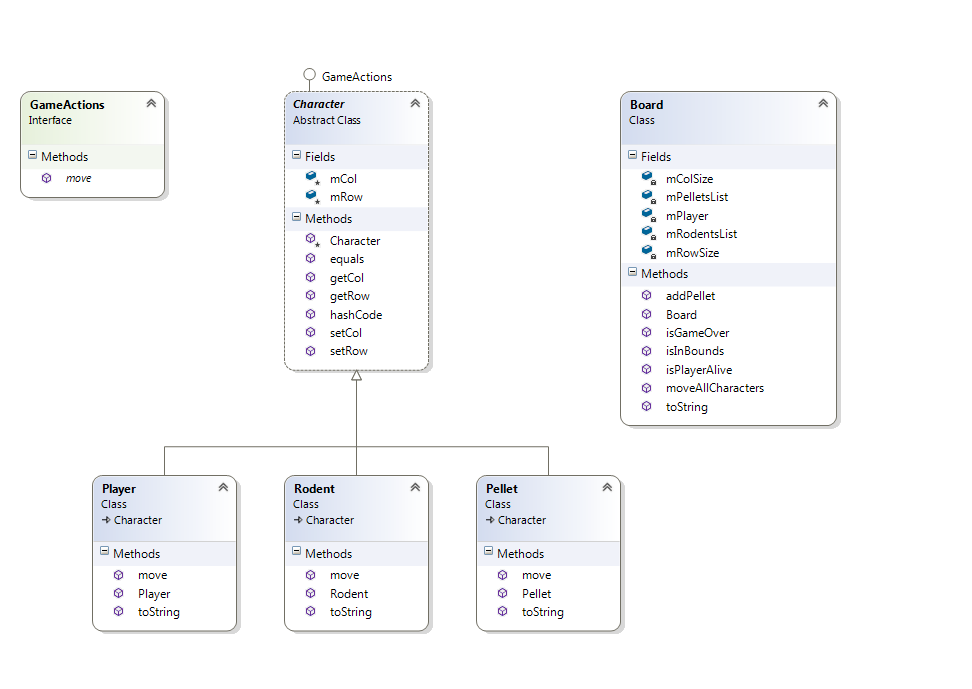
See class diagram below for other specifications.
Rodent: This one of the concrete child (derived) classes of Character. Here are the specifications:
No new member variables
Override the move(Board board) method such that the Rodents move is randomly generated. The Rodent may move in 8 directions, so generate a random row that is either one less, the same as or one more than the Rodents current row. Then generate a random col that is either one less, the same, or one more than the Rodents current col. If the random row and random column are in the bounds of the Board, move the Rodent to that position. Otherwise, loop until you get a random row and column within the bounds of the Board.
Override the toString() method to return the mIcon of the Rodent. (e.g. return R)
See class diagram below for other specifications.
Pellet: This one of the concrete child (derived) classes of Character. Here are the specifications:
No new member variables
Override the move(Board board) method but leave the implementation empty since a Pellet cannot move in Rodents Revenge.
Override the toString() method to return the mIcon of the Pellet. (e.g. return *)
See class diagram below for other specifications.
Board: This is a concrete class, but not part of the Character inheritance. It controls the operations of the Rodents Revenge game board. Here are the specifications:
Create member variables for:
mPlayer (Player) keeps track of the Player objectthe characters row in the game
mRodentsList (List
mPelletsList (List
mRowSize (int) keeps track of how many rows are on the board
mColSize (int) keeps track of how many columns are on the board
Create constructor: public Board(int rowSize, int colSize, int numRodents) Constructor should make numRodents new Rodent objects and start putting them in different rows and columns, from top left (row = 0, col = 0), across (row = 0, col = 1), (row = 0, col = 2), etc and then down (row = 1, col = 0). All Rodent objects should be added to the mRodentsList.
The constructor should also make a new Player object and position the player in the bottom-right of the board (e.g. mRowSize 1, mColSize 1).
Finally, the constructor should make an new empty ArrayList
Create method: public void addPellet(int row, int col) method creates a new Pellet object at the row and col, then adds the object to mPelletsList.
Create method: public boolean isInBounds(int row, int col) method checks to see if the row and column are >= 0 and less than mRowSize and mColSize respectively.
Create method: public boolean isPlayerAlive() method checks to see if the mPlayer object is not null. (null means dead in this game)
Create method: public boolean isGameOver() method checks to see whether the player is not alive or whether all the Rodents are evicted (meaning the size of mRodentsList is 0)
Create method: public void moveAllCharacters()
First, call the move method on the mPlayer
Next, loop through all the Rodents in the mRodentsList and call move on each one. Check to see if the rodent row and col is the same as the player row and col. If so, the player contracted the bubonic plague and died. Set mPlayer to null. L Otherwise, check to see if the rodent row and col is the same as any Pellets row and col in the mPelletsList. If they are the same, remove the Rodent from mRodentsList (it was evicted) and remove the Pellet from mPelletsList (it was eaten).
Override method: public String toString()
Loop through all the rows and columns (positions) on the board (use mRowSize and mColSize)
If the Player is at that position, concatenate a P on the output String.
Else if a Pellet is at that position, concatenate a * on the output String.
Else if a Rodent is at that position: count how many rodents are at that position. If only one Rodent, concatenate a R on the output String. Otherwise if there are multiple Rodents at that position, print the number instead e.g. 3 indicates 3 Rodents.
Else, if the position is empty, concatenate a . On the output String.
After looping through all the positions, concatenate the statement 10 rodents left to evict.
(where the number, e.g. 10 comes from the size of the mRodentsList)
Return the output String, making sure each row of the board is on a separate line of output. See the example below:
. . . . . . . R
. 2 . R . . . .
R . . . R R . .
R . . . . P . R
. . R . . . . .
10 rodents left to evict.
Note: there are 2 Rodents at (row = 1, col = 1). The Player is located at (row = 3, col = 5). All the dots (.) mark empty positions.
GameDemo: This is the driver class which has been fully implemented. You should not have to make any changes to this code and may use it to test the Rodents Revenge game.
Below is a class diagram to help with the specification.
![Part 1 Interfaces, Abstract Classes, Lambdas and Exceptions [10 points total] In](https://dsd5zvtm8ll6.cloudfront.net/si.experts.images/questions/2024/10/6703fcdd82fd9_5896703fcdd03026.jpg)
Finally, below is a sample transaction of playing the game [I lost L]
Welcome to THE RODENTS' REVENGE!
How many rows are in the room? 5
How many columns are in the room? 8
How many rodents have invaded the MBCC? 20
R R R R R R R R
R R R R R R R R
R R R R . . . .
. . . . . . . .
. . . . . . . P
20 rodents left to evict.
What action would you like the player to take?
U: Move Up
D: Move Down
L: Move Left
R: Move Right
P: Pellet
u
. 2 2 . R . . R
2 R 2 . . R R 2
R . . . R R . .
. . R R . . . P
. . . . . . . .
20 rodents left to evict.
What action would you like the player to take?
U: Move Up
D: Move Down
L: Move Left
R: Move Right
P: Pellet
p
R R . 2 . R R .
2 . 2 R . . R 2
R R . R . . . .
R . R . R . . P
. . . . . . . .
20 rodents left to evict.
What action would you like the player to take?
U: Move Up
D: Move Down
L: Move Left
R: Move Right
P: Pellet
L
R R . 2 . R . .
R R 2 R R . R .
R . R . . . . 2
R . . R . . P *
. . . R R . . .
20 rodents left to evict.
What action would you like the player to take?
U: Move Up
D: Move Down
L: Move Left
R: Move Right
P: Pellet
P
. R . R . R . .
2 3 R R . 2 R .
R . R . . . . R
. . . . R . P *
R . . R . R . .
20 rodents left to evict.
What action would you like the player to take?
U: Move Up
D: Move Down
L: Move Left
R: Move Right
P: Pellet
u
R R . R . . R R
. 3 R . R R R .
. 2 R R . . P .
. R . . . . * .
. . R . . . R .
19 rodents left to evict.
What action would you like the player to take?
U: Move Up
D: Move Down
L: Move Left
R: Move Right
P: Pellet
r
R 2 R . . R . R
. R R 3 R . . R
. R . R . . . P
2 . . R . . * .
. . . . . . R .
19 rodents left to evict.
What action would you like the player to take?
U: Move Up
D: Move Down
L: Move Left
R: Move Right
P: Pellet
r
Player cannot move RIGHT and loses turn.
3 R R 2 R . 2 .
. . . R . . R .
. R R . R . . P
. . R . . . * .
R R . . . . . R
19 rodents left to evict.
What action would you like the player to take?
U: Move Up
D: Move Down
L: Move Left
R: Move Right
P: Pellet
u
4 . . . . R . .
. . R 2 R R . 2
. R R R . . . .
. . R . . R . .
R . . . . . . .
18 rodents left to evict.
Player has been consumed by the bubonic plague. Please save humanity and do not bring food into MBCC classrooms!
GameActions Board Class Character GameActions Interface Abstract Class Fields Fields Methods mColSize mPelletsList mPlayer mRodentsList mRowSize mCol mRow move Methods * Character equals Methods getCol addPellet getRow Board isGameOver hashCode setCol setRow isInBounds isPlayerAlive moveAI|Characters toString Player Class Character Rodent Class Character Pellet Class Character Methods Methods Methods move Player toString move Rodent toString move Pellet toString GameActions Board Class Character GameActions Interface Abstract Class Fields Fields Methods mColSize mPelletsList mPlayer mRodentsList mRowSize mCol mRow move Methods * Character equals Methods getCol addPellet getRow Board isGameOver hashCode setCol setRow isInBounds isPlayerAlive moveAI|Characters toString Player Class Character Rodent Class Character Pellet Class Character Methods Methods Methods move Player toString move Rodent toString move Pellet toString
Step by Step Solution
There are 3 Steps involved in it

Get step-by-step solutions from verified subject matter experts
 Study Help