







Question: Part 1: Person Generator: 1 Create a person.java class to represent a Person Object. Person Fields string ID; String firstName; string lastName; String title; Mr.,
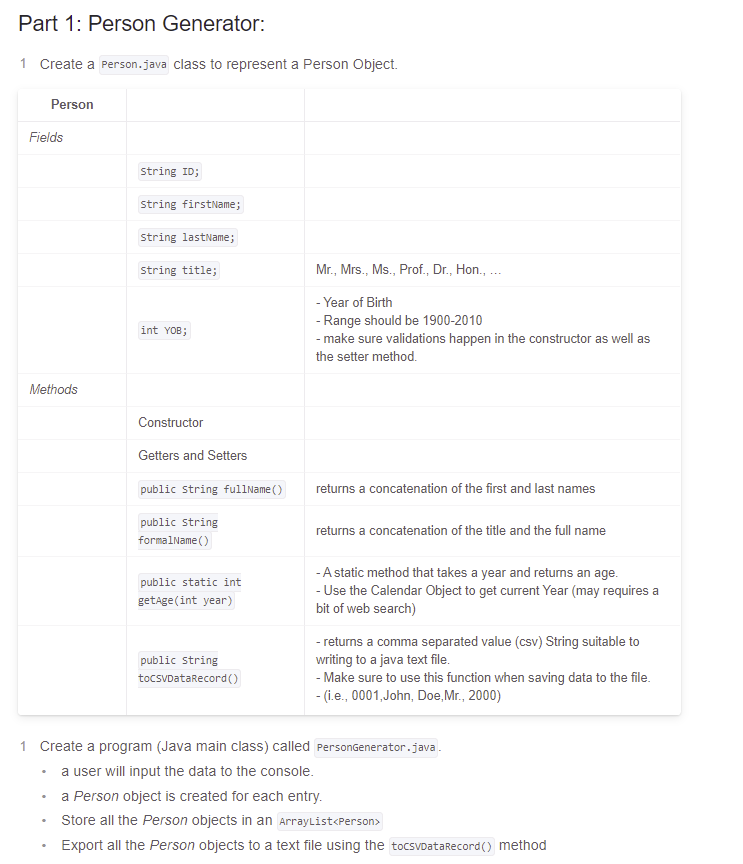
Part 1: Person Generator: 1 Create a person.java class to represent a Person Object. Person Fields string ID; String firstName; string lastName; String title; Mr., Mrs., Ms., Prof., Dr., Hon., . - Year of Birth - Range should be 1900-2010 - make sure validations happen in the constructor as well as the setter method. int yoB; Methods Constructor Getters and Setters public string fullName() returns a concatenation of the first and last names public String formalName(s) returns a concatenation of the title and the full name public static int getAge(int year) -A static method that takes a year and returns an age. - Use the Calendar Object to get current Year (may requires a bit of web search) public String tocsvDataRecord - returns a comma separated value (csv) String suitable to writing to a java text file. - Make sure to use this function when saving data to the file. - (i.e., 0001, John, Doe, Mr., 2000) 1 Create a program (Java main class) called PersonGenerator.java. a user will input the data to the console. a Person object is created for each entry. Store all the Person objects in an ArrayList
Step by Step Solution
There are 3 Steps involved in it

Get step-by-step solutions from verified subject matter experts
 Study Help